> ## Documentation Index
> Fetch the complete documentation index at: https://docs.llmcontrols.ai/llms.txt
> Use this file to discover all available pages before exploring further.
# Data components in LLM Controls
Data components load data from a source into your flow.
They may perform some processing or type checking, like converting raw HTML data into text, or ensuring your loaded file is of an acceptable type.
## **Use a data component in a flow**
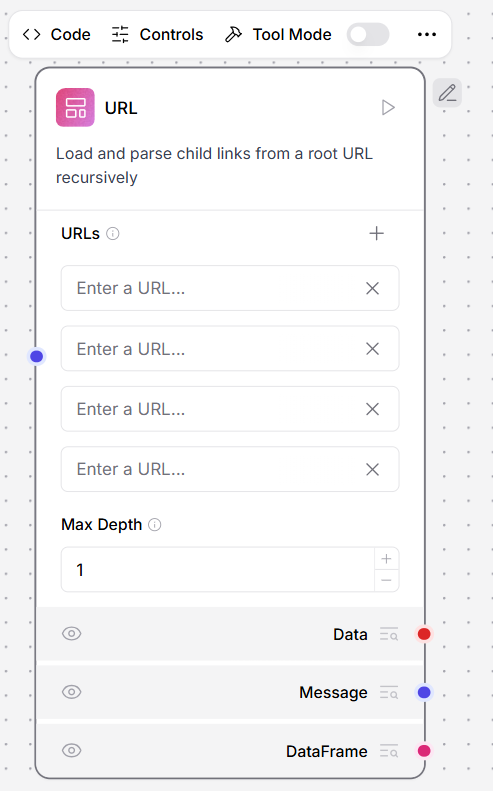
The **URL** data component loads content from a list of URLs.
In the component's **URLs** field, enter the URL you want to load
To add multiple URL fields, click the add button
Alternatively, connect a component that outputs the `Message` type, like the **Chat Input** component, to supply your URLs from a component
 ## API Request Component
This component makes HTTP requests using URLs or cURL commands.
### Setup Instructions
1. Connect the **Data** output to a component that accepts the input (for example, connect the **API Request** component to a **Chat Output** component)
## API Request Component
This component makes HTTP requests using URLs or cURL commands.
### Setup Instructions
1. Connect the **Data** output to a component that accepts the input (for example, connect the **API Request** component to a **Chat Output** component)
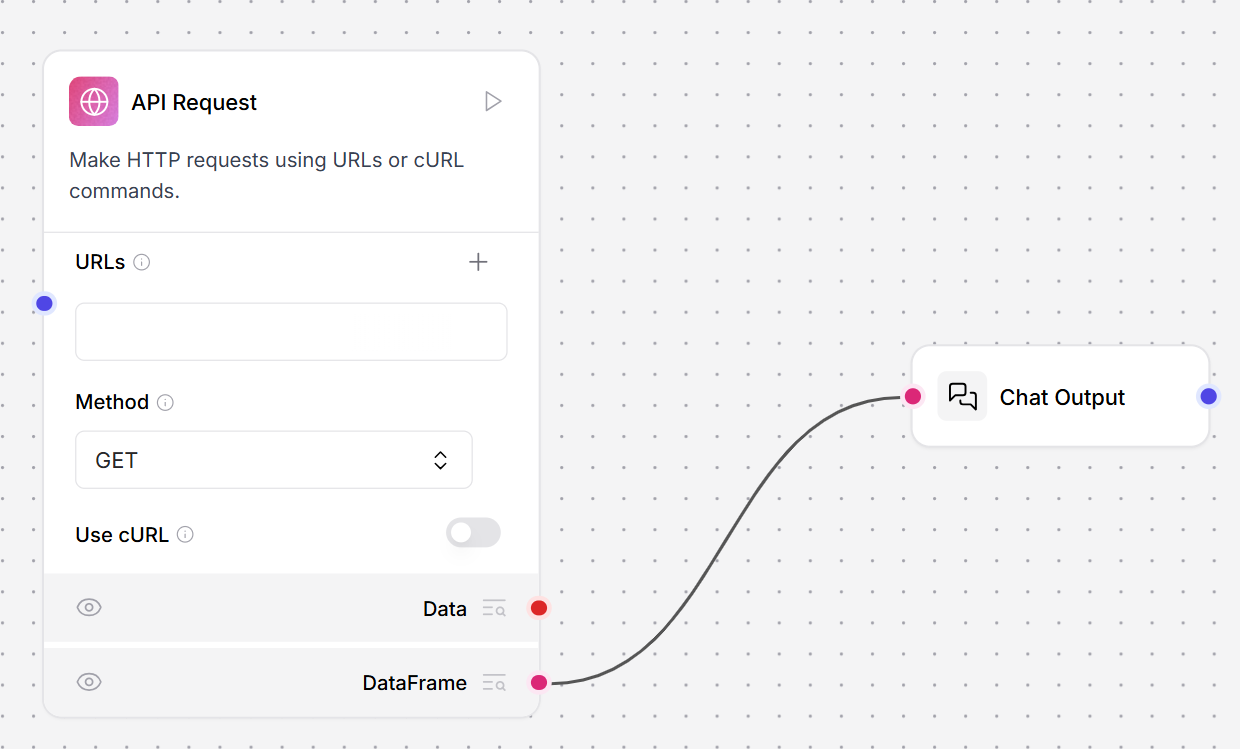 2. In the API component's **URLs** field, enter the endpoint for your request
3. In the **Method** field, enter the type of request (GET, POST, PATCH, PUT, or DELETE)
4. Optionally, enable the **Use cURL** button to create a field for pasting curl requests
5. Click **Playground**, then click **Run Flow** to execute your request
**Inputs**
| **Name** | **Display Name** | **Info** |
| :----------------------- | :--------------------- | :---------------------------------------------------------------------------------------------------------------- |
| urls | URLs | Enter one or more URLs, separated by commas. |
| curl | cURL | Paste a curl command to populate the dictionary fields for headers and body. |
| method | Method | The HTTP method to use. |
| use\_curl | Use cURL | Enable cURL mode to populate fields from a cURL command. |
| query\_params | Query Parameters | The query parameters to append to the URL. |
| body | Body | The body to send with the request as a dictionary (for `POST`, `PATCH`, `PUT`). |
| headers | Headers | The headers to send with the request as a dictionary. |
| timeout | Timeout | The timeout to use for the request. |
| follow\_redirects | Follow Redirects | Whether to follow http redirects. |
| save\_to\_file | Save to File | Save the API response to a temporary file. |
| include\_httpx\_metadata | Include HTTPx Metadata | Include properties such as `headers`, `status_code`, `response_headers`, and `redirection_history` in the output. |
**Outputs**
| **Name** | **Display Name** | **Info** |
| :-------- | :--------------- | :--------------------------------------------------------------------------------------- |
| data | Data | The result of the API requests. Returns a Data object containing source URL and results. |
| dataframe | DataFrame | Converts the API response data into a tabular DataFrame format. |
## File
This component loads and parses files of various supported formats and converts the content into a Data object. It supports multiple file types and provides options for parallel processing and error handling.
To Load a Document
1. Click the **Select files** button
2. Select a local file or a file loaded with [File management](/Concepts/manage-files)
**Inputs**
| **Name** | **Display Name** | **Info** |
| :-------------------------------------- | :---------------------------------- | :------------------------------------------------------------------------------------------------------------------------------------------------------------------------ |
| path | Files | The path to files to load. Supports individual files or bundled archives. |
| file\_path | Server File Path | A Data object with a `file_path` property pointing to the server file or a Message object with a path to the file. Supersedes 'Path' but supports the same file types. |
| separator | Separator | The separator to use between multiple outputs in Message format. |
| silent\_errors | Silent Errors | If true, errors do not raise an exception. |
| delete\_server\_file\_after\_processing | Delete Server File After Processing | If true, the Server File Path is deleted after processing. |
| ignore\_unsupported\_extensions | Ignore Unsupported Extensions | If true, files with unsupported extensions are not processed. |
| ignore\_unspecified\_files | Ignore Unspecified Files | If true, `Data` with no `file_path` property is ignored. |
| use\_multithreading | \[Deprecated] Use Multithreading | Set 'Processing Concurrency' greater than `1` to enable multithreading. This option is deprecated. |
| concurrency\_multithreading | Processing Concurrency | When multiple files are being processed, the number of files to process concurrently. Default is 1. Values greater than 1 enable parallel processing for 2 or more files. |
**Outputs**
| **Name** | **Display Name** | **Info** |
| :-------- | :--------------- | :------------------------------------------------------ |
| data | Data | The parsed content of the file as a Data object. |
| dataframe | DataFrame | The file content as a DataFrame object. |
| message | Message | The file content as a Message object. |
### Supported File Types
#### Text Files
* `.txt` - Plain text files
* `.md`, `.mdx` - Markdown files
* `.csv` - Comma-separated values
* `.json` - JSON data files
* `.yaml`, `.yml` - YAML configuration files
* `.xml` - XML documents
* `.html`, `.htm` - HTML web pages
* `.pdf` - PDF documents
* `.docx` - Microsoft Word documents
#### Code Files
* `.py` - Python source code
* `.js` - JavaScript files
* `.ts`, `.tsx` - TypeScript files
* `.sh` - Shell scripts
* `.sql` - SQL query files
#### Archive Formats
For bundling multiple files:
* `.zip` - ZIP archives
* `.tar` - TAR archives
* `.tgz` - Gzipped TAR archives
* `.bz2` - Bzip2 compressed files
* `.gz` - Gzip compressed files
## SQL Query
This component executes SQL queries on a specified database.
**Inputs**
| **Name** | **Display Name** | **Info** |
| :--------------- | :--------------- | :-------------------------------------------------------------------- |
| query | Query | The SQL query to execute. |
| database\_url | Database URL | The URL of the database. |
| include\_columns | Include Columns | Include columns in the result. |
| passthrough | Passthrough | If an error occurs, return the query instead of raising an exception. |
| add\_error | Add Error | Add the error to the result. |
**Outputs**
| **Name** | **Display Name** | **Info** |
| :------- | :--------------- | :------------------------------------- |
| result | Result | The result of the SQL query execution. |
## URL
This component fetches content from one or more URLs, processes the content, and returns it in various formats. It supports output in plain text or raw HTML.
In the component's **URLs** field, enter the URL you want to load
1. To use this component in a flow, connect the **DataFrame** output to a component that accepts the input. For example, connect the **URL** component to a **Chat Output** component.
2. In the API component's **URLs** field, enter the endpoint for your request
3. In the **Method** field, enter the type of request (GET, POST, PATCH, PUT, or DELETE)
4. Optionally, enable the **Use cURL** button to create a field for pasting curl requests
5. Click **Playground**, then click **Run Flow** to execute your request
**Inputs**
| **Name** | **Display Name** | **Info** |
| :----------------------- | :--------------------- | :---------------------------------------------------------------------------------------------------------------- |
| urls | URLs | Enter one or more URLs, separated by commas. |
| curl | cURL | Paste a curl command to populate the dictionary fields for headers and body. |
| method | Method | The HTTP method to use. |
| use\_curl | Use cURL | Enable cURL mode to populate fields from a cURL command. |
| query\_params | Query Parameters | The query parameters to append to the URL. |
| body | Body | The body to send with the request as a dictionary (for `POST`, `PATCH`, `PUT`). |
| headers | Headers | The headers to send with the request as a dictionary. |
| timeout | Timeout | The timeout to use for the request. |
| follow\_redirects | Follow Redirects | Whether to follow http redirects. |
| save\_to\_file | Save to File | Save the API response to a temporary file. |
| include\_httpx\_metadata | Include HTTPx Metadata | Include properties such as `headers`, `status_code`, `response_headers`, and `redirection_history` in the output. |
**Outputs**
| **Name** | **Display Name** | **Info** |
| :-------- | :--------------- | :--------------------------------------------------------------------------------------- |
| data | Data | The result of the API requests. Returns a Data object containing source URL and results. |
| dataframe | DataFrame | Converts the API response data into a tabular DataFrame format. |
## File
This component loads and parses files of various supported formats and converts the content into a Data object. It supports multiple file types and provides options for parallel processing and error handling.
To Load a Document
1. Click the **Select files** button
2. Select a local file or a file loaded with [File management](/Concepts/manage-files)
**Inputs**
| **Name** | **Display Name** | **Info** |
| :-------------------------------------- | :---------------------------------- | :------------------------------------------------------------------------------------------------------------------------------------------------------------------------ |
| path | Files | The path to files to load. Supports individual files or bundled archives. |
| file\_path | Server File Path | A Data object with a `file_path` property pointing to the server file or a Message object with a path to the file. Supersedes 'Path' but supports the same file types. |
| separator | Separator | The separator to use between multiple outputs in Message format. |
| silent\_errors | Silent Errors | If true, errors do not raise an exception. |
| delete\_server\_file\_after\_processing | Delete Server File After Processing | If true, the Server File Path is deleted after processing. |
| ignore\_unsupported\_extensions | Ignore Unsupported Extensions | If true, files with unsupported extensions are not processed. |
| ignore\_unspecified\_files | Ignore Unspecified Files | If true, `Data` with no `file_path` property is ignored. |
| use\_multithreading | \[Deprecated] Use Multithreading | Set 'Processing Concurrency' greater than `1` to enable multithreading. This option is deprecated. |
| concurrency\_multithreading | Processing Concurrency | When multiple files are being processed, the number of files to process concurrently. Default is 1. Values greater than 1 enable parallel processing for 2 or more files. |
**Outputs**
| **Name** | **Display Name** | **Info** |
| :-------- | :--------------- | :------------------------------------------------------ |
| data | Data | The parsed content of the file as a Data object. |
| dataframe | DataFrame | The file content as a DataFrame object. |
| message | Message | The file content as a Message object. |
### Supported File Types
#### Text Files
* `.txt` - Plain text files
* `.md`, `.mdx` - Markdown files
* `.csv` - Comma-separated values
* `.json` - JSON data files
* `.yaml`, `.yml` - YAML configuration files
* `.xml` - XML documents
* `.html`, `.htm` - HTML web pages
* `.pdf` - PDF documents
* `.docx` - Microsoft Word documents
#### Code Files
* `.py` - Python source code
* `.js` - JavaScript files
* `.ts`, `.tsx` - TypeScript files
* `.sh` - Shell scripts
* `.sql` - SQL query files
#### Archive Formats
For bundling multiple files:
* `.zip` - ZIP archives
* `.tar` - TAR archives
* `.tgz` - Gzipped TAR archives
* `.bz2` - Bzip2 compressed files
* `.gz` - Gzip compressed files
## SQL Query
This component executes SQL queries on a specified database.
**Inputs**
| **Name** | **Display Name** | **Info** |
| :--------------- | :--------------- | :-------------------------------------------------------------------- |
| query | Query | The SQL query to execute. |
| database\_url | Database URL | The URL of the database. |
| include\_columns | Include Columns | Include columns in the result. |
| passthrough | Passthrough | If an error occurs, return the query instead of raising an exception. |
| add\_error | Add Error | Add the error to the result. |
**Outputs**
| **Name** | **Display Name** | **Info** |
| :------- | :--------------- | :------------------------------------- |
| result | Result | The result of the SQL query execution. |
## URL
This component fetches content from one or more URLs, processes the content, and returns it in various formats. It supports output in plain text or raw HTML.
In the component's **URLs** field, enter the URL you want to load
1. To use this component in a flow, connect the **DataFrame** output to a component that accepts the input. For example, connect the **URL** component to a **Chat Output** component.
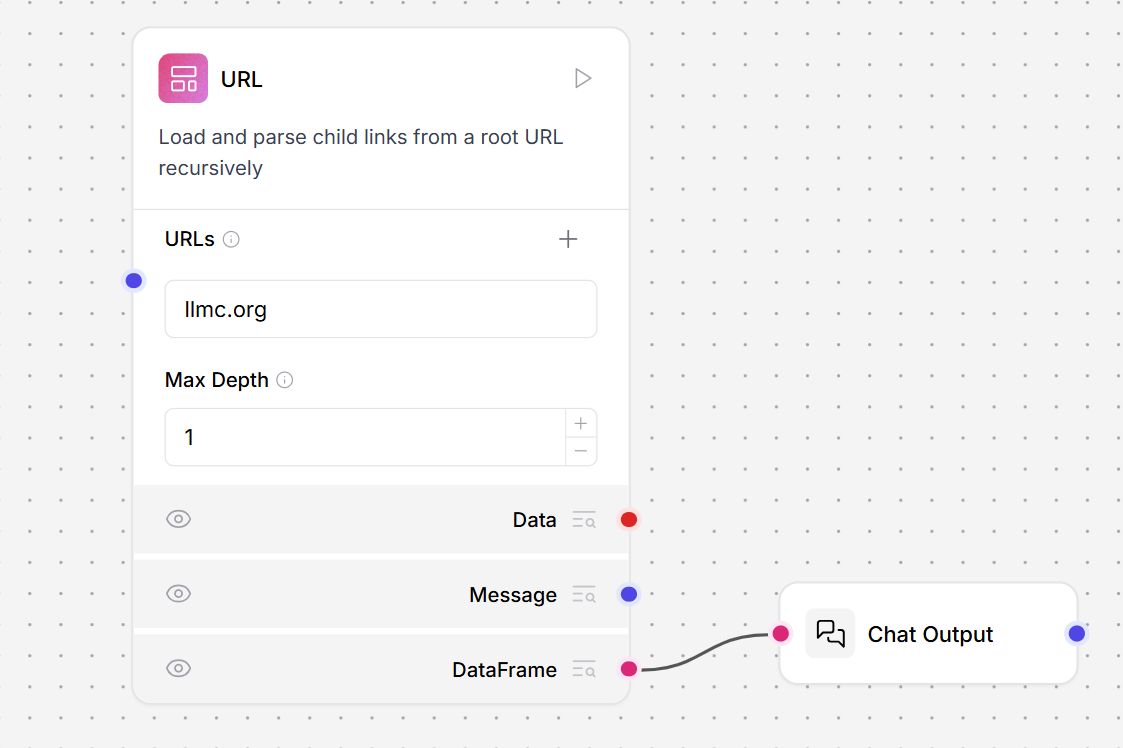 2. In the URL component's **URLs** field, enter the URL for your request. This example uses `llmc.org`.
3. Optionally, in the **Max Depth** field, enter how many pages away from the initial URL you want to crawl. Select `1` to crawl only the page specified in the **URLs** field. Select `2` to crawl all pages linked from that page. The component crawls by link traversal, not by URL path depth.
4. Click **Playground**, and then click **Run Flow**. The text contents of the URL are returned to the Playground as a structured DataFrame.
5. In the **URL** component, change the output port to **Message**, and then run the flow again. The text contents of the URL are returned as unstructured raw text, which you can extract patterns from with the **Regex Extractor** tool.
6. Connect the **URL** component to a **Regex Extractor** and **Chat Output**.
2. In the URL component's **URLs** field, enter the URL for your request. This example uses `llmc.org`.
3. Optionally, in the **Max Depth** field, enter how many pages away from the initial URL you want to crawl. Select `1` to crawl only the page specified in the **URLs** field. Select `2` to crawl all pages linked from that page. The component crawls by link traversal, not by URL path depth.
4. Click **Playground**, and then click **Run Flow**. The text contents of the URL are returned to the Playground as a structured DataFrame.
5. In the **URL** component, change the output port to **Message**, and then run the flow again. The text contents of the URL are returned as unstructured raw text, which you can extract patterns from with the **Regex Extractor** tool.
6. Connect the **URL** component to a **Regex Extractor** and **Chat Output**.
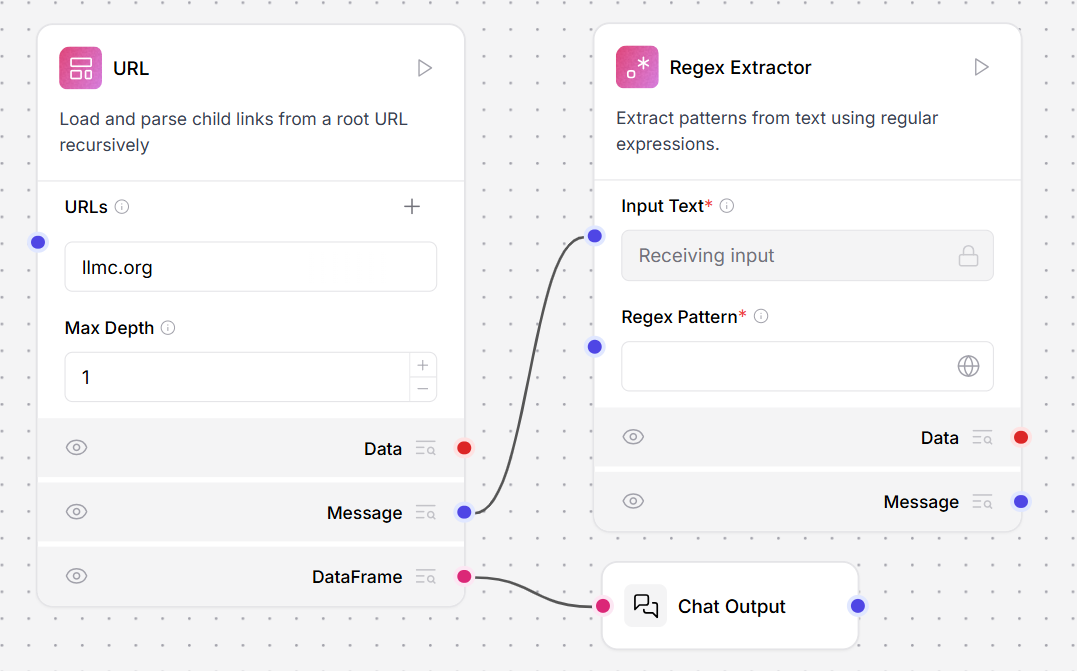 7. In the **Regex Extractor** tool, enter a pattern to extract text from the **URL** component's raw output. This example extracts the first paragraph from the "In the News" section of `https://en.wikipedia.org/wiki/Main_Page`.
**Inputs**
| **Name** | **Display Name** | **Info** |
| :--------------- | :--------------- | :----------------------------------------------------------------------------------------------------------- |
| urls | URLs | Click the '+' button to enter one or more URLs to crawl recursively. |
| max\_depth | Max Depth | Controls how many 'clicks' away from the initial page the crawler will go. |
| prevent\_outside | Prevent Outside | If enabled, only crawls URLs within the same domain as the root URL. |
| use\_async | Use Async | If enabled, uses asynchronous loading which can be significantly faster but might use more system resources. |
| format | Output Format | Output Format. Use `Text` to extract the text from the HTML or `HTML` for the raw HTML content. |
| timeout | Timeout | Timeout for the request in seconds. |
| headers | Headers | The headers to send with the request. |
**Outputs**
| **Name** | **Display Name** | **Info** |
| :-------- | :--------------- | :--------------------------------------------------------------------- |
| data | Data | A list of Data objects containing fetched content and metadata. |
| text | Message | The fetched content as formatted text. |
| dataframe | DataFrame | The content formatted as a DataFrame object. |
## **Webhook**
This component defines a webhook trigger that runs a flow when it receives an HTTP POST request.
If the input is not valid JSON, the component wraps it in a `payload` object so that it can be processed and still trigger the flow. The component does not require an API key.
When you add a **Webhook** component to a flow, the flow's [**API access pane**](https://docs.llmcontrols.ai/Concepts/publish-flows#api-access%E2%80%8B) exposes an additional **Webhook cURL** tab that contains a `POST /v1/webhook/$FLOW_ID` code snippet. You can use this request to send data to the **Webhook** component and trigger the flow. For example:
To test the webhook component:
1. Add a **Webhook** component to the flow.
2. Connect the **Webhook** component's **Data** output to the **Data** input of a [Parser](https://docs.llmcontrols.ai/Concepts/publish-flows#api-access%E2%80%8B) component.
3. Connect the **Parser** component's **Parsed Text** output to the **Text** input of a [Chat Output](https://docs.llmcontrols.ai/Components/Inputsandoutputs#chat-output%E2%80%8B) component.
4. In the **Parser** component, under **Mode**, select **Stringify**. This mode passes the webhook's data as a string for the **Chat Output** component to print.
5. To send a POST request, copy the code from the **Webhook cURL** tab in the **API** pane and paste it into a terminal.
6. Send the POST request.
7. Open the **Playground**. Your JSON data is posted to the **Chat Output** component, which indicates that the webhook component is correctly triggering the flow.
**Inputs**
| **Name** | **Display Name** | **Description** |
| :------- | :--------------- | :------------------------------------------------------------------- |
| data | Payload | Receives a payload from external systems through HTTP POST requests. |
| curl | cURL | The cURL command template for making requests to this webhook. |
| endpoint | Endpoint | The endpoint URL where this webhook receives requests. |
**Outputs**
| **Name** | **Display Name** | **Description** |
| :----------- | :--------------- | :-------------------------------------------------------------------------------------------------------------------------------------------------------------------------------------------- |
| output\_data | Data | Outputs processed data from the webhook input, and returns an empty Data object if no input is provided. If the input is not valid JSON, the component wraps it in a `payload` object. |
ation about creating a service account JSON, see [Service Account JSON](https://developers.google.com/identity/protocols/oauth2/service-account).
**Inputs**
| **Input** | **Type** | **Description** |
| :-------------- | :--------------- | :-------------------------------------------------------------------------------------- |
| token\_string | SecretStrInput | A JSON string containing OAuth 2.0 access token information for service account access. |
| query\_item | DropdownInput | The field to query. |
| valid\_operator | DropdownInput | The operator to use in the query. |
| search\_term | MessageTextInput | The value to search for in the specified query item. |
| query\_string | MessageTextInput | The query string used for searching. |
**Outputs**
| **Output** | **Type** | **Description** |
| :---------- | :--------- | :--------------------------------------------------- |
| doc\_urls | List\[str] | The URLs of the found documents. |
| doc\_ids | List\[str] | The IDs of the found documents. |
| doc\_titles | List\[str] | The titles of the found documents. |
| Data | Data | The document titles and URLs in a structured format. |
### Directory
This component recursively loads files from a directory and converts the content into Data objects. It supports filtering by file type, depth control, and optional multithreading for parallel processing.
**To Load a Directory**
1. Enter the directory path or use the default current directory
2. Optionally select specific file types to filter
3. Set the search depth and enable recursive mode if needed
**Inputs**
| Name | Display Name | Info |
| :------------------ | :----------------- | :--------------------------------------------------------------------------------------- |
| path | Path | Path to the directory to load files from. Defaults to current directory ('.') |
| types | File Types | File types to load. Select one or more types or leave empty to load all supported types. |
| depth | Depth | Depth to search for files. |
| max\_concurrency | Max Concurrency | Maximum concurrency for loading files. |
| load\_hidden | Load Hidden | If true, hidden files will be loaded. |
| recursive | Recursive | If true, the search will be recursive. |
| silent\_errors | Silent Errors | If true, errors will not raise an exception. |
| use\_multithreading | Use Multithreading | If true, multithreading will be used. |
**Outputs**
| Name | Display Name | Info |
| :-------- | :----------- | :--------------------------------------------- |
| data | Data | The loaded files as a list of Data objects. |
| dataframe | DataFrame | The loaded file content as a DataFrame object. |
### Load Spreadsheet
This component loads and parses spreadsheet files (.xlsx, .xls) and converts the content into a searchable data format for analysis. It supports sheet selection, row limits, caching, and optimized loading for large files.
**To Load a Spreadsheet**
1. Click the Select files button and upload an .xlsx or .xls file
2. Optionally specify a sheet name (defaults to the first sheet)
3. Configure row limits and caching as needed
Inputs
| Name | Display Name | Info |
| :-------------------------------------- | :---------------------------------- | :---------------------------------------------------------------------------------------------------------------------------------------------------------------- |
| path | Files | The path to the spreadsheet file to load. Supports .xlsx and .xls files. |
| file\_path | Server File Path | A Data object with a file\_path property pointing to the server file or a Message object with a path to the file. Supercedes 'Path' but supports same file types. |
| separator | Separator | Specify the separator to use between multiple outputs in Message format. |
| silent\_errors | Silent Errors | If true, errors will not raise an exception. |
| delete\_server\_file\_after\_processing | Delete Server File After Processing | If true, the Server File Path will be deleted after processing. |
| ignore\_unsupported\_extensions | Ignore Unsupported Extensions | If true, files with unsupported extensions will not be processed. |
| ignore\_unspecified\_files | Ignore Unspecified Files | If true, Data with no file\_path property will be ignored. |
| sheet\_name | Sheet Name | Name of the sheet to load (default: first sheet). |
| max\_rows | Max Rows | Maximum number of rows to load (0 = all rows). |
| include\_index | Include Row Index | Include row index as a column. |
| text\_key | Text Key | The key to use for the text column. Defaults to 'text'. |
| enable\_caching | Enable Caching | Cache loaded data to avoid reloading for subsequent queries. |
| cache\_dir | Cache Directory | Directory to store cached data (default: system temp directory). |
| optimize\_for\_large\_files | Optimize for Large Files | Use optimized loading for files with 100,000+ rows. |
| chunk\_size | Chunk Size | Number of rows to process in chunks for large files. |
**Outputs**
| Name | Display Name | Info |
| :--------- | :----------- | :---------------------------------------------------------------------------------------- |
| data\_list | Data List | The parsed spreadsheet content as a list of Data objects. |
| summary | Data Summary | Summary information about the loaded data including total rows, columns, and sample data. |
| dataframe | DataFrame | The spreadsheet content as a DataFrame object for SQL queries. |
### Recursive URL Crawler
This component loads and parses child links from a root URL recursively. It crawls web pages up to a specified depth and extracts content in text or HTML format.
**To Crawl URLs**
1. Enter one or more URLs by clicking the + button
2. Set the Max Depth to control how many link levels to crawl
3. Configure output format (Text or HTML)
Inputs
| Name | Display Name | Info |
| :--------------- | :-------------- | :----------------------------------------------------------------------------------------------------------------------------------------------------------------------------------------------------------------------------------------------------------------------------------------------- |
| urls | URLs | Enter one or more URLs to crawl recursively, by clicking the '+' button. |
| max\_depth | Max Depth | Controls how many 'clicks' away from the initial page the crawler will go: depth 1: only the initial page; depth 2: initial page + all pages linked directly from it; depth 3: initial page + direct links + links found on those pages. Note: This is about link traversal, not URL path depth. |
| prevent\_outside | Prevent Outside | If enabled, only crawls URLs within the same domain as the root URL. This helps prevent the crawler from going to external websites. |
| use\_async | Use Async | If enabled, uses asynchronous loading which can be significantly faster but might use more system resources. |
| format | Output Format | Output Format. Use 'Text' to extract the text from the HTML or 'HTML' for the raw HTML content. |
#### Outputs
| Name | Display Name | Info |
| :-------- | :----------- | :---------------------------------------------------- |
| data | Data | The crawled content as a list of Data objects. |
| text | Message | The crawled content as a concatenated Message object. |
| dataframe | DataFrame | The crawled content as a DataFrame object. |
### S3 Bucket Uploader
This component uploads files to an Amazon S3 bucket. It supports two upload strategies: storing parsed data or uploading the original file as-is, with options for path prefixing and stripping.
**To Upload Files to S3**
1. Provide your AWS Access Key ID and AWS Secret Key
2. Enter the Bucket Name
3. Connect Data inputs from upstream components
4. Choose an upload strategy
#### Inputs
| Name | Display Name | Info |
| :----------------------- | :----------------------- | :------------------------------------------------------------------------------------------------------------------------------------------------------------------------------- |
| aws\_access\_key\_id | AWS Access Key ID | AWS Access key ID. |
| aws\_secret\_access\_key | AWS Secret Key | AWS Secret Key. |
| bucket\_name | Bucket Name | Enter the name of the bucket. |
| strategy | Strategy for file upload | Choose the strategy to upload the file. By Data means that the source file is parsed and stored as LLM Controls data. By File Name means that the source file is uploaded as is. |
| data\_inputs | Data Inputs | The data to split. |
| s3\_prefix | S3 Prefix | Prefix for all files. |
| strip\_path | Strip Path | Removes path from file path. |
#### Outputs
| Name | Display Name | Info |
| :--- | :------------------- | :------------------------------------------------------ |
| data | Writes to AWS Bucket | Processes and uploads files to the configured S3 bucket |
7. In the **Regex Extractor** tool, enter a pattern to extract text from the **URL** component's raw output. This example extracts the first paragraph from the "In the News" section of `https://en.wikipedia.org/wiki/Main_Page`.
**Inputs**
| **Name** | **Display Name** | **Info** |
| :--------------- | :--------------- | :----------------------------------------------------------------------------------------------------------- |
| urls | URLs | Click the '+' button to enter one or more URLs to crawl recursively. |
| max\_depth | Max Depth | Controls how many 'clicks' away from the initial page the crawler will go. |
| prevent\_outside | Prevent Outside | If enabled, only crawls URLs within the same domain as the root URL. |
| use\_async | Use Async | If enabled, uses asynchronous loading which can be significantly faster but might use more system resources. |
| format | Output Format | Output Format. Use `Text` to extract the text from the HTML or `HTML` for the raw HTML content. |
| timeout | Timeout | Timeout for the request in seconds. |
| headers | Headers | The headers to send with the request. |
**Outputs**
| **Name** | **Display Name** | **Info** |
| :-------- | :--------------- | :--------------------------------------------------------------------- |
| data | Data | A list of Data objects containing fetched content and metadata. |
| text | Message | The fetched content as formatted text. |
| dataframe | DataFrame | The content formatted as a DataFrame object. |
## **Webhook**
This component defines a webhook trigger that runs a flow when it receives an HTTP POST request.
If the input is not valid JSON, the component wraps it in a `payload` object so that it can be processed and still trigger the flow. The component does not require an API key.
When you add a **Webhook** component to a flow, the flow's [**API access pane**](https://docs.llmcontrols.ai/Concepts/publish-flows#api-access%E2%80%8B) exposes an additional **Webhook cURL** tab that contains a `POST /v1/webhook/$FLOW_ID` code snippet. You can use this request to send data to the **Webhook** component and trigger the flow. For example:
To test the webhook component:
1. Add a **Webhook** component to the flow.
2. Connect the **Webhook** component's **Data** output to the **Data** input of a [Parser](https://docs.llmcontrols.ai/Concepts/publish-flows#api-access%E2%80%8B) component.
3. Connect the **Parser** component's **Parsed Text** output to the **Text** input of a [Chat Output](https://docs.llmcontrols.ai/Components/Inputsandoutputs#chat-output%E2%80%8B) component.
4. In the **Parser** component, under **Mode**, select **Stringify**. This mode passes the webhook's data as a string for the **Chat Output** component to print.
5. To send a POST request, copy the code from the **Webhook cURL** tab in the **API** pane and paste it into a terminal.
6. Send the POST request.
7. Open the **Playground**. Your JSON data is posted to the **Chat Output** component, which indicates that the webhook component is correctly triggering the flow.
**Inputs**
| **Name** | **Display Name** | **Description** |
| :------- | :--------------- | :------------------------------------------------------------------- |
| data | Payload | Receives a payload from external systems through HTTP POST requests. |
| curl | cURL | The cURL command template for making requests to this webhook. |
| endpoint | Endpoint | The endpoint URL where this webhook receives requests. |
**Outputs**
| **Name** | **Display Name** | **Description** |
| :----------- | :--------------- | :-------------------------------------------------------------------------------------------------------------------------------------------------------------------------------------------- |
| output\_data | Data | Outputs processed data from the webhook input, and returns an empty Data object if no input is provided. If the input is not valid JSON, the component wraps it in a `payload` object. |
ation about creating a service account JSON, see [Service Account JSON](https://developers.google.com/identity/protocols/oauth2/service-account).
**Inputs**
| **Input** | **Type** | **Description** |
| :-------------- | :--------------- | :-------------------------------------------------------------------------------------- |
| token\_string | SecretStrInput | A JSON string containing OAuth 2.0 access token information for service account access. |
| query\_item | DropdownInput | The field to query. |
| valid\_operator | DropdownInput | The operator to use in the query. |
| search\_term | MessageTextInput | The value to search for in the specified query item. |
| query\_string | MessageTextInput | The query string used for searching. |
**Outputs**
| **Output** | **Type** | **Description** |
| :---------- | :--------- | :--------------------------------------------------- |
| doc\_urls | List\[str] | The URLs of the found documents. |
| doc\_ids | List\[str] | The IDs of the found documents. |
| doc\_titles | List\[str] | The titles of the found documents. |
| Data | Data | The document titles and URLs in a structured format. |
### Directory
This component recursively loads files from a directory and converts the content into Data objects. It supports filtering by file type, depth control, and optional multithreading for parallel processing.
**To Load a Directory**
1. Enter the directory path or use the default current directory
2. Optionally select specific file types to filter
3. Set the search depth and enable recursive mode if needed
**Inputs**
| Name | Display Name | Info |
| :------------------ | :----------------- | :--------------------------------------------------------------------------------------- |
| path | Path | Path to the directory to load files from. Defaults to current directory ('.') |
| types | File Types | File types to load. Select one or more types or leave empty to load all supported types. |
| depth | Depth | Depth to search for files. |
| max\_concurrency | Max Concurrency | Maximum concurrency for loading files. |
| load\_hidden | Load Hidden | If true, hidden files will be loaded. |
| recursive | Recursive | If true, the search will be recursive. |
| silent\_errors | Silent Errors | If true, errors will not raise an exception. |
| use\_multithreading | Use Multithreading | If true, multithreading will be used. |
**Outputs**
| Name | Display Name | Info |
| :-------- | :----------- | :--------------------------------------------- |
| data | Data | The loaded files as a list of Data objects. |
| dataframe | DataFrame | The loaded file content as a DataFrame object. |
### Load Spreadsheet
This component loads and parses spreadsheet files (.xlsx, .xls) and converts the content into a searchable data format for analysis. It supports sheet selection, row limits, caching, and optimized loading for large files.
**To Load a Spreadsheet**
1. Click the Select files button and upload an .xlsx or .xls file
2. Optionally specify a sheet name (defaults to the first sheet)
3. Configure row limits and caching as needed
Inputs
| Name | Display Name | Info |
| :-------------------------------------- | :---------------------------------- | :---------------------------------------------------------------------------------------------------------------------------------------------------------------- |
| path | Files | The path to the spreadsheet file to load. Supports .xlsx and .xls files. |
| file\_path | Server File Path | A Data object with a file\_path property pointing to the server file or a Message object with a path to the file. Supercedes 'Path' but supports same file types. |
| separator | Separator | Specify the separator to use between multiple outputs in Message format. |
| silent\_errors | Silent Errors | If true, errors will not raise an exception. |
| delete\_server\_file\_after\_processing | Delete Server File After Processing | If true, the Server File Path will be deleted after processing. |
| ignore\_unsupported\_extensions | Ignore Unsupported Extensions | If true, files with unsupported extensions will not be processed. |
| ignore\_unspecified\_files | Ignore Unspecified Files | If true, Data with no file\_path property will be ignored. |
| sheet\_name | Sheet Name | Name of the sheet to load (default: first sheet). |
| max\_rows | Max Rows | Maximum number of rows to load (0 = all rows). |
| include\_index | Include Row Index | Include row index as a column. |
| text\_key | Text Key | The key to use for the text column. Defaults to 'text'. |
| enable\_caching | Enable Caching | Cache loaded data to avoid reloading for subsequent queries. |
| cache\_dir | Cache Directory | Directory to store cached data (default: system temp directory). |
| optimize\_for\_large\_files | Optimize for Large Files | Use optimized loading for files with 100,000+ rows. |
| chunk\_size | Chunk Size | Number of rows to process in chunks for large files. |
**Outputs**
| Name | Display Name | Info |
| :--------- | :----------- | :---------------------------------------------------------------------------------------- |
| data\_list | Data List | The parsed spreadsheet content as a list of Data objects. |
| summary | Data Summary | Summary information about the loaded data including total rows, columns, and sample data. |
| dataframe | DataFrame | The spreadsheet content as a DataFrame object for SQL queries. |
### Recursive URL Crawler
This component loads and parses child links from a root URL recursively. It crawls web pages up to a specified depth and extracts content in text or HTML format.
**To Crawl URLs**
1. Enter one or more URLs by clicking the + button
2. Set the Max Depth to control how many link levels to crawl
3. Configure output format (Text or HTML)
Inputs
| Name | Display Name | Info |
| :--------------- | :-------------- | :----------------------------------------------------------------------------------------------------------------------------------------------------------------------------------------------------------------------------------------------------------------------------------------------- |
| urls | URLs | Enter one or more URLs to crawl recursively, by clicking the '+' button. |
| max\_depth | Max Depth | Controls how many 'clicks' away from the initial page the crawler will go: depth 1: only the initial page; depth 2: initial page + all pages linked directly from it; depth 3: initial page + direct links + links found on those pages. Note: This is about link traversal, not URL path depth. |
| prevent\_outside | Prevent Outside | If enabled, only crawls URLs within the same domain as the root URL. This helps prevent the crawler from going to external websites. |
| use\_async | Use Async | If enabled, uses asynchronous loading which can be significantly faster but might use more system resources. |
| format | Output Format | Output Format. Use 'Text' to extract the text from the HTML or 'HTML' for the raw HTML content. |
#### Outputs
| Name | Display Name | Info |
| :-------- | :----------- | :---------------------------------------------------- |
| data | Data | The crawled content as a list of Data objects. |
| text | Message | The crawled content as a concatenated Message object. |
| dataframe | DataFrame | The crawled content as a DataFrame object. |
### S3 Bucket Uploader
This component uploads files to an Amazon S3 bucket. It supports two upload strategies: storing parsed data or uploading the original file as-is, with options for path prefixing and stripping.
**To Upload Files to S3**
1. Provide your AWS Access Key ID and AWS Secret Key
2. Enter the Bucket Name
3. Connect Data inputs from upstream components
4. Choose an upload strategy
#### Inputs
| Name | Display Name | Info |
| :----------------------- | :----------------------- | :------------------------------------------------------------------------------------------------------------------------------------------------------------------------------- |
| aws\_access\_key\_id | AWS Access Key ID | AWS Access key ID. |
| aws\_secret\_access\_key | AWS Secret Key | AWS Secret Key. |
| bucket\_name | Bucket Name | Enter the name of the bucket. |
| strategy | Strategy for file upload | Choose the strategy to upload the file. By Data means that the source file is parsed and stored as LLM Controls data. By File Name means that the source file is uploaded as is. |
| data\_inputs | Data Inputs | The data to split. |
| s3\_prefix | S3 Prefix | Prefix for all files. |
| strip\_path | Strip Path | Removes path from file path. |
#### Outputs
| Name | Display Name | Info |
| :--- | :------------------- | :------------------------------------------------------ |
| data | Writes to AWS Bucket | Processes and uploads files to the configured S3 bucket |