> ## Documentation Index
> Fetch the complete documentation index at: https://docs.llmcontrols.ai/llms.txt
> Use this file to discover all available pages before exploring further.
# Helper components in LLM Controls
Helper components provide utility functions to help manage data, tasks, and other components in your flow.
## **Use a helper component in a flow**[****](https://docs.langflow.org/components-helpers#use-a-helper-component-in-a-flow)
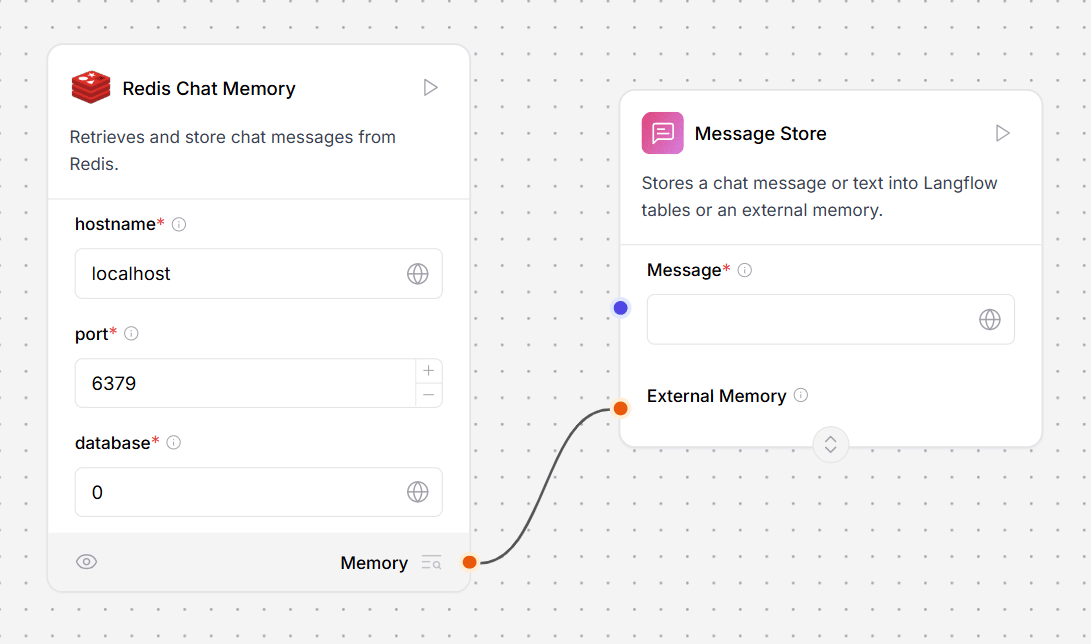
Chat memory in LLM Controls is stored either in local LLM Controls tables with `LCBufferMemory` or connected to an external database.
The **Store Message** helper component stores chat memories as [Data](/Concepts/LLMCobjects) objects, and the **Message History** helper component retrieves chat messages as data objects or strings.
This example flow stores and retrieves chat history from an [AstraDBChatMemory](https://docs.llmcontrols.ai/Components/Memories#astradbchatmemory-component%E2%80%8B) component with **Store Message** and **Chat Memory** components.
 ## **Batch Run**[****](https://docs.langflow.org/components-helpers#batch-run)
The **Batch Run** component runs a language model over **each row** of a [DataFrame](/Concepts/LLMCobjects) text column and returns a new DataFrame with the original text and an LLM response.
The response contains the following columns:
* `text_input`: The original text from the input DataFrame.
* `model_response`: The model's response for each input.
* `batch_index`: The processing order, with a `0`-based index.
* `metadata` (optional): Additional information about the processing.
These columns, when connected to a **Parser** component, can be used as variables within curly braces.
To use the Batch Run component with a **Parser** component, do the following:
1. Connect a **Model** component to the **Batch Run** component's **Language model** port.
2. Connect a component that outputs a DataFrame, like the **File** component, to the **Batch Run** component's **DataFrame** input.
3. Connect the **Batch Run** component's **Batch Results** output to a **Parser** component's **DataFrame** input. The flow looks like this:
## **Batch Run**[****](https://docs.langflow.org/components-helpers#batch-run)
The **Batch Run** component runs a language model over **each row** of a [DataFrame](/Concepts/LLMCobjects) text column and returns a new DataFrame with the original text and an LLM response.
The response contains the following columns:
* `text_input`: The original text from the input DataFrame.
* `model_response`: The model's response for each input.
* `batch_index`: The processing order, with a `0`-based index.
* `metadata` (optional): Additional information about the processing.
These columns, when connected to a **Parser** component, can be used as variables within curly braces.
To use the Batch Run component with a **Parser** component, do the following:
1. Connect a **Model** component to the **Batch Run** component's **Language model** port.
2. Connect a component that outputs a DataFrame, like the **File** component, to the **Batch Run** component's **DataFrame** input.
3. Connect the **Batch Run** component's **Batch Results** output to a **Parser** component's **DataFrame** input. The flow looks like this:
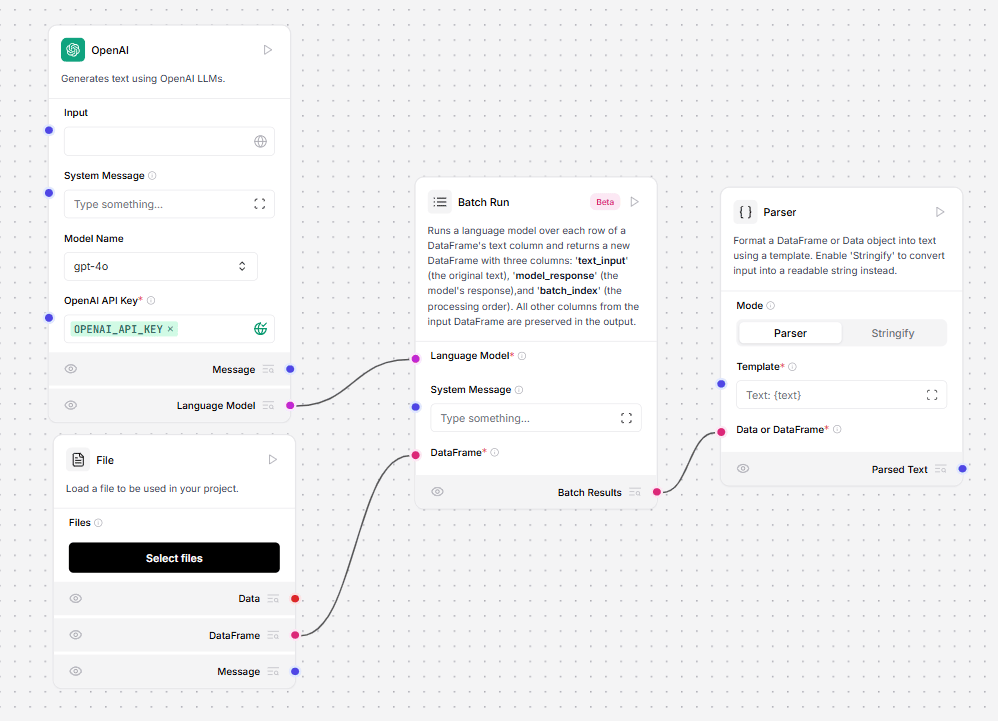 4. In the **Column Name** field of the **Batch Run** component, enter a column name based on the data you're loading from the **File** loader. For example, to process a column of `names`, enter `name`.
5. Optionally, in the **System Message** field of the **Batch Run** component, enter a **System Message** to instruct the connected LLM on how to process your file. For example, `create a business card for each name.`
6. In the **Template** field of the **Parser** component, enter a template for using the **Batch Run** component's new DataFrame columns. To use all three columns from the **Batch Run** component, include them like this:
7. To run the flow, in the **Parser** component, click **Run component**.
8. To view your created DataFrame, in the **Parser** component, click.
9. Optionally, connect a **Chat Output** component, and open the **Playground** to see the output.
**Inputs**
| **Name** | **Type** | **Description** |
| :------------------- | :--------------- | :------------------------------------------------------------------------------------------------------- |
| model | HandleInput | Connect the 'Language Model' output from your LLM component here. Required. |
| system\_message | MultilineInput | A multi-line system instruction for all rows in the DataFrame. |
| df | DataFrameInput | The DataFrame whose column is treated as text messages, as specified by 'column\_name'. Required. |
| column\_name | MessageTextInput | The name of the DataFrame column to treat as text messages. If empty, all columns are formatted in TOML. |
| output\_column\_name | MessageTextInput | Name of the column where the model's response is stored. Default=`model_response`. |
| enable\_metadata | BoolInput | If True, add metadata to the output DataFrame. |
**Outputs**
| **Name** | **Type** | **Description** |
| :------------- | :-------- | :---------------------------------------------------------------------- |
| batch\_results | DataFrame | A DataFrame with all original columns plus the model's response column. |
## **Current date**
The Current Date component returns the current date and time in a selected timezone. This component provides a flexible way to obtain timezone-specific date and time information within an LLM Controls pipeline.
**Inputs**
| **Name** | **Type** | **Description** |
| :------- | :------- | :------------------------------------------ |
| timezone | String | The timezone for the current date and time. |
**Outputs**
| **Name** | **Type** | **Description** |
| :------------ | :------- | :------------------------------------------------------------ |
| current\_date | String | The resulting current date and time in the selected timezone. |
## **ID Generator**
This component generates a unique ID.
**Inputs**
| **Name** | **Type** | **Description** |
| :--------- | :------- | :----------------------- |
| unique\_id | String | The generated unique ID. |
**Outputs**
| **Name** | **Type** | **Description** |
| :------- | :------- | :----------------------- |
| id | String | The generated unique ID. |
## **Message history**
**info**
Before LLM Controls 1.1, this component was known as the Chat Memory component.
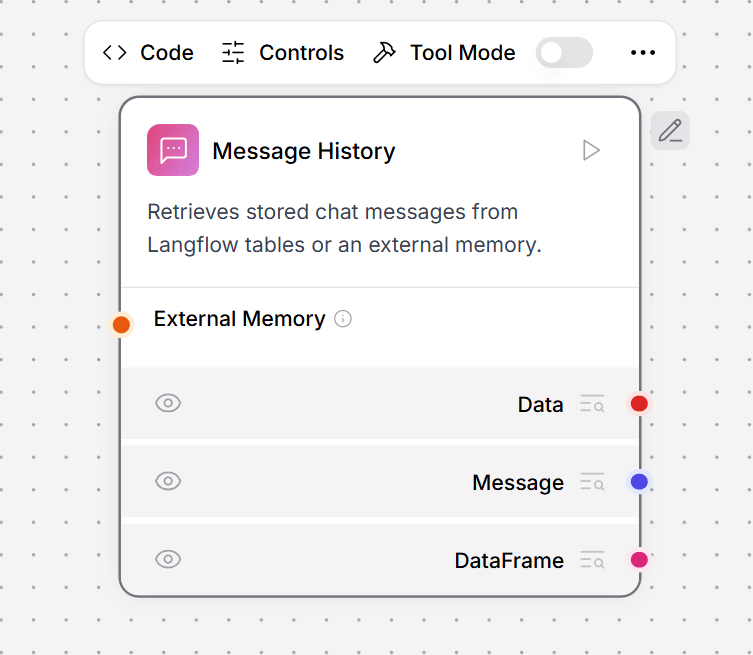
This component retrieves chat messages from LLM Controls tables or external memory.
In this example, the **Message Store** component stores the complete chat history in a local LLM Controls table, which the **Message History** component retrieves as context for the LLM to answer each question.
4. In the **Column Name** field of the **Batch Run** component, enter a column name based on the data you're loading from the **File** loader. For example, to process a column of `names`, enter `name`.
5. Optionally, in the **System Message** field of the **Batch Run** component, enter a **System Message** to instruct the connected LLM on how to process your file. For example, `create a business card for each name.`
6. In the **Template** field of the **Parser** component, enter a template for using the **Batch Run** component's new DataFrame columns. To use all three columns from the **Batch Run** component, include them like this:
7. To run the flow, in the **Parser** component, click **Run component**.
8. To view your created DataFrame, in the **Parser** component, click.
9. Optionally, connect a **Chat Output** component, and open the **Playground** to see the output.
**Inputs**
| **Name** | **Type** | **Description** |
| :------------------- | :--------------- | :------------------------------------------------------------------------------------------------------- |
| model | HandleInput | Connect the 'Language Model' output from your LLM component here. Required. |
| system\_message | MultilineInput | A multi-line system instruction for all rows in the DataFrame. |
| df | DataFrameInput | The DataFrame whose column is treated as text messages, as specified by 'column\_name'. Required. |
| column\_name | MessageTextInput | The name of the DataFrame column to treat as text messages. If empty, all columns are formatted in TOML. |
| output\_column\_name | MessageTextInput | Name of the column where the model's response is stored. Default=`model_response`. |
| enable\_metadata | BoolInput | If True, add metadata to the output DataFrame. |
**Outputs**
| **Name** | **Type** | **Description** |
| :------------- | :-------- | :---------------------------------------------------------------------- |
| batch\_results | DataFrame | A DataFrame with all original columns plus the model's response column. |
## **Current date**
The Current Date component returns the current date and time in a selected timezone. This component provides a flexible way to obtain timezone-specific date and time information within an LLM Controls pipeline.
**Inputs**
| **Name** | **Type** | **Description** |
| :------- | :------- | :------------------------------------------ |
| timezone | String | The timezone for the current date and time. |
**Outputs**
| **Name** | **Type** | **Description** |
| :------------ | :------- | :------------------------------------------------------------ |
| current\_date | String | The resulting current date and time in the selected timezone. |
## **ID Generator**
This component generates a unique ID.
**Inputs**
| **Name** | **Type** | **Description** |
| :--------- | :------- | :----------------------- |
| unique\_id | String | The generated unique ID. |
**Outputs**
| **Name** | **Type** | **Description** |
| :------- | :------- | :----------------------- |
| id | String | The generated unique ID. |
## **Message history**
**info**
Before LLM Controls 1.1, this component was known as the Chat Memory component.
This component retrieves chat messages from LLM Controls tables or external memory.
In this example, the **Message Store** component stores the complete chat history in a local LLM Controls table, which the **Message History** component retrieves as context for the LLM to answer each question.
 For more information on configuring memory in LLM Controls.
**Inputs**
| **Name** | **Type** | **Description** |
| :----------- | :------- | :------------------------------------------------------------------------------------------------------------------------------ |
| memory | Memory | Retrieve messages from an external memory. If empty, the LLM Controls tables are used. |
| sender | String | Filter by sender type. |
| sender\_name | String | Filter by sender name. |
| n\_messages | Integer | The number of messages to retrieve. |
| session\_id | String | The session ID of the chat. If empty, the current session ID parameter is used. |
| order | String | The order of the messages. |
| template | String | The template to use for formatting the data. It can contain the keys `{text}`, `{sender}` or any other key in the message data. |
**Outputs**
| **Name** | **Type** | **Description** |
| :------------- | :-------- | :---------------------------------------- |
| messages | Data | The retrieved messages as Data objects. |
| messages\_text | Message | The retrieved messages formatted as text. |
| dataframe | DataFrame | A DataFrame containing the message data. |
## **Message store**
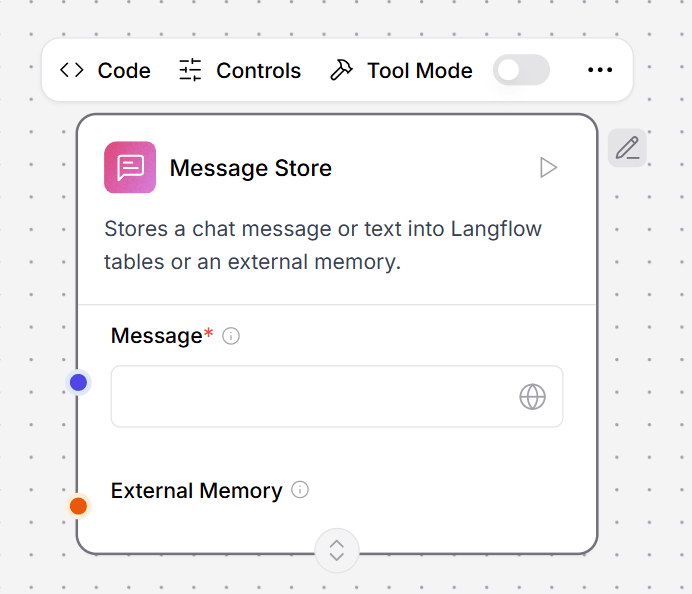
This component stores chat messages or text in LLM Controls tables or external memory.
In this example, the **Message Store** component stores the complete chat history in a local LLM Controls table, which the **Message History** component retrieves as context for the LLM to answer each question.
For more information on configuring memory in LLM Controls.
**Inputs**
| **Name** | **Type** | **Description** |
| :----------- | :------- | :------------------------------------------------------------------------------------------------------------------------------ |
| memory | Memory | Retrieve messages from an external memory. If empty, the LLM Controls tables are used. |
| sender | String | Filter by sender type. |
| sender\_name | String | Filter by sender name. |
| n\_messages | Integer | The number of messages to retrieve. |
| session\_id | String | The session ID of the chat. If empty, the current session ID parameter is used. |
| order | String | The order of the messages. |
| template | String | The template to use for formatting the data. It can contain the keys `{text}`, `{sender}` or any other key in the message data. |
**Outputs**
| **Name** | **Type** | **Description** |
| :------------- | :-------- | :---------------------------------------- |
| messages | Data | The retrieved messages as Data objects. |
| messages\_text | Message | The retrieved messages formatted as text. |
| dataframe | DataFrame | A DataFrame containing the message data. |
## **Message store**
This component stores chat messages or text in LLM Controls tables or external memory.
In this example, the **Message Store** component stores the complete chat history in a local LLM Controls table, which the **Message History** component retrieves as context for the LLM to answer each question.
 For more information on configuring memory in LLM Controls.
**Inputs**
| **Name** | **Type** | **Description** |
| :----------- | :------- | :------------------------------------------------------------------------------------------------- |
| message | String | The chat message to be stored. (Required) |
| memory | Memory | The external memory to store the message. If empty, the LLM Controls tables are used. |
| sender | String | The sender of the message. Can be Machine or User. If empty, the current sender parameter is used. |
| sender\_name | String | The name of the sender. Can be AI or User. If empty, the current sender parameter is used. |
| session\_id | String | The session ID of the chat. If empty, the current session ID parameter is used. |
**Outputs**
| **Name** | **Type** | **Description** |
| :--------------- | :---------- | :-------------------------------------------------------------------- |
| stored\_messages | List\[Data] | The list of stored messages after the current message has been added. |
## **Structured output**
This component transforms LLM responses into structured data formats.
In this example from the **Financial Report Parser** template, the **Structured Output** component transforms unstructured financial reports into structured data.
For more information on configuring memory in LLM Controls.
**Inputs**
| **Name** | **Type** | **Description** |
| :----------- | :------- | :------------------------------------------------------------------------------------------------- |
| message | String | The chat message to be stored. (Required) |
| memory | Memory | The external memory to store the message. If empty, the LLM Controls tables are used. |
| sender | String | The sender of the message. Can be Machine or User. If empty, the current sender parameter is used. |
| sender\_name | String | The name of the sender. Can be AI or User. If empty, the current sender parameter is used. |
| session\_id | String | The session ID of the chat. If empty, the current session ID parameter is used. |
**Outputs**
| **Name** | **Type** | **Description** |
| :--------------- | :---------- | :-------------------------------------------------------------------- |
| stored\_messages | List\[Data] | The list of stored messages after the current message has been added. |
## **Structured output**
This component transforms LLM responses into structured data formats.
In this example from the **Financial Report Parser** template, the **Structured Output** component transforms unstructured financial reports into structured data.
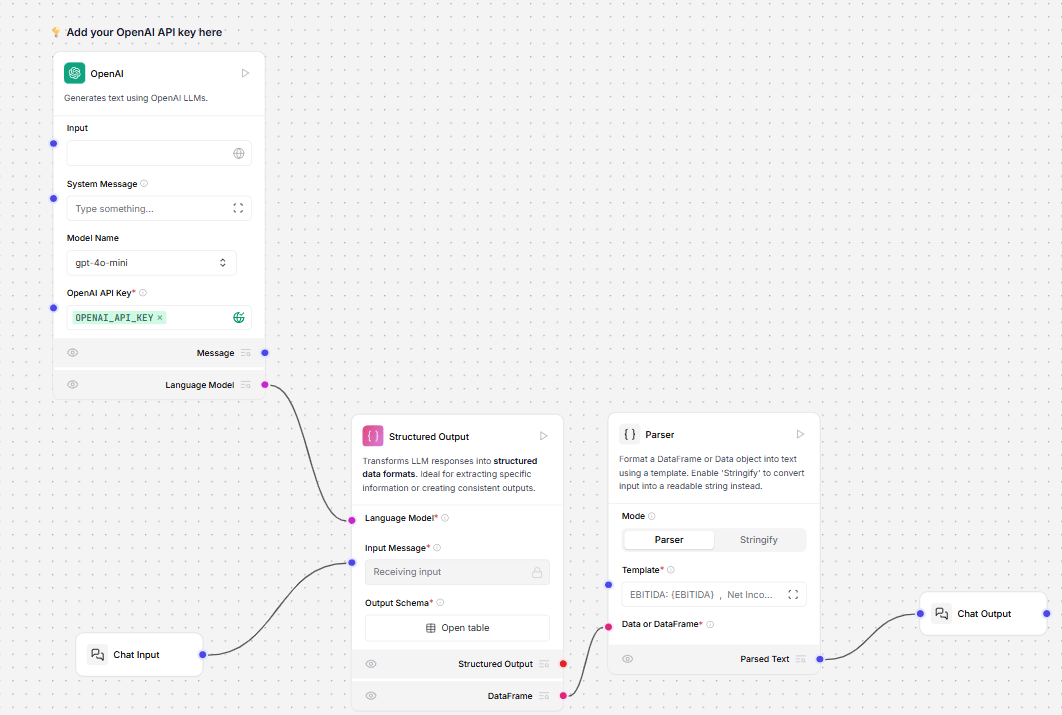 The connected LLM model is prompted by the **Structured Output** component's `Format Instructions` parameter to extract structured output from the unstructured text. `Format Instructions` is utilized as the system prompt for the **Structured Output** component.
In the **Structured Output** component, click the **Open table** button to view the `Output Schema` table. The `Output Schema` parameter defines the structure and data types for the model's output using a table with the following fields:
* **Name**: The name of the output field.
* **Description**: The purpose of the output field.
* **Type**: The data type of the output field. The available types are `str`, `int`, `float`, `bool`, `list`, or `dict`. The default is `text`.
* **Multiple**: This feature is deprecated. Currently, it is set to `True` by default if you expect multiple values for a single field. For example, a `list` of `features` is set to `True` to contain multiple values, such as `["waterproof", "durable", "lightweight"]`. Default: `True`.
The **Parser** component parses the structured output into a template for orderly presentation in chat output. The template receives the values from the `output_schema` table with curly braces.
For example, the template `EBITDA: {EBITDA}, Net Income: {NET_INCOME}, GROSS_PROFIT: {GROSS_PROFIT}` presents the extracted values in the **Playground** as `EBITDA: 900 million, Net Income: 500 million, GROSS_PROFIT: 1.2 billion`.
**Inputs**
| **Name** | **Type** | **Description** |
| :------------- | :------------ | :---------------------------------------------------------------- |
| llm | LanguageModel | The language model to use to generate the structured output. |
| input\_value | String | The input message to the language model. |
| system\_prompt | String | The instructions to the language model for formatting the output. |
| schema\_name | String | The name for the output data schema. |
| output\_schema | Table | The structure and data types for the model's output. |
| multiple | Boolean | \[Deprecated] Always set to `True`. |
**Outputs**
| **Name** | **Type** | **Description** |
| :----------------- | :------- | :------------------------------------------------------------------ |
| structured\_output | Data | The structured output is a Data object based on the defined schema. |
The connected LLM model is prompted by the **Structured Output** component's `Format Instructions` parameter to extract structured output from the unstructured text. `Format Instructions` is utilized as the system prompt for the **Structured Output** component.
In the **Structured Output** component, click the **Open table** button to view the `Output Schema` table. The `Output Schema` parameter defines the structure and data types for the model's output using a table with the following fields:
* **Name**: The name of the output field.
* **Description**: The purpose of the output field.
* **Type**: The data type of the output field. The available types are `str`, `int`, `float`, `bool`, `list`, or `dict`. The default is `text`.
* **Multiple**: This feature is deprecated. Currently, it is set to `True` by default if you expect multiple values for a single field. For example, a `list` of `features` is set to `True` to contain multiple values, such as `["waterproof", "durable", "lightweight"]`. Default: `True`.
The **Parser** component parses the structured output into a template for orderly presentation in chat output. The template receives the values from the `output_schema` table with curly braces.
For example, the template `EBITDA: {EBITDA}, Net Income: {NET_INCOME}, GROSS_PROFIT: {GROSS_PROFIT}` presents the extracted values in the **Playground** as `EBITDA: 900 million, Net Income: 500 million, GROSS_PROFIT: 1.2 billion`.
**Inputs**
| **Name** | **Type** | **Description** |
| :------------- | :------------ | :---------------------------------------------------------------- |
| llm | LanguageModel | The language model to use to generate the structured output. |
| input\_value | String | The input message to the language model. |
| system\_prompt | String | The instructions to the language model for formatting the output. |
| schema\_name | String | The name for the output data schema. |
| output\_schema | Table | The structure and data types for the model's output. |
| multiple | Boolean | \[Deprecated] Always set to `True`. |
**Outputs**
| **Name** | **Type** | **Description** |
| :----------------- | :------- | :------------------------------------------------------------------ |
| structured\_output | Data | The structured output is a Data object based on the defined schema. |