> ## Documentation Index
> Fetch the complete documentation index at: https://docs.llmcontrols.ai/llms.txt
> Use this file to discover all available pages before exploring further.
# Prompt components in LLM Controls
A prompt is a structured input to a language model that instructs the model how to handle user inputs and variables.
Prompt components create prompt templates with custom fields and dynamic variables for providing your model structured, repeatable prompts.
Prompts are a combination of natural language and variables created with curly braces.
## **Use a prompt component in a flow**
An example of modifying a prompt can be found in [Vector RAG starter flow](/Templates/VectorstoreRAG), where a basic chatbot flow is extended to include a full vector RAG pipeline.
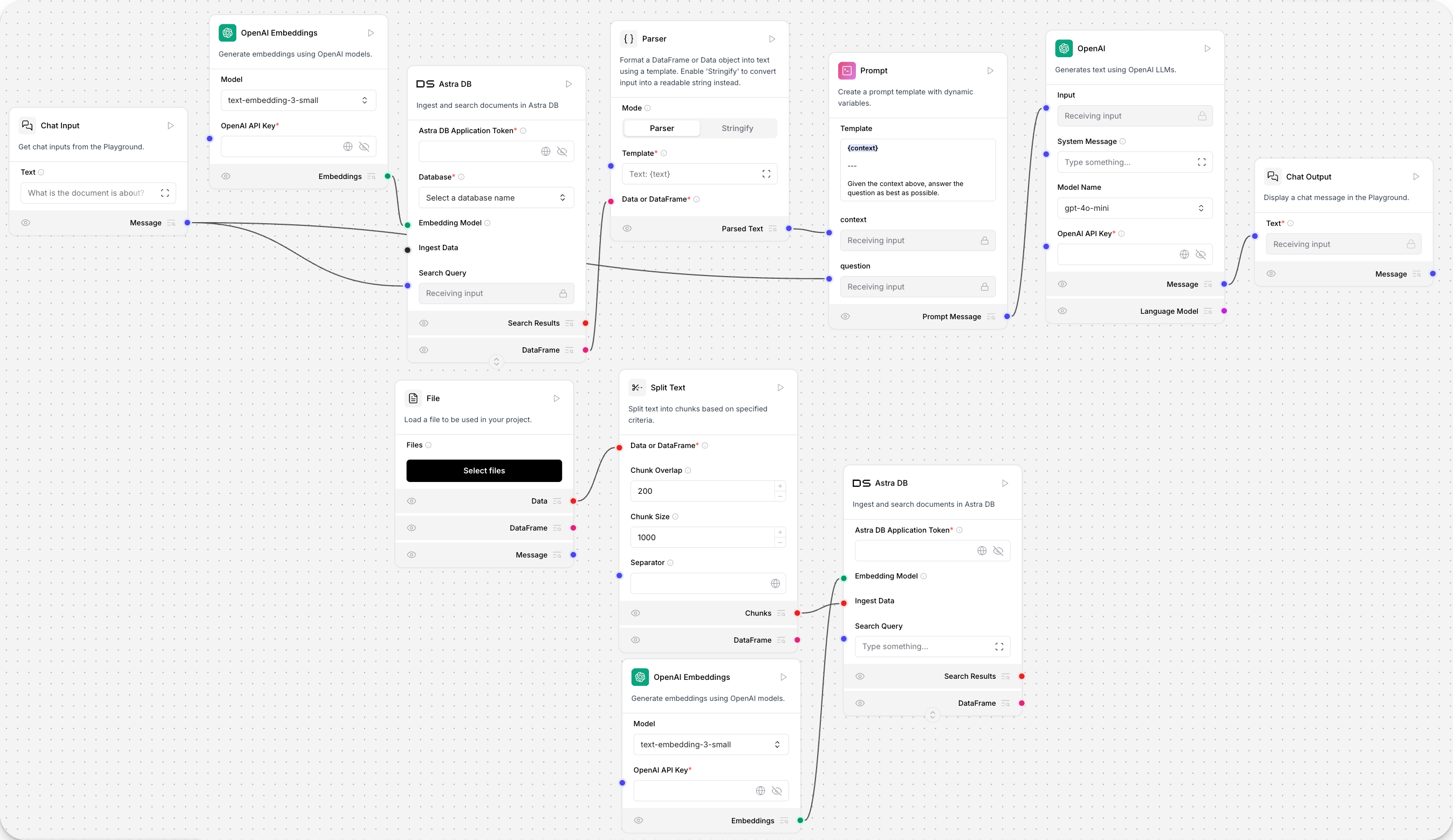 The default prompt in the **Prompt** component is `Answer the user as if you were a GenAI expert, enthusiastic about helping them get started building something fresh.`
This prompt creates a "personality" for your LLM's chat interactions, but it doesn't include variables that you may find useful when templating prompts.
To modify the prompt template, in the **Prompt** component, click the **Template** field. For example, the `{context}` variable gives the LLM model access to embedded vector data to return better answers.
When variables are added to a prompt template, new fields are automatically created in the component. These fields can be connected to receive text input from other components to automate prompting, or to output instructions to other components. An example of prompts controlling agents behavior is available in the [sequential tasks agent starter flow](/Templates/Sequentialtasksagent).
**Inputs**
| **Name** | **Display Name** | **Info** |
| :------- | :--------------- | :----------------------------------------------- |
| template | Template | Create a prompt template with dynamic variables. |
**Outputs**
| **Name** | **Display Name** | **Info** |
| :------- | :--------------- | :-------------------------------------------------------------- |
| prompt | Prompt Message | The built prompt message returned by the `build_prompt` method. |
## **Results**
This component displays and compares model performance based on evaluation metrics from the Prompt Optimizer. It stores ranked results in a leaderboard with accuracy, speed, cost, and detailed feedback.
**Inputs**
| Name | Display Name | Info |
| :---------------- | :------------------ | :--------------------------------------------------- |
| evaluator\_input | Evaluator Input | The evaluation results from the Evaluator component. |
| prompt\_selection | Select Prompt/Model | Choose a prompt/model config from the leaderboard. |
| top\_k | Top K Results | Number of top results to include in the output. |
| include\_details | Include Details | Whether to include detailed metrics in the output. |
Outputs
| Name | Display Name | Info |
| :---------- | :----------- | :---------------------------------------------------------------------------------------------------------------------------------------------------------- |
| leaderboard | Leaderboard | The ranked results as a DataFrame containing Rank, Model, Token Size, Accuracy, Speed, Cost, Prompt, and optionally Strengths, Weaknesses, and Suggestions. |
The default prompt in the **Prompt** component is `Answer the user as if you were a GenAI expert, enthusiastic about helping them get started building something fresh.`
This prompt creates a "personality" for your LLM's chat interactions, but it doesn't include variables that you may find useful when templating prompts.
To modify the prompt template, in the **Prompt** component, click the **Template** field. For example, the `{context}` variable gives the LLM model access to embedded vector data to return better answers.
When variables are added to a prompt template, new fields are automatically created in the component. These fields can be connected to receive text input from other components to automate prompting, or to output instructions to other components. An example of prompts controlling agents behavior is available in the [sequential tasks agent starter flow](/Templates/Sequentialtasksagent).
**Inputs**
| **Name** | **Display Name** | **Info** |
| :------- | :--------------- | :----------------------------------------------- |
| template | Template | Create a prompt template with dynamic variables. |
**Outputs**
| **Name** | **Display Name** | **Info** |
| :------- | :--------------- | :-------------------------------------------------------------- |
| prompt | Prompt Message | The built prompt message returned by the `build_prompt` method. |
## **Results**
This component displays and compares model performance based on evaluation metrics from the Prompt Optimizer. It stores ranked results in a leaderboard with accuracy, speed, cost, and detailed feedback.
**Inputs**
| Name | Display Name | Info |
| :---------------- | :------------------ | :--------------------------------------------------- |
| evaluator\_input | Evaluator Input | The evaluation results from the Evaluator component. |
| prompt\_selection | Select Prompt/Model | Choose a prompt/model config from the leaderboard. |
| top\_k | Top K Results | Number of top results to include in the output. |
| include\_details | Include Details | Whether to include detailed metrics in the output. |
Outputs
| Name | Display Name | Info |
| :---------- | :----------- | :---------------------------------------------------------------------------------------------------------------------------------------------------------- |
| leaderboard | Leaderboard | The ranked results as a DataFrame containing Rank, Model, Token Size, Accuracy, Speed, Cost, Prompt, and optionally Strengths, Weaknesses, and Suggestions. |