> ## Documentation Index
> Fetch the complete documentation index at: https://docs.llmcontrols.ai/llms.txt
> Use this file to discover all available pages before exploring further.

# Tool components in LLM Controls

Tools are typically connected to agent components at the **Tools** port. Agents use LLMs as a reasoning engine to decide which of the connected tool components to use to solve a problem.

Tools in agentic functions are, essentially, functions that the agent can call to perform tasks or access external resources. A function is wrapped as a `Tool` object, with a common interface the agent understands. Agents become aware of tools through tool registration, where the agent is provided a list of available tools, typically at agent initialization. The `Tool` object's description tells the agent what the tool can do.

The agent then uses a connected LLM to reason through the problem to decide which tool is best for the job.

## **Use a tool in a flow**

Tools are typically connected to agent components at the **Tools** port.

The [simple agent starter project](/Templates/Simpleagent) uses URL and Calculator tools connected to an [agent component](https://docs.llmcontrols.ai/Components/Agents#agent-component%E2%80%8B) to answer a user's questions. The OpenAI LLM acts as a brain for the agent to decide which tool to use.

<img src="https://mintcdn.com/devrel/9PuWEwunOBJ8KxNm/images/simple_agent(1).png?fit=max&auto=format&n=9PuWEwunOBJ8KxNm&q=85&s=44640a56acb168b190ee551b29b33392" alt="Simple Agent(1) Pn" width="977" height="772" data-path="images/simple_agent(1).png" />

To make a component into a tool that an agent can use, enable **Tool Mode** in the component. Enabling tool mode modifies a component input to accept calls from an agent. If the component you want to connect to an agent doesn't have a **Tool Mode** option, you can modify the component's inputs to become a tool.

## **arXiv**

This component searches and retrieves papers from [arXiv.org](http://arXiv.org).
<Accordion title="Parameters">
  **Inputs**

  | **Name**      | **Type** | **Description**                                                      |
  | :------------ | :------- | :------------------------------------------------------------------- |
  | search\_query | String   | The search query for arXiv papers. For example, `quantum computing`. |
  | search\_type  | String   | The field to search in.                                              |
  | max\_results  | Integer  | The maximum number of results to return.                             |

  **Outputs**

  | **Name** | **Type**    | **Description**                   |
  | :------- | :---------- | :-------------------------------- |
  | papers   | List\[Data] | A list of retrieved arXiv papers. |
</Accordion>

## **Astra DB tool**

This component allows agents to query data from Astra DB collections.

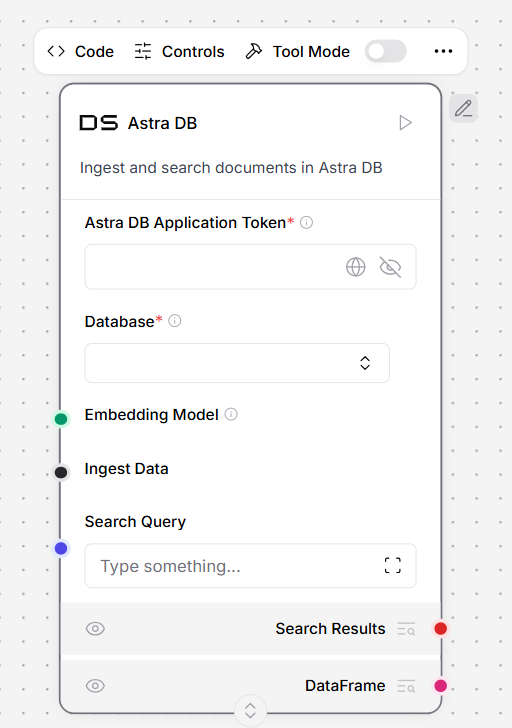
To use this tool in a flow, connect it to an **Agent** component. The flow looks like this:

<img src="https://mintcdn.com/devrel/3c4Ck_HlevcLlxoS/images/Tool_Astral_DB.png?fit=max&auto=format&n=3c4Ck_HlevcLlxoS&q=85&s=ae122f07a98a55d3d9e655bd715fa0e6" alt="Tool Astral DB Pn" width="512" height="728" data-path="images/Tool_Astral_DB.png" />

The **Tool Name** and **Tool Description** fields are required for the Agent to decide when to use the tool. **Tool Name** cannot contain spaces.

The values for **Collection Name**, **Astra DB Application Token**, and **Astra DB API Endpoint** are found in your Astra DB deployment. For more information, see the [DataStax documentation](https://docs.datastax.com/en/astra-db-serverless/databases/create-database.html).

In this example, an **OpenAI** embeddings component is connected to use the Astra DB tool component's **Semantic Search** capability. To use **Semantic Search**, you must have an embedding model or Astra DB Vectorize enabled. If you try to run the flow without an embedding model, you will get an error.

Open the **Playground** and ask a question about your data. The Agent uses the **Astra DB Tool** to return information about your collection.

### **Define Astra DB tool parameters**

The **Tool Parameters** configuration pane allows you to define parameters for [filter conditions](https://docs.datastax.com/en/astra-db-serverless/api-reference/document-methods/find-many.html#parameters) for the component's **Find** command.

These filters become available as parameters that the LLM can use when calling the tool, with a better understanding of each parameter provided by the **Description** field.

1. To define a parameter for your query, in the **Tool Parameters** pane, click **Add a new row**.
2. Complete the fields based on your data. For example, with this filter, the LLM can filter by unique `customer_id` values.

* Name: `customer_id`
* Attribute Name: Leave empty if the attribute matches the field name in the database.
* Description: `"The unique identifier of the customer to filter by"`.
* Is Metadata: `False` unless the value is stored in the metadata field.
* Is Mandatory: `True` to require this filter.
* Is Timestamp: `False` since the value is an ID, not a timestamp.
* Operator: `$eq` to look for an exact match.

If you want to apply filters regardless of the LLM's input, use the **Static Filters** option, which is available in the component's **Controls** pane.

| **Parameter**  | **Description**                                                                                                                                                                                                                                                                                                                                                                                   |
| :------------- | :------------------------------------------------------------------------------------------------------------------------------------------------------------------------------------------------------------------------------------------------------------------------------------------------------------------------------------------------------------------------------------------------ |
| Name           | The name of the parameter that is exposed to the LLM. It can be the same as the underlying field name or a more descriptive label. The LLM uses this name, along with the description, to infer what value to provide during execution.                                                                                                                                                           |
| Attribute Name | When the parameter name shown to the LLM differs from the actual field or property in the database, use this setting to map the user-facing name to the correct attribute. For example, to apply a range filter to the timestamp field, define two separate parameters, such as `start_date` and `end_date`, that both reference the same timestamp attribute.                                    |
| Description    | Provides instructions to the LLM on how the parameter should be used. Clear and specific guidance helps the LLM provide valid input. For example, if a field such as `specialty` is stored in lowercase, the description should indicate that the input must be lowercase.                                                                                                                        |
| Is Metadata    | When loading data using LangChain or LLM Controls, additional attributes may be stored under a metadata object. If the target attribute is stored this way, enable this option. It adjusts the query by generating a filter in the format: `{"metadata.<attribute_name>": "<value>"}`                                                                                                             |
| Is Timestamp   | For date or time-based filters, enable this option to automatically convert values to the timestamp format that the Astrapy client expects. This ensures compatibility with the underlying API without requiring manual formatting.                                                                                                                                                               |
| Operator       | Defines the filtering logic applied to the attribute. You can use any valid [Data API filter operator](https://docs.datastax.com/en/astra-db-serverless/api-reference/filter-operator-collections.html). For example, to filter a time range on the timestamp attribute, use two parameters: one with the `$gt` operator for "greater than", and another with the `$lt` operator for "less than". |

<Accordion title="Parameters">
  **Inputs**

  | **Name**          | **Type**     | **Description**                                                                                                                       |
  | :---------------- | :----------- | :------------------------------------------------------------------------------------------------------------------------------------ |
  | Tool Name         | String       | The name used to reference the tool in the agent's prompt.                                                                            |
  | Tool Description  | String       | A brief description of the tool. This helps the model decide when to use it.                                                          |
  | Collection Name   | String       | The name of the Astra DB collection to query.                                                                                         |
  | Token             | SecretString | The authentication token for accessing Astra DB.                                                                                      |
  | API Endpoint      | String       | The Astra DB API endpoint.                                                                                                            |
  | Projection Fields | String       | The attributes to return, separated by commas. The default is `*`.                                                                    |
  | Tool Parameters   | Dict         | Parameters the model needs to fill to execute the tool. For required parameters, use an exclamation mark, for example `!customer_id`. |
  | Static Filters    | Dict         | Attribute-value pairs used to filter query results.                                                                                   |
  | Limit             | String       | The number of documents to return.                                                                                                    |

  **Outputs**

  The **Data** output is used when directly querying Astra DB, while the **Tool** output is used when integrating with agents.

  | **Name** | **Type**       | **Description**                                                                                                                                                                                                 |
  | :------- | :------------- | :-------------------------------------------------------------------------------------------------------------------------------------------------------------------------------------------------------------- |
  | Data     | List\[Data]    | A list of <u>Data</u> objects containing the query results from Astra DB. Each `Data` object contains the document fields specified by the projection attributes. Limited by the `number_of_results` parameter. |
  | Tool     | StructuredTool | A LangChain `StructuredTool` object that can be used in agent workflows. Contains the tool name, description, argument schema based on tool parameters, and the query function.                                 |
</Accordion>

## **Astra DB CQL Tool**

The `Astra DB CQL Tool` allows agents to query data from CQL tables in Astra DB.

<Accordion title="Parameters">
  **Inputs**

  | **Name**          | **Type**     | **Description**                                                                                                                                         |
  | :---------------- | :----------- | :------------------------------------------------------------------------------------------------------------------------------------------------------ |
  | Tool Name         | String       | The name used to reference the tool in the agent's prompt.                                                                                              |
  | Tool Description  | String       | A brief description of the tool to guide the model in using it.                                                                                         |
  | Keyspace          | String       | The name of the keyspace.                                                                                                                               |
  | Table Name        | String       | The name of the Astra DB CQL table to query.                                                                                                            |
  | Token             | SecretString | The authentication token for Astra DB.                                                                                                                  |
  | API Endpoint      | String       | The Astra DB API endpoint.                                                                                                                              |
  | Projection Fields | String       | The attributes to return, separated by commas. Default: "\*".                                                                                           |
  | Partition Keys    | Dict         | Required parameters that the model must fill to query the tool.                                                                                         |
  | Clustering Keys   | Dict         | Optional parameters the model can fill to refine the query. Required parameters should be marked with an exclamation mark, for example, `!customer_id`. |
  | Static Filters    | Dict         | Attribute-value pairs used to filter query results.                                                                                                     |
  | Limit             | String       | The number of records to return.                                                                                                                        |

  **Outputs**

  | **Name** | **Type**       | **Description**                                                                                                                                                                                                         |
  | :------- | :------------- | :---------------------------------------------------------------------------------------------------------------------------------------------------------------------------------------------------------------------- |
  | Data     | List\[Data]    | A list of <u>Data</u> objects containing the query results from the Astra DB CQL table. Each Data object contains the document fields specified by the projection fields. Limited by the `number_of_results` parameter. |
  | Tool     | StructuredTool | A LangChain StructuredTool object that can be used in agent workflows. Contains the tool name, description, argument schema based on partition and clustering keys, and the query function.                             |
</Accordion>

## **Bing Search API**

This component allows you to call the Bing Search API.

<Accordion title="Parameters">
  **Inputs**

  | **Name**                | **Type**     | **Description**                         |
  | :---------------------- | :----------- | :-------------------------------------- |
  | bing\_subscription\_key | SecretString | A Bing API subscription key.            |
  | input\_value            | String       | The search query input.                 |
  | bing\_search\_url       | String       | A custom Bing Search URL.               |
  | k                       | Integer      | The number of search results to return. |

  **Outputs**

  | **Name** | **Type**    | **Description**                          |
  | :------- | :---------- | :--------------------------------------- |
  | results  | List\[Data] | A list of search results.                |
  | tool     | Tool        | A Bing Search tool for use in LangChain. |
</Accordion>

## **Combinatorial Reasoner**

This component runs Icosa's Combinatorial Reasoning (CR) pipeline on an input to create an optimized prompt with embedded reasons. For more information, see [Icosa computing](https://www.icosacomputing.com/).

<Accordion title="Parameters">
  **Inputs**

  | **Name**         | **Type**     | **Description**                              |
  | :--------------- | :----------- | :------------------------------------------- |
  | prompt           | String       | The input to run CR on.                      |
  | openai\_api\_key | SecretString | An OpenAI API key for authentication.        |
  | username         | String       | A username for Icosa API authentication.     |
  | password         | SecretString | A password for Icosa API authentication.     |
  | model\_name      | String       | The OpenAI LLM to use for reason generation. |

  **Outputs**

  | **Name**          | **Type**      | **Description**                                                           |
  | :---------------- | :------------ | :------------------------------------------------------------------------ |
  | optimized\_prompt | Message       | A message object containing the optimized prompt.                         |
  | reasons           | List\[String] | A list of the selected reasons that are embedded in the optimized prompt. |
</Accordion>

## **DuckDuckGo search**

This component performs web searches using the [DuckDuckGo](https://www.duckduckgo.com/) search engine with result-limiting capabilities.

<Accordion title="Parameters">
  **Inputs**

  | **Name**             | **Type** | **Description**                                             |
  | :------------------- | :------- | :---------------------------------------------------------- |
  | input\_value         | String   | The search query to execute with DuckDuckGo.                |
  | max\_results         | Integer  | The maximum number of search results to return. Default: 5. |
  | max\_snippet\_length | Integer  | The maximum length of each result snippet. Default: 100.    |

  **Outputs**

  | **Name** | **Type**    | **Description**                                                                |
  | :------- | :---------- | :----------------------------------------------------------------------------- |
  | data     | List\[Data] | A list of search results as Data objects containing snippets and full content. |
  | text     | String      | The search results formatted as a single text string.                          |
</Accordion>

## **Exa Search**

This component provides an [Exa Search](https://exa.ai/) toolkit for search and content retrieval.

<Accordion title="Parameters">
  **Inputs**

  | **Name**              | **Type**     | **Description**                                         |
  | :-------------------- | :----------- | :------------------------------------------------------ |
  | metaphor\_api\_key    | SecretString | An API key for Exa Search.                              |
  | use\_autoprompt       | Boolean      | Whether to use the autoprompt feature. Default: true.   |
  | search\_num\_results  | Integer      | The number of results to return for search. Default: 5. |
  | similar\_num\_results | Integer      | The number of similar results to return. Default: 5.    |

  **Outputs**

  | **Name** | **Type**    | **Description**                                 |
  | :------- | :---------- | :---------------------------------------------- |
  | tools    | List\[Tool] | A list of search tools provided by the toolkit. |
</Accordion>

## **Glean Search API**

This component allows you to call the Glean Search API.

<Accordion title="Parameters">
  **Inputs**

  | **Name**             | **Type**     | **Description**                               |
  | :------------------- | :----------- | :-------------------------------------------- |
  | glean\_api\_url      | String       | The URL of the Glean API.                     |
  | glean\_access\_token | SecretString | An access token for Glean API authentication. |
  | query                | String       | The search query input.                       |
  | page\_size           | Integer      | The number of results per page. Default: 10.  |
  | request\_options     | Dict         | Additional options for the API request.       |

  **Outputs**

  | **Name** | **Type**    | **Description**                           |
  | :------- | :---------- | :---------------------------------------- |
  | results  | List\[Data] | A list of search results.                 |
  | tool     | Tool        | A Glean Search tool for use in LangChain. |
</Accordion>

## **Google Serper API**

This component allows you to call the Serper.dev Google Search API.

<Accordion title="Parameters">
  **Inputs**

  | **Name**         | **Type**     | **Description**                                                |
  | :--------------- | :----------- | :------------------------------------------------------------- |
  | serper\_api\_key | SecretString | An API key for [Serper.dev](http://Serper.dev) authentication. |
  | input\_value     | String       | The search query input.                                        |
  | k                | Integer      | The number of search results to return.                        |

  **Outputs**

  | **Name** | **Type**    | **Description**                                   |
  | :------- | :---------- | :------------------------------------------------ |
  | results  | List\[Data] | A list of search results.                         |
  | tool     | Tool        | A Google Serper search tool for use in LangChain. |
</Accordion>

## **MCP connection**

The **MCP connection** component exposes Model Context Protocol (MCP) servers, including your other flows, as tools for LLM Controls agents.MCP consists of parameters Such as :

<Accordion title="Parameters">
  1. MODE: studio, sse
  2. MCP SSE URL: uvx mcp-server-fetch (example command)
  3. Tools
</Accordion>

## **Wikidata**

This component performs a search using the Wikidata API.

<Accordion title="Parameters">
  **Inputs**

  | **Name** | **Type** | **Description**                                   |
  | :------- | :------- | :------------------------------------------------ |
  | query    | String   | The text query for similarity search on Wikidata. |

  **Outputs**

  | **Name** | **Type**    | **Description**                                                 |
  | :------- | :---------- | :-------------------------------------------------------------- |
  | data     | List\[Data] | The search results from Wikidata API as a list of Data objects. |
  | text     | Message     | The search results formatted as a text message.                 |
</Accordion>

## **Spreadsheet Query**

This component provides tools for searching through spreadsheet data using SQL queries, natural language, filters, and aggregations. It also supports chart generation (line, scatter, bar, histogram, pie, box plots).

<Accordion title="Parameters">
  **Inputs**

  | Name                 | Display Name         | Info                                                |
  | :------------------- | :------------------- | :-------------------------------------------------- |
  | dataframe            | Excel DataFrame      | DataFrame from Excel/CSV file                       |
  | data\_list           | Excel Data           | List of Data objects from Excel file                |
  | tool\_name           | Tool Name            | Name of the tool for the agent                      |
  | tool\_description    | Tool Description     | Description of what this tool does                  |
  | default\_limit       | Default Result Limit | Default maximum number of results to return         |
  | enable\_sql\_queries | Enable SQL Queries   | Enable SQL query support for advanced data analysis |

  #### Outputs

  | Name  | Display Name | Info                                                                                                                     |
  | :---- | :----------- | :----------------------------------------------------------------------------------------------------------------------- |
  | tools | Tools        | A set of structured tools for SQL queries, natural language queries, filtering, aggregation, charting, and SQL download. |
</Accordion>

## **Tool Calling Agent**

This component is an agent designed to utilize various tools seamlessly within workflows. It uses a language model to process user input and decide which tools to call.

<Accordion title="Parameters">
  **Inputs**

  #### Outputs

  | Name     | Display Name | Info                               |
  | :------- | :----------- | :--------------------------------- |
  | agent    | Agent        | The configured agent instance.     |
  | response | Response     | The agent's response to the input. |
</Accordion>

## **Calculator**

This component performs basic arithmetic operations on a given expression. It safely evaluates mathematical expressions using Python's AST parser, supporting addition, subtraction, multiplication, division, and exponentiation.

<Accordion title="Parameters">
  **Inputs**

  | Name       | Display Name | Info                                                             |
  | :--------- | :----------- | :--------------------------------------------------------------- |
  | expression | Expression   | The arithmetic expression to evaluate (e.g., '44(33/22)+12-20'). |

  #### Outputs

  | Name   | Display Name | Info                                    |
  | :----- | :----------- | :-------------------------------------- |
  | result | Data         | The evaluation result as a Data object. |
</Accordion>

## **Python REPL**

This component is a Python code executor that lets you run Python code with specific imported modules. Remember to always use print() to see your results.

<Accordion title="Parameters">
  **Inputs**

  | Name            | Display Name   | Info                                                                              |
  | :-------------- | :------------- | :-------------------------------------------------------------------------------- |
  | global\_imports | Global Imports | A comma-separated list of modules to import globally, e.g. 'math,numpy,pandas'.   |
  | python\_code    | Python Code    | The Python code to execute. Only modules specified in Global Imports can be used. |

  #### Outputs

  | Name    | Display Name | Info                                   |
  | :------ | :----------- | :------------------------------------- |
  | results | Results      | The execution result as a Data object. |
</Accordion>

## **Search API**

This component calls the searchapi.io API with result limiting. It returns organic search results with title, link, and snippet fields. Supports Google, Bing, and DuckDuckGo engines.

<Accordion title="Parameters">
  **Inputs**

  #### Outputs

  | Name      | Display Name | Info                                                                          |
  | :-------- | :----------- | :---------------------------------------------------------------------------- |
  | data      | Data         | Search results as a list of Data objects containing title, link, and snippet. |
  | text      | Text         | Search results as concatenated text in a Message object.                      |
  | dataframe | DataFrame    | Search results as a DataFrame object.                                         |
</Accordion>

## **Serp Search API**

This component calls the Serp Search API with result limiting. It returns organic search results with title, link, and snippet fields.

<Accordion title="Parameters">
  **Inputs**

  #### Outputs

  | Name | Display Name | Info                                                                          |
  | :--- | :----------- | :---------------------------------------------------------------------------- |
  | data | Data         | Search results as a list of Data objects containing title, link, and snippet. |
  | text | Text         | Search results as concatenated text in a Message object.                      |
</Accordion>

## **Tavily AI Search**

This component is a search engine optimized for LLMs and RAG, aimed at efficient, quick, and persistent search results. It supports configurable search depth, topic filtering, time ranges, and can include images and short answers.

<Accordion title="Parameters">
  #### Inputs

  | Name            | Display Name   | Info                                                                                                         |
  | :-------------- | :------------- | :----------------------------------------------------------------------------------------------------------- |
  | api\_key        | Tavily API Key | Your Tavily API Key.                                                                                         |
  | query           | Search Query   | The search query you want to execute with Tavily.                                                            |
  | search\_depth   | Search Depth   | The depth of the search. Options: basic, advanced.                                                           |
  | topic           | Search Topic   | The category of the search. Options: general, news.                                                          |
  | time\_range     | Time Range     | The time range back from the current date to include in the search results. Options: day, week, month, year. |
  | max\_results    | Max Results    | The maximum number of search results to return.                                                              |
  | include\_images | Include Images | Include a list of query-related images in the response.                                                      |
  | include\_answer | Include Answer | Include a short answer to original query.                                                                    |

  #### Outputs

  | Name | Display Name | Info                                                                                |
  | :--- | :----------- | :---------------------------------------------------------------------------------- |
  | data | Data         | Search results as a list of Data objects containing title, URL, content, and score. |
  | text | Text         | Search results as concatenated text in a Message object.                            |
</Accordion>

## **Wikipedia**

This component calls the Wikipedia API to search and retrieve article content.

<Accordion title="Parameters">
  **Inputs**

  <table><thead><tr><td colspan="1" rowspan="1">Name</td><td colspan="1" rowspan="1">Display Name</td><td colspan="1" rowspan="1">Info</td></tr></thead><tbody><tr><td colspan="1" rowspan="1">input\_value</td><td colspan="1" rowspan="1">Input</td></tr><tr><td colspan="1" rowspan="1">lang</td><td colspan="1" rowspan="1">Language</td></tr><tr><td colspan="1" rowspan="1">k</td><td colspan="1" rowspan="1">Number of results</td></tr><tr><td colspan="1" rowspan="1">load\_all\_available\_meta</td><td colspan="1" rowspan="1">Load all available meta</td></tr><tr><td colspan="1" rowspan="1">doc\_content\_chars\_max</td><td colspan="1" rowspan="1">Document content characters max</td></tr></tbody></table>

  #### Outputs

  | Name      | Display Name | Info                                                 |
  | :-------- | :----------- | :--------------------------------------------------- |
  | data      | Data         | Wikipedia article content as a list of Data objects. |
  | dataframe | DataFrame    | Wikipedia article content as a DataFrame object.     |
</Accordion>

## **WolframAlpha API**

This component enables queries to Wolfram Alpha for computational data, facts, and calculations across various topics, delivering structured responses.

<Accordion title="Parameters">
  **Inputs**

  <table><thead><tr><td colspan="1" rowspan="1">Name</td><td colspan="1" rowspan="1">Display Name</td><td colspan="1" rowspan="1">Info</td></tr></thead><tbody><tr><td colspan="1" rowspan="1">input\_value</td><td colspan="1" rowspan="1">Input Query</td><td colspan="1" rowspan="1">Example query: 'What is the population of France?'</td></tr><tr><td colspan="1" rowspan="1">app\_id</td><td colspan="1" rowspan="1">App ID</td></tr></tbody></table>

  #### Outputs

  | Name      | Display Name | Info                                              |
  | :-------- | :----------- | :------------------------------------------------ |
  | data      | Data         | The Wolfram Alpha response as a Data object.      |
  | dataframe | DataFrame    | The Wolfram Alpha response as a DataFrame object. |
</Accordion>

## **Yahoo Finance**

This component uses yfinance (unofficial package) to access financial data and market information from Yahoo Finance. It supports multiple data retrieval methods including stock info, news, balance sheets, earnings, and more.

<Accordion title="Parameters">
  **Inputs**

  | Name      | Display Name   | Info                                                                                                                                                                                                                                                                                                                                                                                                                                                                                                                                                   |
  | :-------- | :------------- | :----------------------------------------------------------------------------------------------------------------------------------------------------------------------------------------------------------------------------------------------------------------------------------------------------------------------------------------------------------------------------------------------------------------------------------------------------------------------------------------------------------------------------------------------------- |
  | symbol    | Stock Symbol   | The stock symbol to retrieve data for (e.g., AAPL, GOOG).                                                                                                                                                                                                                                                                                                                                                                                                                                                                                              |
  | method    | Data Method    | The type of data to retrieve. Options: get\_info, get\_news, get\_actions, get\_analysis, get\_balance\_sheet, get\_calendar, get\_cashflow, get\_institutional\_holders, get\_recommendations, get\_sustainability, get\_major\_holders, get\_mutualfund\_holders, get\_insider\_purchases, get\_insider\_transactions, get\_insider\_roster\_holders, get\_dividends, get\_capital\_gains, get\_splits, get\_shares, get\_fast\_info, get\_sec\_filings, get\_recommendations\_summary, get\_upgrades\_downgrades, get\_earnings, get\_income\_stmt. |
  | num\_news | Number of News | The number of news articles to retrieve (only applicable for get\_news).                                                                                                                                                                                                                                                                                                                                                                                                                                                                               |

  #### Outputs

  | Name      | Display Name | Info                                                         |
  | :-------- | :----------- | :----------------------------------------------------------- |
  | data      | Data         | The retrieved financial data as a list of Data objects.      |
  | text      | Text         | The financial data as concatenated text in a Message object. |
  | dataframe | DataFrame    | The financial data as a DataFrame object.                    |
</Accordion>
