> ## Documentation Index
> Fetch the complete documentation index at: https://docs.llmcontrols.ai/llms.txt
> Use this file to discover all available pages before exploring further.
# Flows
Flows in LLM Controls are fully serializable and can be saved and loaded from the file system. In this guide, we'll explore how to import and export flows.
## **Import Flow**[****](https://docs.langflow.org/concepts-flows#import-flow)
If you've already got an LLM Controls JSON file, import it into LLM Controls by clicking on the project name and choosing **Import Flow**.
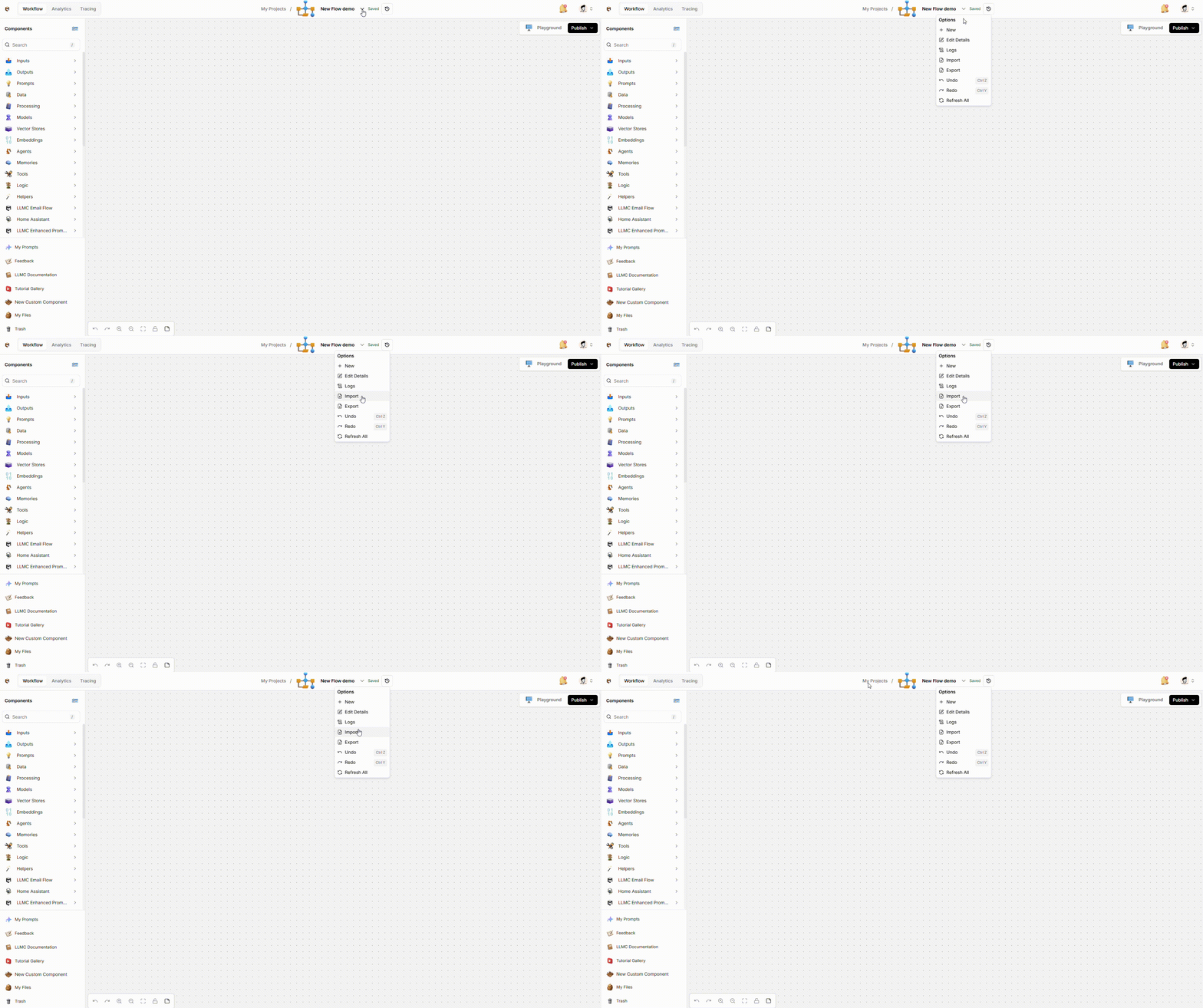 Once imported, your flow is ready to use.
TIP
You can drag and drop LLM Controls files directly from your file system into the LLM Controls window to import a flow, even into the initial LLM Controls splash screen.
## **Export Flow**[****](https://docs.langflow.org/concepts-flows#export-flow)
The option to export a flow is available in the same menu as shown above. Once exported as JSON, you can import your flow into another LLM Controls instance.
## **LLM Controls JSON file contents**[****](https://docs.langflow.org/concepts-flows#langflow-json-file-contents)
LLM Controls JSON files contain [nodes](https://docs.llmcontrols.ai/Concepts/flows#nodes%E2%80%8B) and [edges](https://docs.llmcontrols.ai/Concepts/flows#edges%E2%80%8B) that describe components and connections, and [additional metadata](https://docs.llmcontrols.ai/Concepts/flows#additional-metadata-and-project-informatio%E2%80%8B) that describes the flow.
### **Nodes**[****](https://docs.langflow.org/concepts-flows#nodes)
**Nodes** represent the components that make up the flow.
The `ChatInput` node is the entry point of the flow. It's the first node that will be executed.
`ChatInput-jFwUm` is a unique identifier for the node.
### **Edges**[****](https://docs.langflow.org/concepts-flows#edges)
**Edges** represent the connections between nodes.
The connection between the `ChatInput` node and the `OpenAIModel` node is represented as an edge:
This edge shows that the `ChatInput` component outputs a `Message` type to the `target` node, which is the `OpenAIModel` node. The `OpenAIModel` component accepts the `Message` type at the `input_value` field.
### **Additional metadata and project information**[****](https://docs.langflow.org/concepts-flows#additional-metadata-and-project-information)
Additional information about the flow is stored in the root `data` object.
* Metadata and project information, including the name, description, and `last_tested_version` of the flow.
* Visual information about the flow defines the initial position of the flow in the workspace.
**Notes** are like comments to help you understand the flow within the workspace. They may contain links, code snippets, and other information. Notes are written in Markdown and stored as `node` objects.
Once imported, your flow is ready to use.
TIP
You can drag and drop LLM Controls files directly from your file system into the LLM Controls window to import a flow, even into the initial LLM Controls splash screen.
## **Export Flow**[****](https://docs.langflow.org/concepts-flows#export-flow)
The option to export a flow is available in the same menu as shown above. Once exported as JSON, you can import your flow into another LLM Controls instance.
## **LLM Controls JSON file contents**[****](https://docs.langflow.org/concepts-flows#langflow-json-file-contents)
LLM Controls JSON files contain [nodes](https://docs.llmcontrols.ai/Concepts/flows#nodes%E2%80%8B) and [edges](https://docs.llmcontrols.ai/Concepts/flows#edges%E2%80%8B) that describe components and connections, and [additional metadata](https://docs.llmcontrols.ai/Concepts/flows#additional-metadata-and-project-informatio%E2%80%8B) that describes the flow.
### **Nodes**[****](https://docs.langflow.org/concepts-flows#nodes)
**Nodes** represent the components that make up the flow.
The `ChatInput` node is the entry point of the flow. It's the first node that will be executed.
`ChatInput-jFwUm` is a unique identifier for the node.
### **Edges**[****](https://docs.langflow.org/concepts-flows#edges)
**Edges** represent the connections between nodes.
The connection between the `ChatInput` node and the `OpenAIModel` node is represented as an edge:
This edge shows that the `ChatInput` component outputs a `Message` type to the `target` node, which is the `OpenAIModel` node. The `OpenAIModel` component accepts the `Message` type at the `input_value` field.
### **Additional metadata and project information**[****](https://docs.langflow.org/concepts-flows#additional-metadata-and-project-information)
Additional information about the flow is stored in the root `data` object.
* Metadata and project information, including the name, description, and `last_tested_version` of the flow.
* Visual information about the flow defines the initial position of the flow in the workspace.
**Notes** are like comments to help you understand the flow within the workspace. They may contain links, code snippets, and other information. Notes are written in Markdown and stored as `node` objects.