> ## Documentation Index
> Fetch the complete documentation index at: https://docs.llmcontrols.ai/llms.txt
> Use this file to discover all available pages before exploring further.
# Integrate Apify with LLM Controls
[Apify](https://apify.com/) is a web scraping and data extraction platform. It provides an [Actor Store](https://apify.com/store) with more than 3,000 ready-made cloud tools called **Actors**.
Apify components in LLM Controls run **Actors** to accomplish tasks like data extraction, content analysis, and SQL operations.
## **Prerequisites**
* An [Apify API token](https://docs.apify.com/platform/integrations/api)
## **Use the Apify Actors component in a flow**[****](https://docs.langflow.org/integrations-apify#use-the-apify-actors-component-in-a-flow)
To use an **Apify Actor** in your flow:
1. Click and drag the **Apify Actors** component to your **workspace**.
2. In the **Apify Actor** component's **Apify Token** field, add your **Apify API token**.
3. In the **Apify Actor** component's **Actor** field, add your **Actor ID**. You can find the Actor ID in the [Apify Actor Store](https://apify.com/store). For example, the [Website Content Crawler](https://apify.com/apify/website-content-crawler) has Actor ID `apify/website-content-crawler`.
4. The component can now be used as a **Tool** to be connected to an **Agent** component, or configured to run manually. For more information on running the component manually, see the **JSON Example** in the [Apify documentation](https://apify.com/apify/website-content-crawler/input-schema).
## **Example flows**
Here are some example flows that use the **Apify Actors** component.
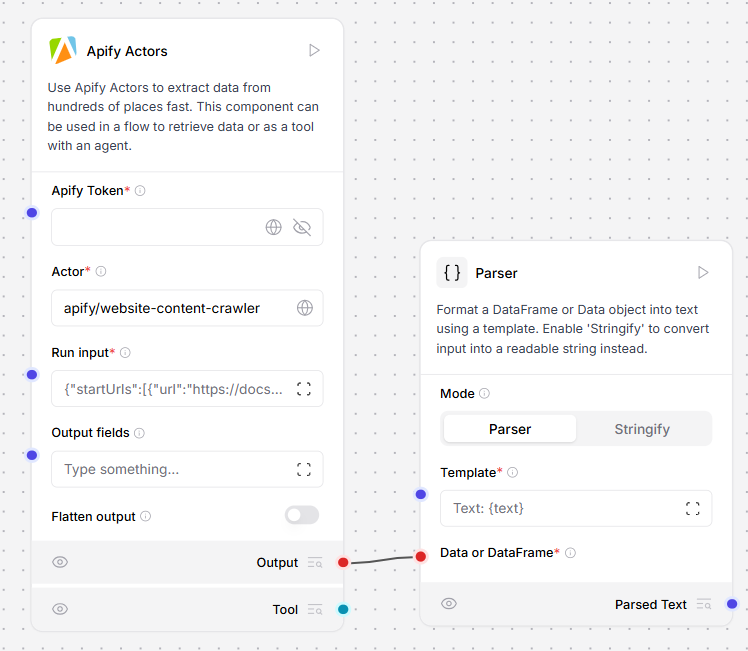
### **Extract website text content in Markdown**[****](https://docs.langflow.org/integrations-apify#extract-website-text-content-in-markdown)
Use the [Website Content Crawler Actor](https://apify.com/apify/website-content-crawler) to extract text content in Markdown format from a website and process it in your flow.
 ### **Process web content with an agent**[****](https://docs.langflow.org/integrations-apify#process-web-content-with-an-agent)
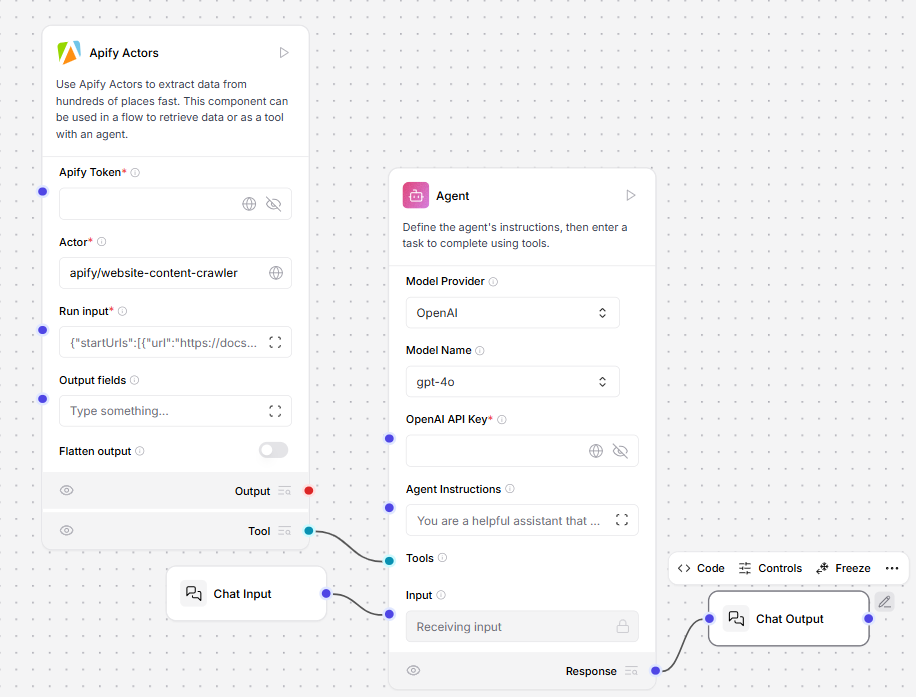
Extract website content using the [Website Content Crawler Actor](https://apify.com/apify/website-content-crawler), and then process it with an agent.
The agent takes the extracted data and transforms it into summaries, insights, or structured responses to make the information more actionable.
### **Process web content with an agent**[****](https://docs.langflow.org/integrations-apify#process-web-content-with-an-agent)
Extract website content using the [Website Content Crawler Actor](https://apify.com/apify/website-content-crawler), and then process it with an agent.
The agent takes the extracted data and transforms it into summaries, insights, or structured responses to make the information more actionable.
 ### **Analyze social media profiles with multiple actors**[****](https://docs.langflow.org/integrations-apify#analyze-social-media-profiles-with-multiple-actors)
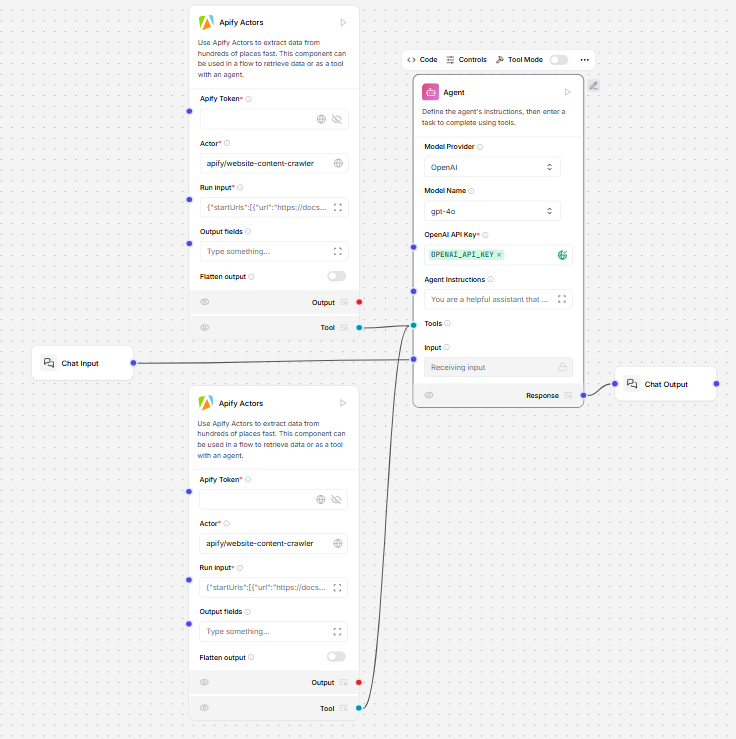
Perform comprehensive social media research with multiple Apify Actors.
Add the [Google Search Results Scraper Actor](https://apify.com/apify/google-search-scraper) to find relevant social media profiles, and then add the [TikTok Data Extractor Actor](https://apify.com/clockworks/free-tiktok-scraper) to gather data and videos.
The agent collects the links from Google and content from TikTok and analyzes the data to provide insights about a person, brand, or topic.
### **Analyze social media profiles with multiple actors**[****](https://docs.langflow.org/integrations-apify#analyze-social-media-profiles-with-multiple-actors)
Perform comprehensive social media research with multiple Apify Actors.
Add the [Google Search Results Scraper Actor](https://apify.com/apify/google-search-scraper) to find relevant social media profiles, and then add the [TikTok Data Extractor Actor](https://apify.com/clockworks/free-tiktok-scraper) to gather data and videos.
The agent collects the links from Google and content from TikTok and analyzes the data to provide insights about a person, brand, or topic.
 ## **Inputs**[****](https://docs.langflow.org/integrations-apify#inputs)
| **Name** | **Display Name** | **Info** |
| :----------- | :--------------- | :--------------------------------------------------------------------------------------------------------------------------------------------------------------- |
| apify\_token | Apify Token | Your Apify API key. |
| actor | Actor | The Apify Actor to run, for example `apify/website-content-crawler`. |
| run\_input | Run Input | The JSON input for configuring the Actor run. For more information, see the [Apify documentation](https://apify.com/apify/website-content-crawler/input-schema). |
## **Outputs**[****](https://docs.langflow.org/integrations-apify#outputs)
| **Name** | **Display Name** | **Info** |
| :------- | :--------------- | :-------------------------------------------------------- |
| output | Actor Run Result | The JSON response containing the output of the Actor run. |
## **Inputs**[****](https://docs.langflow.org/integrations-apify#inputs)
| **Name** | **Display Name** | **Info** |
| :----------- | :--------------- | :--------------------------------------------------------------------------------------------------------------------------------------------------------------- |
| apify\_token | Apify Token | Your Apify API key. |
| actor | Actor | The Apify Actor to run, for example `apify/website-content-crawler`. |
| run\_input | Run Input | The JSON input for configuring the Actor run. For more information, see the [Apify documentation](https://apify.com/apify/website-content-crawler/input-schema). |
## **Outputs**[****](https://docs.langflow.org/integrations-apify#outputs)
| **Name** | **Display Name** | **Info** |
| :------- | :--------------- | :-------------------------------------------------------- |
| output | Actor Run Result | The JSON response containing the output of the Actor run. |