> ## Documentation Index
> Fetch the complete documentation index at: https://docs.llmcontrols.ai/llms.txt
> Use this file to discover all available pages before exploring further.
# Prompt Optimizer
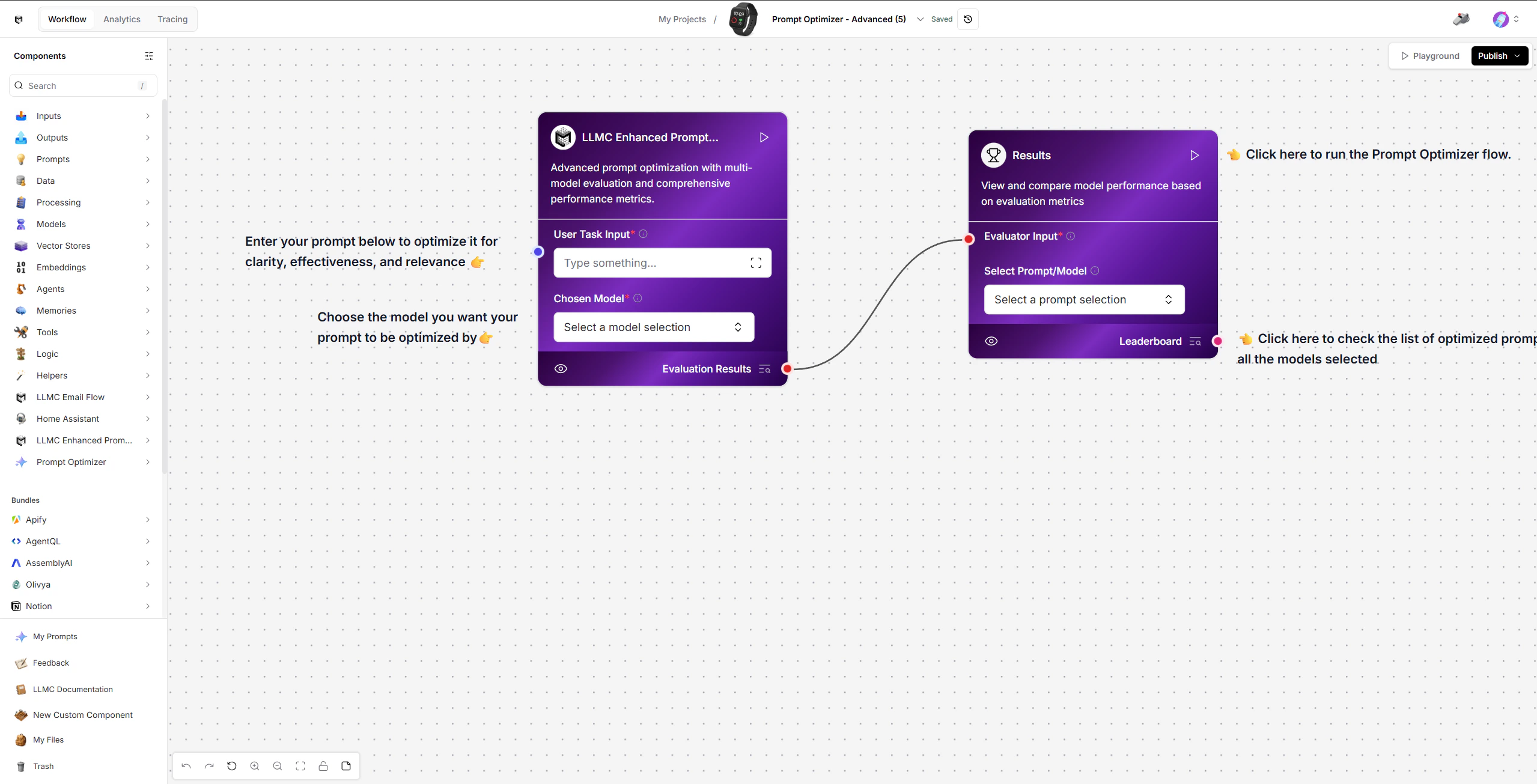 The Prompt Optimizer template automatically improves your prompts by generating variations, testing them against evaluation criteria, scoring responses, and ranking results - all handled by a single optimization engine.
This template helps you find the best-performing prompt for any task without manual trial and error.
## Prerequisites
* Basic familiarity with LLMC components
## Create the Prompt Optimizer Flow
### 1. Enter Your Task
Start with the LLMC Prompt Optimizer component (left side of the workspace).
Steps:
* Enter a clear task or base prompt in the User Task Input field.
* Select the model you want your prompt to be optimized by using the Chosen Model.
Example: "Summarize news articles concisely for a mobile app."
### 2. Run the Optimization
Click Run on the Results node (right side) to trigger the full optimization pipeline.
What happens behind the scenes:
* Generates structured prompt variations from your task.
* Creates test cases to evaluate prompts fairly and consistently.
* Builds scoring criteria like clarity, relevance, tone, and completeness.
* Generates answers from each prompt variation using the selected model.
* Scores and ranks each output against the evaluation criteria.
### 3. Review Results
The Results component aggregates scores and displays a ranked leaderboard.
* View the Leaderboard to compare prompt performance across all models selected.
* Use Select Prompt/Model to choose the top-performing prompt for use.
## Modify or Extend
* Change the task description to optimize prompts for different use cases.
* Select different models to compare how prompts perform across providers.
* Use the selected prompt in LLMC Executor within other templates like Vector Store RAG or Targeted FAQ.
## Configuration Checklist
| Component | Configuration |
| :-------------------- | :----------------------------------------- |
| LLMC Prompt Optimizer | Enter task, select model to optimize with |
| Results | View leaderboard, select best prompt/model |
## Example
**Input**: "Generate concise product descriptions for an e-commerce website."
**Output**: A ranked leaderboard of optimized prompt variations with accuracy, speed, and quality scores.
## Built With
* LLMC Framework
* LLMC Prompt Optimizer Engine
* Results Leaderboard
Automatically find the best prompt for any task with evaluation-driven optimization and ranked comparison.
The Prompt Optimizer template automatically improves your prompts by generating variations, testing them against evaluation criteria, scoring responses, and ranking results - all handled by a single optimization engine.
This template helps you find the best-performing prompt for any task without manual trial and error.
## Prerequisites
* Basic familiarity with LLMC components
## Create the Prompt Optimizer Flow
### 1. Enter Your Task
Start with the LLMC Prompt Optimizer component (left side of the workspace).
Steps:
* Enter a clear task or base prompt in the User Task Input field.
* Select the model you want your prompt to be optimized by using the Chosen Model.
Example: "Summarize news articles concisely for a mobile app."
### 2. Run the Optimization
Click Run on the Results node (right side) to trigger the full optimization pipeline.
What happens behind the scenes:
* Generates structured prompt variations from your task.
* Creates test cases to evaluate prompts fairly and consistently.
* Builds scoring criteria like clarity, relevance, tone, and completeness.
* Generates answers from each prompt variation using the selected model.
* Scores and ranks each output against the evaluation criteria.
### 3. Review Results
The Results component aggregates scores and displays a ranked leaderboard.
* View the Leaderboard to compare prompt performance across all models selected.
* Use Select Prompt/Model to choose the top-performing prompt for use.
## Modify or Extend
* Change the task description to optimize prompts for different use cases.
* Select different models to compare how prompts perform across providers.
* Use the selected prompt in LLMC Executor within other templates like Vector Store RAG or Targeted FAQ.
## Configuration Checklist
| Component | Configuration |
| :-------------------- | :----------------------------------------- |
| LLMC Prompt Optimizer | Enter task, select model to optimize with |
| Results | View leaderboard, select best prompt/model |
## Example
**Input**: "Generate concise product descriptions for an e-commerce website."
**Output**: A ranked leaderboard of optimized prompt variations with accuracy, speed, and quality scores.
## Built With
* LLMC Framework
* LLMC Prompt Optimizer Engine
* Results Leaderboard
Automatically find the best prompt for any task with evaluation-driven optimization and ranked comparison.