> ## Documentation Index
> Fetch the complete documentation index at: https://docs.llmcontrols.ai/llms.txt
> Use this file to discover all available pages before exploring further.
# Targeted FAQ
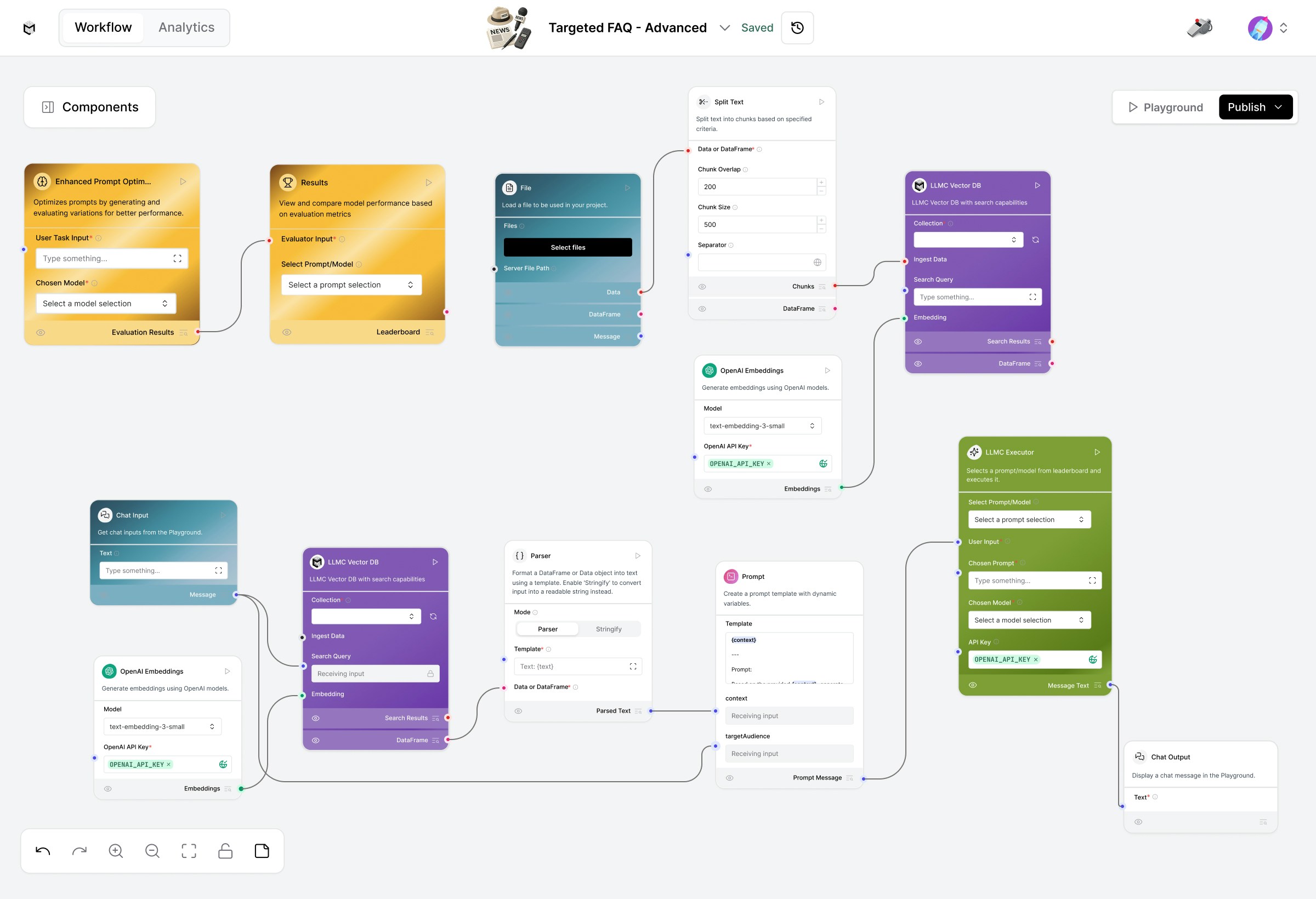 The Targeted FAQ template enables you to create **personalized, audience-aware FAQ systems** using retrieval-augmented generation (RAG), optimized prompting, and dynamic execution.\
This advanced setup combines **vector-based knowledge retrieval** with **prompt optimization** and **LLMC Executor** for consistently high-quality, context-specific answers.
## **Prerequisites**
1. **OpenAI API Key** (required for both embeddings and model)
2. A structured FAQ or document file (PDF, TXT)
3. Basic familiarity with **LLMC components**
## Create the Targeted FAQ Flow
### **1. Load Your FAQ Data**
Start with the **Load Data Flow** (bottom section of the workspace).\
This flow prepares your knowledge base for retrieval.
**Steps:**
1. Upload your document using the **File** component.
2. Split the content into manageable text chunks via **Split Text**.
3. Generate embeddings with **OpenAI Embeddings** (text-embedding-3-small).
4. Store embeddings in **LLM Vector DB** for future semantic retrieval.
*Ensure your OpenAI API Key is added to the Embeddings component.*
### **2. Query FAQs for a Target Audience**
Once your data is embedded, switch to the Retriever Flow (middle section).
**Components:**
1. **User Input** – Enter persona or audience (e.g., "environment enthusiast").
2. **LLM Vector DB** – Retrieves relevant FAQ chunks based on audience and query.
3. **OpenAI Embeddings** – Matches the same embedding model used in the loader flow.
4. **Parser** – Formats and cleans retrieved content for the LLM.
5. **Prompt** – Generates a question-aware, persona-specific FAQ response.
6. **Chat Output** – Displays the final answer directly in the playground.
Try modifying the persona field to see how answers adapt to different users.
### **3. Optimize Your FAQ Prompts**
Use the **Prompt Optimizer Flow** to refine your prompt instructions and improve FAQ response quality.
**How it works:**
1. Automatically generates prompt variations and test cases.
2. Scores and ranks are prompted by relevance, accuracy, and tone consistency.
3. Displays a **leaderboard** of best-performing prompts.
**To run it:**
1. Input your optimization task (e.g., “Generate the best FAQ tone for customer support”).
2. Click **Run** on the Result node.
3. Review and select the top-performing prompt from the leaderboard.
### **4. Execute and Compare Results**
Once optimized prompts are ready, use the **LLMC Executor** to run them.
**In the LLMC Executor:**
1. Select your optimized **Prompt** and preferred **Model** (gpt-4o, claude-4-sonnet, etc.).
2. Paste your **OpenAI API Key** if not already configured.
3. Click **Play** to execute the query.
4. The **Output** displays your final, persona-tailored FAQ answer.
## **Modify or Extend**
1. **Change the persona tone** in the Prompt to match the brand voice or audience type.
2. **Swap models** in LLMC Executor to test performance differences.
3. **Adjust chunk size** and **overlap** in Split Text for better retrieval precision.
4. Use **Results Leaderboard** to continuously improve FAQ quality over time.
## **Configuration Checklist**
| **Component** | **Configuration** |
| :------------------------ | :------------------------------------------- |
| **File / Split Text** | Upload and preprocess FAQ data |
| **OpenAI Embeddings** | Embedding model: text-embedding-3-small |
| **LLM Vector DB** | Stores embedded vectors for retrieval |
| **Prompt Optimizer Flow** | Generates and ranks prompt variants |
| **LLMC Executor** | Runs the selected model and prompt |
| **API Key** | Required for embeddings and GPT model access |
## **Example**
**Input:** Target Audience – “College Students”\
**Output:** FAQs rewritten in a simplified, relatable tone for students.
## **Built With**
1. **LLMC Framework**
2. **Prompt Optimizer Flow**
3. **LLMC Executor**
4. **RAG Architecture (Vector Retrieval + Prompting)**
5. **OpenAI GPT Models**
Deliver precise, audience-tailored FAQ responses with automation, retrieval intelligence, and optimized prompting.
#
The Targeted FAQ template enables you to create **personalized, audience-aware FAQ systems** using retrieval-augmented generation (RAG), optimized prompting, and dynamic execution.\
This advanced setup combines **vector-based knowledge retrieval** with **prompt optimization** and **LLMC Executor** for consistently high-quality, context-specific answers.
## **Prerequisites**
1. **OpenAI API Key** (required for both embeddings and model)
2. A structured FAQ or document file (PDF, TXT)
3. Basic familiarity with **LLMC components**
## Create the Targeted FAQ Flow
### **1. Load Your FAQ Data**
Start with the **Load Data Flow** (bottom section of the workspace).\
This flow prepares your knowledge base for retrieval.
**Steps:**
1. Upload your document using the **File** component.
2. Split the content into manageable text chunks via **Split Text**.
3. Generate embeddings with **OpenAI Embeddings** (text-embedding-3-small).
4. Store embeddings in **LLM Vector DB** for future semantic retrieval.
*Ensure your OpenAI API Key is added to the Embeddings component.*
### **2. Query FAQs for a Target Audience**
Once your data is embedded, switch to the Retriever Flow (middle section).
**Components:**
1. **User Input** – Enter persona or audience (e.g., "environment enthusiast").
2. **LLM Vector DB** – Retrieves relevant FAQ chunks based on audience and query.
3. **OpenAI Embeddings** – Matches the same embedding model used in the loader flow.
4. **Parser** – Formats and cleans retrieved content for the LLM.
5. **Prompt** – Generates a question-aware, persona-specific FAQ response.
6. **Chat Output** – Displays the final answer directly in the playground.
Try modifying the persona field to see how answers adapt to different users.
### **3. Optimize Your FAQ Prompts**
Use the **Prompt Optimizer Flow** to refine your prompt instructions and improve FAQ response quality.
**How it works:**
1. Automatically generates prompt variations and test cases.
2. Scores and ranks are prompted by relevance, accuracy, and tone consistency.
3. Displays a **leaderboard** of best-performing prompts.
**To run it:**
1. Input your optimization task (e.g., “Generate the best FAQ tone for customer support”).
2. Click **Run** on the Result node.
3. Review and select the top-performing prompt from the leaderboard.
### **4. Execute and Compare Results**
Once optimized prompts are ready, use the **LLMC Executor** to run them.
**In the LLMC Executor:**
1. Select your optimized **Prompt** and preferred **Model** (gpt-4o, claude-4-sonnet, etc.).
2. Paste your **OpenAI API Key** if not already configured.
3. Click **Play** to execute the query.
4. The **Output** displays your final, persona-tailored FAQ answer.
## **Modify or Extend**
1. **Change the persona tone** in the Prompt to match the brand voice or audience type.
2. **Swap models** in LLMC Executor to test performance differences.
3. **Adjust chunk size** and **overlap** in Split Text for better retrieval precision.
4. Use **Results Leaderboard** to continuously improve FAQ quality over time.
## **Configuration Checklist**
| **Component** | **Configuration** |
| :------------------------ | :------------------------------------------- |
| **File / Split Text** | Upload and preprocess FAQ data |
| **OpenAI Embeddings** | Embedding model: text-embedding-3-small |
| **LLM Vector DB** | Stores embedded vectors for retrieval |
| **Prompt Optimizer Flow** | Generates and ranks prompt variants |
| **LLMC Executor** | Runs the selected model and prompt |
| **API Key** | Required for embeddings and GPT model access |
## **Example**
**Input:** Target Audience – “College Students”\
**Output:** FAQs rewritten in a simplified, relatable tone for students.
## **Built With**
1. **LLMC Framework**
2. **Prompt Optimizer Flow**
3. **LLMC Executor**
4. **RAG Architecture (Vector Retrieval + Prompting)**
5. **OpenAI GPT Models**
Deliver precise, audience-tailored FAQ responses with automation, retrieval intelligence, and optimized prompting.
#