> ## Documentation Index
> Fetch the complete documentation index at: https://docs.llmcontrols.ai/llms.txt
> Use this file to discover all available pages before exploring further.
# Vector Store RAG
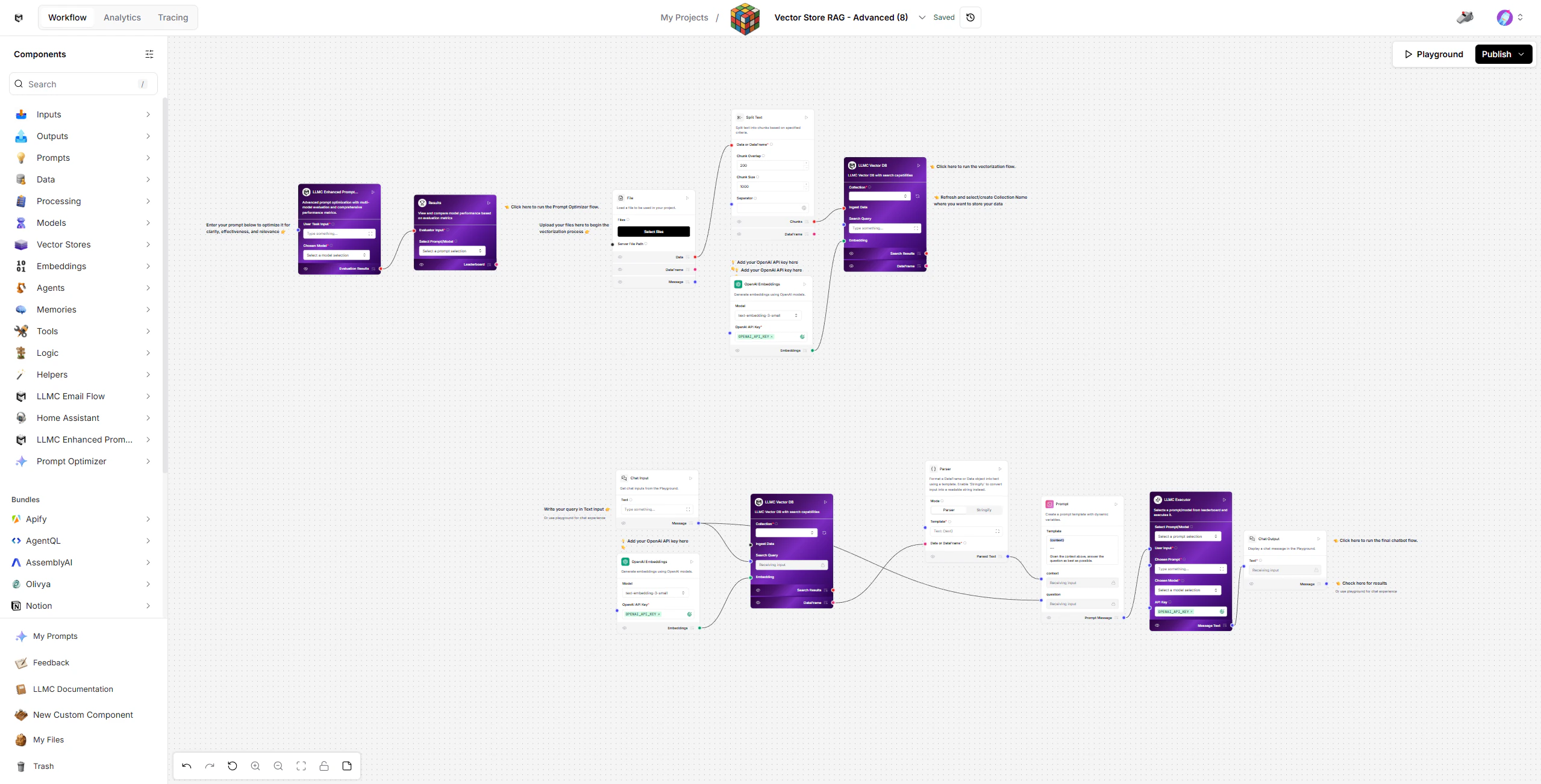 The Vector Store RAG template enables you to build a retrieval-augmented generation (RAG) system that grounds AI responses in your own documents using a vector database, optimized prompting, and dynamic execution.
This advanced setup combines vector-based knowledge retrieval with prompt optimization and the LLMC Executor to deliver consistently high-quality, context-grounded answers.
## Prerequisites
* OpenAI API Key (required for both embeddings and model)
* A document file (PDF, TXT, MD, CSV, JSON, DOCX, etc.)
* Basic familiarity with LLMC components
## Create the Vector Store RAG Flow
### 1. Load Your Documents
* Start with the Load Data Flow (top-right section of the workspace).
This flow prepares your knowledge base for retrieval.
**Steps**:
* Upload your document using the File component.
* Split the content into manageable text chunks via Split Text.
* Generate embeddings with OpenAI Embeddings (text-embedding-3-small).
* Store embeddings in LLMC Vector DB for future semantic retrieval.
Ensure your OpenAI API Key is added to the Embeddings component.
### 2. Ask Questions Using RAG
Once your data is embedded, switch to the Retriever Flow (bottom section).
**Components**:
* Chat Input - Enter your question in the Playground.
* OpenAI Embeddings - Converts your query into a vector for semantic search.
* LLMC Vector DB - Retrieves relevant document chunks based on your query.
* Parser - Formats and cleans retrieved content for the LLM.
* Prompt - Combines the retrieved context with your question into a structured prompt.
* LLMC Executor - Executes the prompt using the selected model and returns the answer.
* Chat Output - Displays the final response in the Playground.
Try different search queries to see how the retrieved context changes.
### 3. Optimize Your Prompts
Use the Prompt Optimizer Flow (top-left section) to refine your prompt instructions and improve response quality.
**How it works:**
* Automatically generates prompt variations and test cases.
* Scores and ranks are prompted by relevance, accuracy, and tone consistency.
* Displays a leaderboard of best-performing prompts.
**To run it:**
* Input your optimization task (e.g., "Answer document questions accurately and concisely").
* Click Run on the Results node.
* Review and select the top-performing prompt from the leaderboard.
### 4. Execute and Compare Results
Once optimized prompts are ready, use the LLMC Executor to run them.
**In the LLMC Executor:**
* Select your optimized Prompt and preferred Model (gpt-4o, claude-4-sonnet, etc.).
* Paste your OpenAI API Key if not already configured.
* Click **Play** to execute the query.
* The output displays your final, context-grounded answer.
## Modify or Extend
* Change the prompt template in the Prompt component to control how context and questions are presented.
* Swap models in LLMC Executor to test performance differences.
* Adjust chunk size and overlap in Split Text for better retrieval precision.
* Use Results Leaderboard to continuously improve response quality over time.
* Create multiple collections in LLMC Vector DB to organize different knowledge bases.
## Configuration Checklist
| Component | Configuration |
| :-------------------- | :------------------------------------------- |
| File / Split Text | Upload and preprocess document data |
| OpenAI Embeddings | Embedding model: text-embedding-3-small |
| LLMC Vector DB | Stores embedded vectors for retrieval |
| Prompt Optimizer Flow | Generates and ranks prompt variants |
| LLMC Executor | Runs the selected model and prompt |
| API Key | Required for embeddings and GPT model access |
## Example
* **Input**: "How does our refund policy work for international customers?"
* **Output**: A clear, accurate response pulled directly from your uploaded refund policy documents.
## Built With
* LLMC Framework
* Prompt Optimizer Flow
* LLMC Executor
* RAG Architecture (Vector Retrieval + Prompting)
* OpenAI GPT Models
Deliver precise, document-grounded AI responses with automation, retrieval intelligence, and optimized prompting.
The Vector Store RAG template enables you to build a retrieval-augmented generation (RAG) system that grounds AI responses in your own documents using a vector database, optimized prompting, and dynamic execution.
This advanced setup combines vector-based knowledge retrieval with prompt optimization and the LLMC Executor to deliver consistently high-quality, context-grounded answers.
## Prerequisites
* OpenAI API Key (required for both embeddings and model)
* A document file (PDF, TXT, MD, CSV, JSON, DOCX, etc.)
* Basic familiarity with LLMC components
## Create the Vector Store RAG Flow
### 1. Load Your Documents
* Start with the Load Data Flow (top-right section of the workspace).
This flow prepares your knowledge base for retrieval.
**Steps**:
* Upload your document using the File component.
* Split the content into manageable text chunks via Split Text.
* Generate embeddings with OpenAI Embeddings (text-embedding-3-small).
* Store embeddings in LLMC Vector DB for future semantic retrieval.
Ensure your OpenAI API Key is added to the Embeddings component.
### 2. Ask Questions Using RAG
Once your data is embedded, switch to the Retriever Flow (bottom section).
**Components**:
* Chat Input - Enter your question in the Playground.
* OpenAI Embeddings - Converts your query into a vector for semantic search.
* LLMC Vector DB - Retrieves relevant document chunks based on your query.
* Parser - Formats and cleans retrieved content for the LLM.
* Prompt - Combines the retrieved context with your question into a structured prompt.
* LLMC Executor - Executes the prompt using the selected model and returns the answer.
* Chat Output - Displays the final response in the Playground.
Try different search queries to see how the retrieved context changes.
### 3. Optimize Your Prompts
Use the Prompt Optimizer Flow (top-left section) to refine your prompt instructions and improve response quality.
**How it works:**
* Automatically generates prompt variations and test cases.
* Scores and ranks are prompted by relevance, accuracy, and tone consistency.
* Displays a leaderboard of best-performing prompts.
**To run it:**
* Input your optimization task (e.g., "Answer document questions accurately and concisely").
* Click Run on the Results node.
* Review and select the top-performing prompt from the leaderboard.
### 4. Execute and Compare Results
Once optimized prompts are ready, use the LLMC Executor to run them.
**In the LLMC Executor:**
* Select your optimized Prompt and preferred Model (gpt-4o, claude-4-sonnet, etc.).
* Paste your OpenAI API Key if not already configured.
* Click **Play** to execute the query.
* The output displays your final, context-grounded answer.
## Modify or Extend
* Change the prompt template in the Prompt component to control how context and questions are presented.
* Swap models in LLMC Executor to test performance differences.
* Adjust chunk size and overlap in Split Text for better retrieval precision.
* Use Results Leaderboard to continuously improve response quality over time.
* Create multiple collections in LLMC Vector DB to organize different knowledge bases.
## Configuration Checklist
| Component | Configuration |
| :-------------------- | :------------------------------------------- |
| File / Split Text | Upload and preprocess document data |
| OpenAI Embeddings | Embedding model: text-embedding-3-small |
| LLMC Vector DB | Stores embedded vectors for retrieval |
| Prompt Optimizer Flow | Generates and ranks prompt variants |
| LLMC Executor | Runs the selected model and prompt |
| API Key | Required for embeddings and GPT model access |
## Example
* **Input**: "How does our refund policy work for international customers?"
* **Output**: A clear, accurate response pulled directly from your uploaded refund policy documents.
## Built With
* LLMC Framework
* Prompt Optimizer Flow
* LLMC Executor
* RAG Architecture (Vector Retrieval + Prompting)
* OpenAI GPT Models
Deliver precise, document-grounded AI responses with automation, retrieval intelligence, and optimized prompting.