LLM Controls provides flexible ways to publish your flows and integrate them into external applications. Whether you want to expose your flow as a secure API, embed it on a website, or share it with your team or organization, this guide walks you through all options.
API Access
You can access your flow programmatically using REST API calls. LLM Controls supports integration using Python, JavaScript (fetch), and cURL.
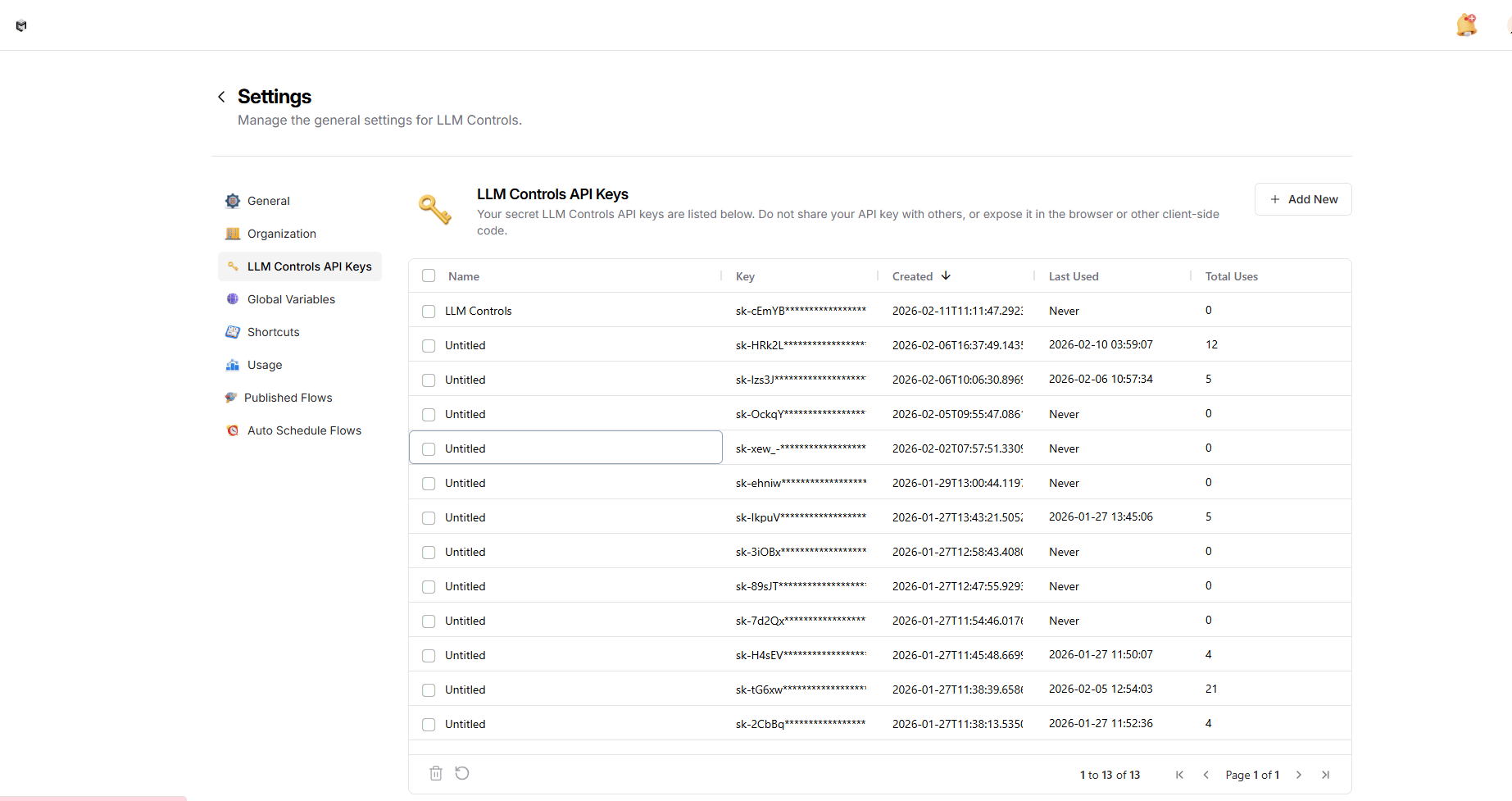
Generating Your API Key
To authenticate API requests, you need a valid LLM Controls API key. Follow the steps below to create one:
- Go to the Settings panel in your LLM Controls dashboard.
- In the left sidebar, click on “LLM Controls API Keys”.
- Click the “Add New” button in the top-right corner.
- Give your key a name (e.g., my_project_key) and save it.
- Your new API key will appear in the list. Make sure to copy it immediately — this is the only time it will be fully visible.
ImportantKeep your API key secure. Do not expose it in frontend code or share it publicly. Use environment variables or server-side storage to manage keys safely. Once created, you can use this key in your API requests by setting it as the x-api-key header.
How to Use the API
Depending on your preferred language, follow the example below
import requests
import os
import json
# Get API key from environment variable
api_key = os.getenv("LLMC_API_KEY")
if not api_key:
raise ValueError("LLMC_API_KEY environment variable not found. Please set your API key in the environment variables.")
url = "https://api.llmcontrols.ai/api/v1/run/9a453fad-2bb2-474f-a541-78dad816d45f?stream=false"
headers = {
"Content-Type": "application/json",
"x-api-key": os.environ["LLMC_API_KEY"] # Authentication key from environment variable
}
payload = {
"input_value": "hello world!",
"output_type": "chat",
"input_type": "chat"
}
try:
# Make the API request
response = requests.post(url, json=payload, headers=headers)
response.raise_for_status() # Raise an exception for HTTP errors
# Process the response
data = response.json()
print("Initial response:", json.dumps(data, indent=2))
except requests.exceptions.RequestException as e:
print("Error making request:", e)
except json.JSONDecodeError as e:
print("Error decoding response:", e)
// Get API key from environment variable
const apiKey = process.env.LLMC_API_KEY;
if (!apiKey) {
throw new Error("LLMC_API_KEY environment variable not found. Please set your API key in the environment variables.");
}
const url = "https://api.llmcontrols.ai/api/v1/run/9a453fad-2bb2-474f-a541-78dad816d45f?stream=false";
const headers = {
"Content-Type": "application/json",
"x-api-key": process.env.LLMC_API_KEY // Authentication key from environment variable
};
const payload = {
"input_value": "hello world!",
"output_type": "chat",
"input_type": "chat"
};
fetch(url, {
method: "POST",
headers: headers,
body: JSON.stringify(payload)
})
.then(response => response.json())
.then(data => {
console.log("Initial response:", data);
})
.catch(error => console.error("Error:", error));
curl --request POST \
--url 'https://api.llmcontrols.ai/api/v1/run/9a453fad-2bb2-474f-a541-78dad816d45f?stream=false' \
--header 'Content-Type: application/json' \
--header "x-api-key: $LLMC_API_KEY" \
--data '{
"input_value": "hello world!",
"output_type": "chat",
"input_type": "chat"
}'
Temporary Overrides
Each flow has customizable input parameters that you can override:
- These input fields are part of the payload (e.g. input_value)
- You can override them via the API or directly through the UI
- To add more override options, add input boxes in the UI and connect them to relevant components
Overrides are not persistent, but they are applied to that particular API run.
Execution Modes: Static vs. Polling
LLM Controls lets you run flows in two modes based on your needs: Static (synchronous) or Polling (asynchronous). You can control this using the sync query parameter in the URL.
Overview
| Mode | Query Param | Use Case | Simplicity | Suitable For Complex Workflow |
|---|
| Static | stream=false | Short flows, real-time responses | ✅ Yes | ❌ No |
| Polling | sync=false | Long-running flows, background tasks | ❌ No | ✅ Yes |
Static Mode (stream=false)
In static mode, the API waits for the full result before returning the response.
When to use:
- Short or fast-executing flows
- Real-time user interaction (e,.g. chat widgets)
Example Request:
POST https://api.llmcontrols.ai/api/v1/run/YOUR_FLOW_ID?stream=false
Content-Type: application/json
x-api-key: YOUR_API_KEY
{
"input_value": "your message", // For chat inputs
"input_type": "chat", // or "text" based on input type
"output_type": "chat", // or "text" based on output type
"tweaks": { // Optional tweaks object
"component_id": {
"parameter": "value"
}
}
}
Example Response:
{
"result": "Here's the response...",
// Additional response data based on your flow's output
}
Polling Mode (sync=false)
In polling mode, the API returns immediately with a task_id and task_url. You must poll this URL to retrieve the final result once it’s ready.
When to use:
- Long-running flows
- Flows that perform multi-step background operations
- When using external data sources or embeddings
Initial Request:
POST https://api.llmcontrols.ai/api/v1/run/YOUR_FLOW_ID?sync=false
Content-Type: application/json
x-api-key: YOUR_API_KEY
{
"input_value": "your message", // For chat inputs
"input_type": "chat", // or "text" based on input type
"output_type": "chat", // or "text" based on output type
"tweaks": { // Optional tweaks object
"component_id": {
"parameter": "value"
}
}
}
Initial Response:
{
"task_id": "abc123",
"message": "Task started. Check task_url for updates.",
"task_url": "https://api.llmcontrols.ai/api/v1/task/abc123"
}
Polling Request:
GET https://api.llmcontrols.ai/api/v1/task/abc123
x-api-key: YOUR_API_KEY
Polling Response:
{
"status": "COMPLETED", // or "PENDING", "FAILED"
"result": {
// Flow output data
}
}
Best Practices
- Use static mode for user-facing interactions.
- Use polling mode when a flow takes more than 10 seconds.
- Always check status in polling responses (PENDING, RUNNING, COMPLETED, FAILED).
Embed into Site
You can embed your flow as a chat widget or a full-screen application.
Features:
- Supports two-way communication between frontend and backend
- Can be embedded in HTML, React, or other frontend frameworks
- Full control over the input/output elements
- Styling customization available (light/dark themes, widget position)
Usage Example:
<script
src="https://cdn.jsdelivr.net/gh/llm-controls/[email protected]/dist/build/static/js/bundle.min.js">
</script>
<llmc-chat
window_title="Smart Spreadsheet Assistant - Advanced (14)"
flow_id="b8f39ca8-98ec-4fed-8983-ac8934a95b28"
host_url="https://app.llmcontrols.ai"
api_key="...">
</llmc-chat>