Tool object with a common interface that the agent understands. Agents become aware of tools through tool registration, where the agent is provided a list of available tools typically at agent initialization. The Tool object’s description tells the agent what the tool can do.
The agent then uses a connected LLM to reason through the problem to decide which tool is best for the job.
Use an agent in a flow
The simple agent starter project uses an agent component connected to a ,URL and Calculator tools to answer a user’s questions. The OpenAI LLM acts as a brain for the agent to decide which tool to use. Tools are connected to agent components at the Tools port.
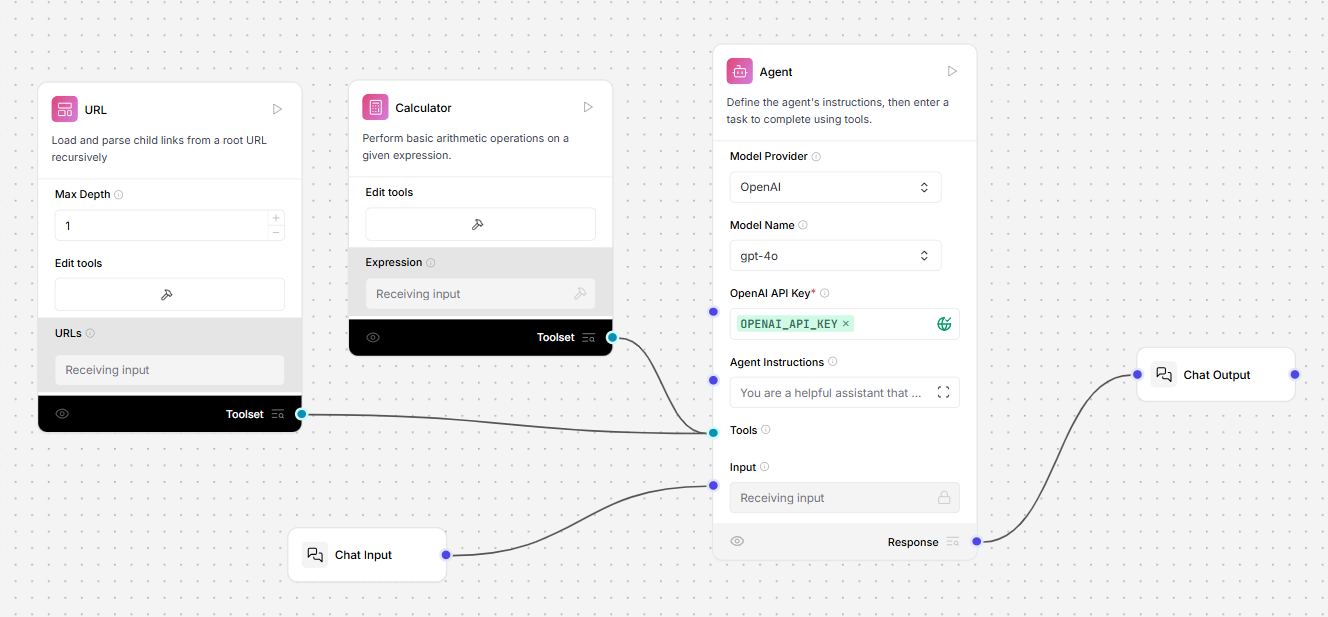
Agent component
This component creates an agent that can use tools to answer questions and perform tasks based on given instructions. The component includes an LLM model integration, a system message prompt, and a Tools port to connect tools to extend its capabilities. For more information on this component,Parameters
Parameters
| Name | Type | Description |
|---|---|---|
| agent_llm | Dropdown | The provider of the language model that the agent uses to generate responses. Options include OpenAI and other providers or Custom. |
| system_prompt | String | The system prompt provides initial instructions and context to guide the agent’s behavior. |
| tools | List | The list of tools available for the agent to use. This field is optional and can be empty. |
| input_value | String | The input task or question for the agent to process. |
| add_current_date_tool | Boolean | When true this adds a tool to the agent that returns the current date. |
| memory | Memory | An optional memory configuration for maintaining conversation history. |
| max_iterations | Integer | The maximum number of iterations the agent can perform. |
| handle_parsing_errors | Boolean | This determines whether to handle parsing errors during agent execution. |
| verbose | Boolean | This enables verbose output for detailed logging. |
| Name | Type | Description |
|---|---|---|
| response | Message | The agent’s response to the given input task. |
JSON Agent
This component creates a JSON agent from a JSON or YAML file and an LLM.Parameters
Parameters
| Name | Type | Description |
|---|---|---|
| llm | LanguageModel | The language model to use for the agent. |
| path | File | The path to the JSON or YAML file. |
| Name | Type | Description |
|---|---|---|
| agent | AgentExecutor | The JSON agent instance. |
Vector Store Agent
This component creates a Vector Store Agent using LangChain.Parameters
Parameters
Inputs
Outputs
| Name | Type | Description |
|---|---|---|
| llm | LanguageModel | The language model to use for the agent. |
| vectorstore | VectorStoreInfo | The vector store information for the agent to use. |
| Name | Type | Description |
|---|---|---|
| agent | AgentExecutor | The Vector Store Agent instance. |
Vector Store Router Agent
This component creates a Vector Store Router Agent using LangChain.Parameters
Parameters
Inputs
Outputs
| Name | Type | Description |
|---|---|---|
| llm | LanguageModel | The language model to use for the agent. |
| vectorstores | List[VectorStoreInfo] | The list of vector store information for the agent to route between. |
| Name | Type | Description |
|---|---|---|
| agent | AgentExecutor | The Vector Store Router Agent instance. |