
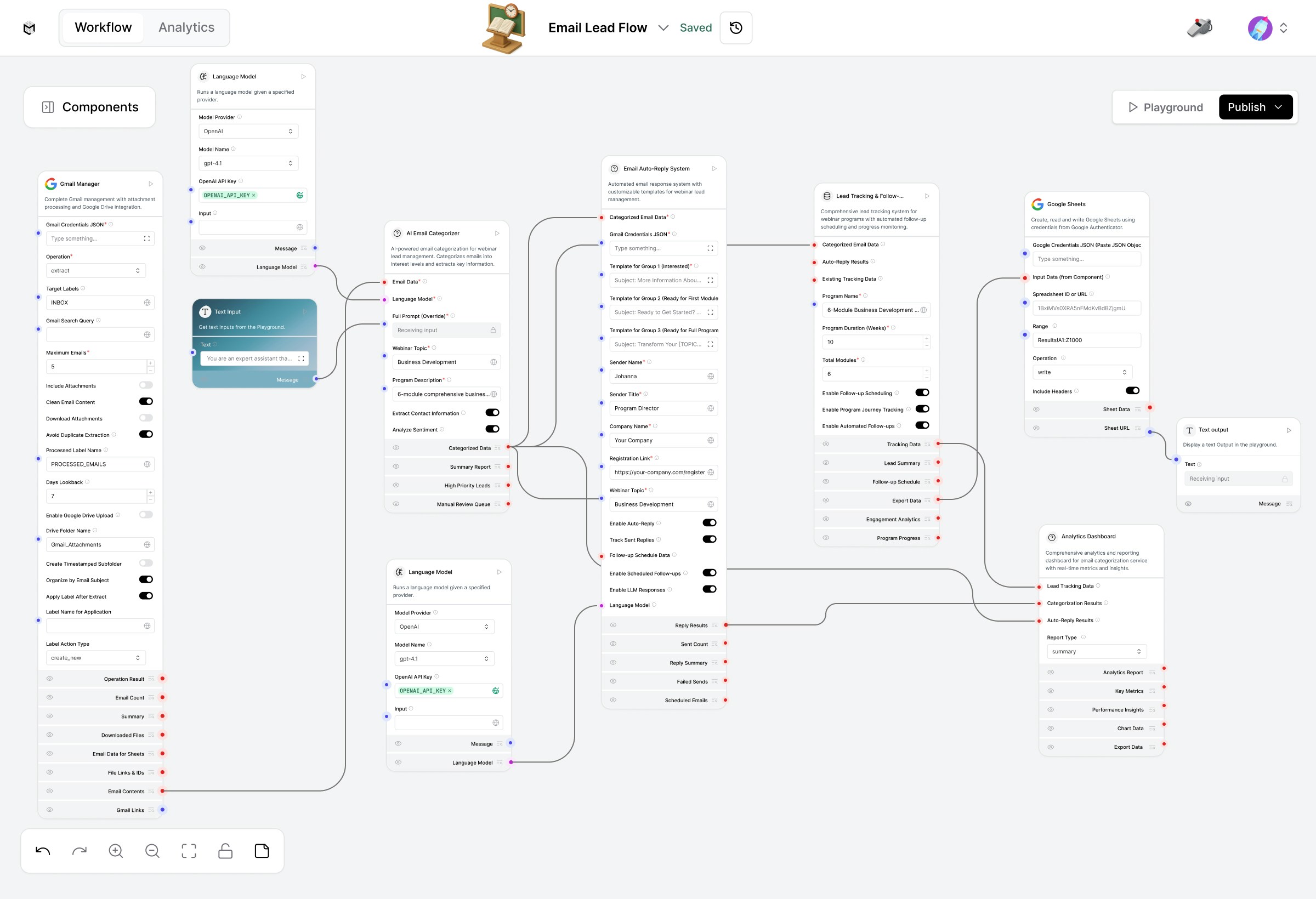
Workflow Steps & Components
1. Gmail Manager
Component: Gmail ManagerPurpose: Connects to Gmail and fetches emails from a specific label (e.g., “Inbound Leads”).
User Configurations:
- Gmail Credentials JSON
- Target Label (e.g., Leads)
- Max Emails to Fetch
- Apply Label after Processing (e.g., Processed)
- Optional: Extract Attachments
2. AI Lead Categorizer
Component: AI Lead CategorizerPurpose: Uses an LLM to analyze email content and identify:
- Lead type (Sales, Business Development, Partnership, etc.)
- Key contact info (Name, Email, Company)
- Message intent (Inquiry, Demo Request, Proposal, etc.)
- Email body (from Gmail Manager)
- Job/Industry context prompt
3. Language Model (LLM Processor)
Component: Language ModelPurpose: Provides context-aware understanding to classify emails more precisely and extract meaningful fields. Connected To:
- AI Lead Categorizer for enrichment
- Email Auto-Reply System for crafting response messages
4. Email Auto-Reply System
Component: Email Auto-Reply System Purpose: Automatically drafts personalized replies using extracted lead details and your preferred tone. Example Outputs:- “Thank you for your interest in our services. Our business development team will reach out shortly.”
- “Appreciate your inquiry. Here’s a link to schedule a meeting.”
- Extracted lead details
- LLM-generated message tone (formal/friendly)
- Predefined templates
5.Google Sheets Integration
Component: Google Sheets Writer Purpose: Appends structured lead data into a centralized Google Sheet. Typical Columns:| Date | Name | Email | Company | Lead Type | Message Summary | Follow-up Status | Required Config:
- Spreadsheet ID
- Target Sheet Name
6. Analytics Dashboard
Component: Analytics DashboardPurpose: Provides a visual summary of lead statistics, such as:
- Number of leads processed
- Lead sources (email domains)
- Category breakdown (Partnerships, Sales, etc.)
- Performance metrics (response rate, follow-up progress)
7. Final Output
Component: Text OutputPurpose: Displays a summary message in Playground view e.g., “10 new leads extracted and appended to Google Sheet successfully.”
End-to-End Flow Summary
Highlights
- Works automatically on labeled inboxes.
- Uses LLMs for accurate intent and field extraction
- Creates and sends contextually personalized replies.
- Tracks processed leads in real-time via Google Sheets + Dashboard.