Use a model component in a flow
Model components receive inputs and prompts for generating text, and the generated text is sent to an output component. The model output can also be sent to the Language Model port and on to a Parse Data component, where the output can be parsed into structured Data objects. This example has the OpenAI model in a chatbot flow. For more information .
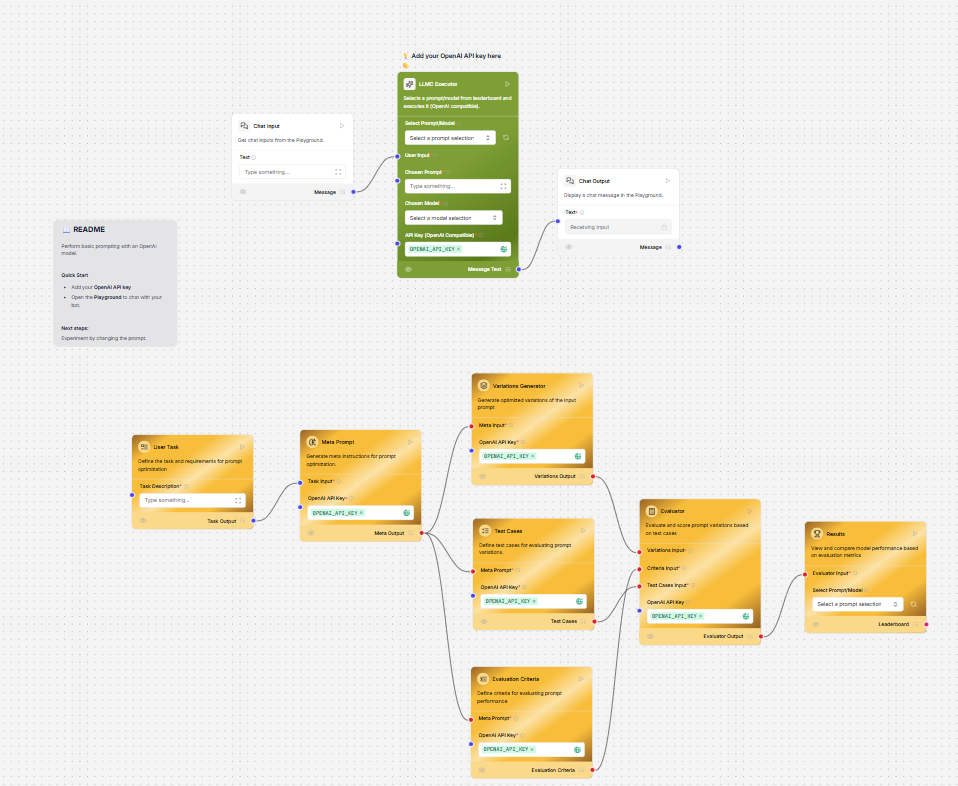
LLMC Executor
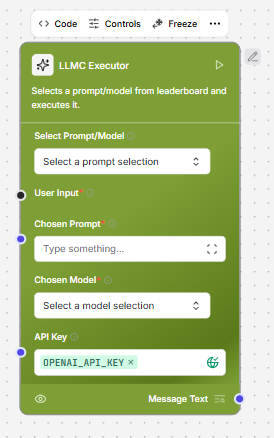
The LLMC Executor is a user-friendly interface designed to streamline interactions with AI language models, such as those from OpenAI. It plays a central role in allowing users to experiment with different prompts and models to generate high-quality AI responses. By integrating with API keys, the executor enables seamless communication with external AI services. Users can effortlessly select prompts , either manually or through integration with a Prompt Optimizer Flow and choose from available AI models using intuitive dropdown menus. Once configured, the tool provides a clean and efficient workflow where users input text, trigger the request with a single click, and receive intelligent outputs in real-time. This makes LLMC Executor an essential component for testing, optimizing, and comparing AI-generated responses across various configurations.Key usage highlights
- Prompt & Model Selection: Choose from a set of predefined prompts and models using dropdowns. Your selections are automatically displayed for clarity.
-
Secure API Access: Enter your API key to enable access to the chosen model. This is required for the tool to work.
AIML
This component creates a ChatOpenAI model instance using the AIML API. For more information, see AIML documentation.Parameters
Parameters
Inputs
Outputs
| Name | Type | Description |
|---|---|---|
| max_tokens | Integer | The maximum number of tokens to generate. Set to 0 for unlimited tokens. Range: 0-128000. |
| model_kwargs | Dictionary | Additional keyword arguments for the model. |
| model_name | String | The name of the AIML model to use. Options are predefined in AIML_CHAT_MODELS. |
| aiml_api_base | String | The base URL of the AIML API. Defaults to https://api.aimlapi.com. |
| api_key | SecretString | The AIML API Key to use for the model. |
| temperature | Float | Controls randomness in the output. Default: 0.1. |
| Name | Type | Description |
|---|---|---|
| model | LanguageModel | An instance of ChatOpenAI configured with the specified parameters. |
Amazon Bedrock
This component generates text using Amazon Bedrock LLMs. For more information, see Amazon Bedrock documentation.Parameters
Parameters
Inputs
Outputs
| Name | Type | Description |
|---|---|---|
| model_id | String | The ID of the Amazon Bedrock model to use. Options include various models. |
| aws_access_key | SecretString | AWS Access Key for authentication. |
| aws_secret_key | SecretString | AWS Secret Key for authentication. |
| aws_session_token | SecretString | The session key for your AWS account. |
| credentials_profile_name | String | Name of the AWS credentials profile to use. |
| region_name | String | AWS region name. Default: us-east-1. |
| model_kwargs | Dictionary | Additional keyword arguments for the model. |
| endpoint_url | String | Custom endpoint URL for the Bedrock service. |
| Name | Type | Description |
|---|---|---|
| model | LanguageModel | An instance of ChatBedrock configured with the specified parameters. |
Anthropic
This component allows the generation of text using Anthropic Chat and Language models. For more information, see the Anthropic documentation.Parameters
Parameters
Inputs
Outputs
| Name | Type | Description |
|---|---|---|
| max_tokens | Integer | The maximum number of tokens to generate. Set to 0 for unlimited tokens. Default: 4096. |
| model | String | The name of the Anthropic model to use. Options include various Claude 3 models. |
| anthropic_api_key | SecretString | Your Anthropic API key for authentication. |
| temperature | Float | Controls randomness in the output. Default: 0.1. |
| anthropic_api_url | String | Endpoint of the Anthropic API. Defaults to https://api.anthropic.com if not specified (advanced). |
| prefill | String | Prefill text to guide the model’s response (advanced). |
| Name | Type | Description |
|---|---|---|
| model | LanguageModel | An instance of ChatAnthropic configured with the specified parameters. |
Azure OpenAI
This component generates text using Azure OpenAI LLM. For more information, see the Azure OpenAI documentation.Parameters
Parameters
Inputs
Outputs
| Name | Type | Description |
|---|---|---|
| Model Name | String | Specifies the name of the Azure OpenAI model to be used for text generation. |
| Azure Endpoint | String | Your Azure endpoint, including the resource. |
| Deployment Name | String | Specifies the name of the deployment. |
| API Version | String | Specifies the version of the Azure OpenAI API to be used. |
| API Key | SecretString | Your Azure OpenAI API key. |
| Temperature | Float | Specifies the sampling temperature. Defaults to 0.7. |
| Max Tokens | Integer | Specifies the maximum number of tokens to generate. Defaults to 1000. |
| Input Value | String | Specifies the input text for text generation. |
| Stream | Boolean | Specifies whether to stream the response from the model. Defaults to False. |
| Name | Type | Description |
|---|---|---|
| model | LanguageModel | An instance of AzureOpenAI configured with the specified parameters. |
Cohere
This component generates text using Cohere’s language models. For more information, see the Cohere documentation.Parameters
Parameters
Inputs
Outputs
| Name | Type | Description |
|---|---|---|
| Cohere API Key | SecretString | Your Cohere API key. |
| Max Tokens | Integer | Specifies the maximum number of tokens to generate. Defaults to 256. |
| Temperature | Float | Specifies the sampling temperature. Defaults to 0.75. |
| Input Value | String | Specifies the input text for text generation. |
| Name | Type | Description |
|---|---|---|
| model | LanguageModel | An instance of the Cohere model configured with the specified parameters. |
DeepSeek
This component generates text using DeepSeek’s language models. For more information, see the DeepSeek documentation.Parameters
Parameters
Inputs
Outputs
| Name | Type | Description |
|---|---|---|
| max_tokens | Integer | Maximum number of tokens to generate. Set to 0 for unlimited. Range: 0-128000. |
| model_kwargs | Dictionary | Additional keyword arguments for the model. |
| json_mode | Boolean | If True, outputs JSON regardless of passing a schema. |
| model_name | String | The DeepSeek model to use. Default: deepseek-chat. |
| api_base | String | Base URL for API requests. Default: https://api.deepseek.com. |
| api_key | SecretString | Your DeepSeek API key for authentication. |
| temperature | Float | Controls randomness in responses. Range: [0.0, 2.0]. Default: 1.0. |
| seed | Integer | Number initialized for random number generation. Use the same seed integer for more reproducible results, and use a different seed number for more random results. |
| Name | Type | Description |
|---|---|---|
| model | LanguageModel | An instance of ChatOpenAI configured with the specified parameters. |
Google Generative AI
This component generates text using Google’s Generative AI models. For more information, see the Google Generative AI documentation.Parameters
Parameters
Inputs
Outputs
| Name | Type | Description |
|---|---|---|
| Google API Key | SecretString | Your Google API key to use for the Google Generative AI. |
| Model | String | The name of the model to use, such as "gemini-pro". |
| Max Output Tokens | Integer | The maximum number of tokens to generate. |
| Temperature | Float | Run inference with this temperature. |
| Top K | Integer | Consider the set of top K most probable tokens. |
| Top P | Float | The maximum cumulative probability of tokens to consider when sampling. |
| N | Integer | Number of chat completions to generate for each prompt. |
| Name | Type | Description |
|---|---|---|
| model | LanguageModel | An instance of ChatGoogleGenerativeAI configured with the specified parameters. |
Groq
This component generates text using Groq’s language models.-
To use this component in a flow, connect it as a Model in a flow like the Basic prompting flow, or select it as the Model Provider if you’re using an Agent component.

- In the Groq API Key field, paste your Groq API key. The Groq model component automatically retrieves a list of the latest models. To refresh your list of models, click Refresh.
- In the Model field, select the model you want to use for your LLM. This example uses llama-3.1-8b-instant, which Groq recommends for real-time conversational interfaces.
- In the Prompt component, enter:
- Click Playground and ask your Groq LLM a question. The responses include a list of sources.
Parameters
Parameters
Inputs
Outputs
| Name | Type | Description |
|---|---|---|
| groq_api_key | SecretString | API key for the Groq API. |
| groq_api_base | String | Base URL path for API requests. Default: https://api.groq.com. |
| max_tokens | Integer | The maximum number of tokens to generate. |
| temperature | Float | Controls randomness in the output. Range: [0.0, 1.0]. Default: 0.1. |
| n | Integer | Number of chat completions to generate for each prompt. |
| model_name | String | The name of the Groq model to use. Options are dynamically fetched from the Groq API. |
| tool_mode_enabled | Bool | If enabled, the component only displays models that work with tools. |
| Name | Type | Description |
|---|---|---|
| model | LanguageModel | An instance of ChatGroq configured with the specified parameters. |
Hugging Face API
This component sends requests to the Hugging Face API to generate text using the model specified in the Model ID field. The Hugging Face API is a hosted inference API for models hosted on Hugging Face, and requires a Hugging Face API token to authenticate. In this example based on the Basic prompting flow, the Hugging Face API model component replaces the Open AI model. By selecting different hosted models, you can see how different models return different results.- Create a Basic prompting flow.
- Replace the OpenAI model component with a Hugging Face API model component.
- In the Hugging Face API component, add your Hugging Face API token to the API Token field.
- Open the Playground and ask a question to the model, and see how it responds.
- Try different models, and see how they perform differently.
Parameters
Parameters
Inputs
Outputs
| Name | Type | Description |
|---|---|---|
| model_id | String | The model ID from Hugging Face Hub. For example, “gpt2”, “facebook/bart-large”. |
| huggingfacehub_api_token | SecretString | Your Hugging Face API token for authentication. |
| temperature | Float | Controls randomness in the output. Range: [0.0, 1.0]. Default: 0.7. |
| max_new_tokens | Integer | Maximum number of tokens to generate. Default: 512. |
| top_p | Float | Nucleus sampling parameter. Range: [0.0, 1.0]. Default: 0.95. |
| top_k | Integer | Top-k sampling parameter. Default: 50. |
| model_kwargs | Dictionary | Additional keyword arguments to pass to the model. |
| Name | Type | Description |
|---|---|---|
| model | LanguageModel | An instance of HuggingFaceHub configured with the specified parameters. |
IBM watsonx.ai
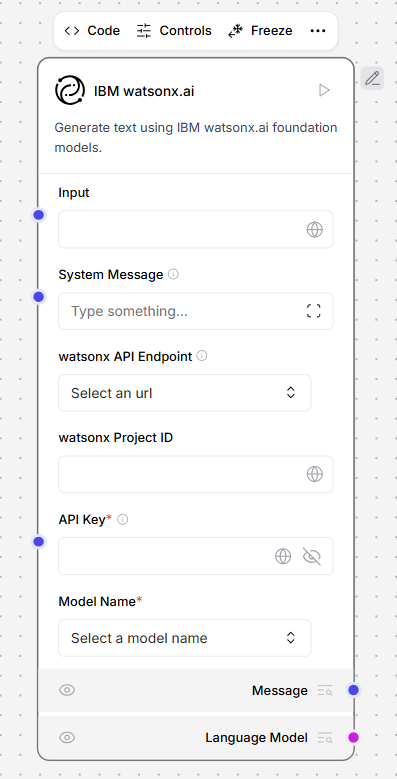
This component generates text using IBM watsonx.ai foundation models. To use IBM watsonx.ai model components, replace a model component with the IBM watsonx.ai component in a flow. An example flow looks like the following:
Parameters
Parameters
Inputs
Outputs
| Name | Type | Description |
|---|---|---|
| url | String | The base URL of the watsonx API. |
| project_id | String | Your watsonx Project ID. |
| api_key | SecretString | Your IBM watsonx API Key. |
| model_name | String | The name of the watsonx model to use. Options are dynamically fetched from the API. |
| max_tokens | Integer | The maximum number of tokens to generate. Default: 1000. |
| stop_sequence | String | The sequence where generation should stop. |
| temperature | Float | Controls randomness in the output. Default: 0.1. |
| top_p | Float | Controls nucleus sampling, which limits the model to tokens whose probability is below the top_p value. Range: Default: 0.9. |
| frequency_penalty | Float | Controls frequency penalty. A positive value decreases the probability of repeating tokens, and a negative value increases the probability. Range: Default: 0.5. |
| presence_penalty | Float | Controls presence penalty. A positive value increases the likelihood of new topics being introduced. Default: 0.3. |
| seed | Integer | A random seed for the model. Default: 8. |
| logprobs | Boolean | Whether to return log probabilities of output tokens or not. Default: True. |
| top_logprobs | Integer | The number of most likely tokens to return at each position. Default: 3. |
| logit_bias | String | A JSON string of token IDs to bias or suppress. |
| Name | Type | Description |
|---|---|---|
| model | LanguageModel | An instance of ChatWatsonx configured with the specified parameters. |
Language model
This component generates text using either OpenAI or Anthropic language models. Use this component as a drop-in replacement for LLM models to switch between different model providers and models. Instead of swapping out model components when you want to try a different provider, like switching between OpenAI and Anthropic components, change the provider dropdown in this single component. This makes it easier to experiment with and compare different models while keeping the rest of your flow intact. For more information, see the OpenAI documentation and Anthropic documentation.Parameters
Parameters
Inputs
Outputs
| Name | Type | Description |
|---|---|---|
| provider | String | The model provider to use. Options: “OpenAI”, “Anthropic”. Default: “OpenAI”. |
| model_name | String | The name of the model to use. Options depend on the selected provider. |
| api_key | SecretString | The API Key for authentication with the selected provider. |
| input_value | String | The input text to send to the model. |
| system_message | String | A system message that helps set the behavior of the assistant (advanced). |
| stream | Boolean | Whether to stream the response. Default: False (advanced). |
| temperature | Float | Controls randomness in responses. Range: [0.0, 1.0]. Default: 0.1 (advanced). |
| Name | Type | Description |
|---|---|---|
| model | LanguageModel | An instance of ChatOpenAI or ChatAnthropic configured with the specified parameters. |
LMStudio
This component generates text using LM Studio’s local language models. For more information, see LM Studio documentation.Parameters
Parameters
Inputs
Outputs
| Name | Type | Description |
|---|---|---|
| base_url | String | The URL where LM Studio is running. Default: "http://localhost:1234". |
| max_tokens | Integer | Maximum number of tokens to generate in the response. Default: 512. |
| temperature | Float | Controls randomness in the output. Range: [0.0, 2.0]. Default: 0.7. |
| top_p | Float | Controls diversity via nucleus sampling. Range: [0.0, 1.0]. Default: 1.0. |
| stop | List[String] | List of strings that stop generation when encountered. |
| stream | Boolean | Whether to stream the response. Default: False. |
| presence_penalty | Float | Penalizes repeated tokens. Range: [-2.0, 2.0]. Default: 0.0. |
| frequency_penalty | Float | Penalizes frequent tokens. Range: [-2.0, 2.0]. Default: 0.0. |
| Name | Type | Description |
|---|---|---|
| model | LanguageModel | An instance of LMStudio configured with the specified parameters. |
Maritalk
This component generates text using Maritalk LLMs. For more information, see Maritalk documentation.Parameters
Parameters
Inputs
Outputs
| Name | Type | Description |
|---|---|---|
| max_tokens | Integer | The maximum number of tokens to generate. Set to 0 for unlimited tokens. Default: 512. |
| model_name | String | The name of the Maritalk model to use. Options: sabia-2-small, sabia-2-medium. Default: sabia-2-small. |
| api_key | SecretString | The Maritalk API Key to use for authentication. |
| temperature | Float | Controls randomness in the output. Range: [0.0, 1.0]. Default: 0.5. |
| endpoint_url | String | The Maritalk API endpoint. Default: https://api.maritalk.com. |
| Name | Type | Description |
|---|---|---|
| model | LanguageModel | An instance of ChatMaritalk configured with the specified parameters. |
Mistral
This component generates text using MistralAI LLMs. For more information, see Mistral AI documentation.Parameters
Parameters
Inputs
Outputs
| Name | Type | Description |
|---|---|---|
| max_tokens | Integer | The maximum number of tokens to generate. Set to 0 for unlimited tokens (advanced). |
| model_name | String | The name of the Mistral AI model to use. Options include open-mixtral-8x7b, open-mixtral-8x22b, mistral-small-latest, mistral-medium-latest, mistral-large-latest, and codestral-latest. Default: codestral-latest. |
| mistral_api_base | String | The base URL of the Mistral API. Defaults to https://api.mistral.ai/v1 (advanced). |
| api_key | SecretString | The Mistral API Key to use for authentication. |
| temperature | Float | Controls randomness in the output. Default: 0.5. |
| max_retries | Integer | Maximum number of retries for API calls. Default: 5 (advanced). |
| timeout | Integer | Timeout for API calls in seconds. Default: 60 (advanced). |
| max_concurrent_requests | Integer | Maximum number of concurrent API requests. Default: 3 (advanced). |
| top_p | Float | Nucleus sampling parameter. Default: 1 (advanced). |
| random_seed | Integer | Seed for random number generation. Default: 1 (advanced). |
| safe_mode | Boolean | Enables safe mode for content generation (advanced). |
| Name | Type | Description |
|---|---|---|
| model | LanguageModel | An instance of ChatMistralAI configured with the specified parameters. |
Novita AI
This component generates text using Novita AI’s language models. For more information, see Novita AI documentation.Parameters
Parameters
Inputs
Outputs
| Name | Type | Description |
|---|---|---|
| api_key | SecretString | Your Novita AI API Key. |
| model | String | The id of the Novita AI model to use. |
| max_tokens | Integer | The maximum number of tokens to generate. Set to 0 for unlimited tokens. |
| temperature | Float | Controls randomness in the output. Range: [0.0, 1.0]. Default: 0.7. |
| top_p | Float | Controls the nucleus sampling. Range: [0.0, 1.0]. Default: 1.0. |
| frequency_penalty | Float | Controls the frequency penalty. Range: [0.0, 2.0]. Default: 0.0. |
| presence_penalty | Float | Controls the presence penalty. Range: [0.0, 2.0]. Default: 0.0. |
| Name | Type | Description |
|---|---|---|
| model | LanguageModel | An instance of Novita AI model configured with the specified parameters. |
NVIDIA
This component generates text using NVIDIA LLMs. For more information, see NVIDIA AI documentation.Parameters
Parameters
Inputs
Outputs
| Name | Type | Description |
|---|---|---|
| max_tokens | Integer | The maximum number of tokens to generate. Set to 0 for unlimited tokens (advanced). |
| model_name | String | The name of the NVIDIA model to use. Default: mistralai/mixtral-8x7b-instruct-v0.1. |
| base_url | String | The base URL of the NVIDIA API. Default: https://integrate.api.nvidia.com/v1. |
| nvidia_api_key | SecretString | The NVIDIA API Key for authentication. |
| temperature | Float | Controls randomness in the output. Default: 0.1. |
| seed | Integer | The seed controls the reproducibility of the job (advanced). Default: 1. |
| Name | Type | Description |
|---|---|---|
| model | LanguageModel | An instance of ChatNVIDIA configured with the specified parameters. |
Ollama
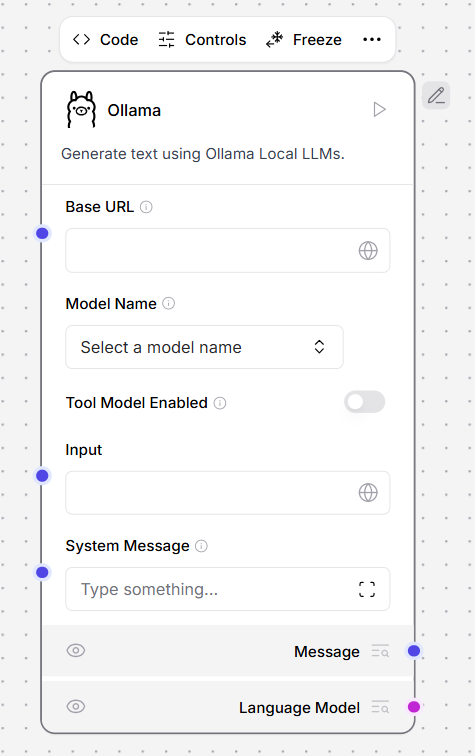
This component generates text using Ollama’s language models. To use this component in a flow, connect LLM Controls to your locally running Ollama server and select a model.-
In the Ollama component, in the Base URL field, enter the address for your locally running Ollama server. This value is set as the
OLLAMA_HOSTenvironment variable in Ollama. The default base URL ishttp://localhost:11434. - To refresh the server’s list of models, click Refresh.
-
In the Model Name field, select a model. This example uses
llama3.2:latest. -
Connect the Ollama model component to a flow. For example, this flow connects a local Ollama server running a Llama 3.2 model as the custom model for an Agent component.
Parameters
Parameters
Inputs
Outputs
| Name | Type | Description |
|---|---|---|
| Base URL | String | Endpoint of the Ollama API. |
| Model Name | String | The model name to use. |
| Temperature | Float | Controls the creativity of model responses. |
| Name | Type | Description |
|---|---|---|
| model | LanguageModel | An instance of an Ollama model configured with the specified parameters. |
OpenAI
This component generates text using OpenAI’s language models. For more information, see OpenAI documentation.Parameters
Parameters
Inputs
Outputs
| Name | Type | Description |
|---|---|---|
| api_key | SecretString | Your OpenAI API Key. |
| model | String | The name of the OpenAI model to use. Options include “gpt-3.5-turbo” and “gpt-4”. |
| max_tokens | Integer | The maximum number of tokens to generate. Set to 0 for unlimited tokens. |
| temperature | Float | Controls randomness in the output. Range: [0.0, 1.0]. Default: 0.7. |
| top_p | Float | Controls the nucleus sampling. Range: [0.0, 1.0]. Default: 1.0. |
| frequency_penalty | Float | Controls the frequency penalty. Range: [0.0, 2.0]. Default: 0.0. |
| presence_penalty | Float | Controls the presence penalty. Range: [0.0, 2.0]. Default: 0.0. |
| Name | Type | Description |
|---|---|---|
| model | LanguageModel | An instance of OpenAI model configured with the specified parameters. |
OpenRouter
This component generates text using OpenRouter’s unified API for multiple AI models from different providers. For more information, see OpenRouter documentation.Parameters
Parameters
Inputs
Outputs
| Name | Type | Description |
|---|---|---|
| api_key | SecretString | Your OpenRouter API key for authentication. |
| site_url | String | Your site URL for OpenRouter rankings (advanced). |
| app_name | String | Your app name for OpenRouter rankings (advanced). |
| provider | String | The AI model provider to use. |
| model_name | String | The specific model to use for chat completion. |
| temperature | Float | Controls randomness in the output. Range: [0.0, 2.0]. Default: 0.7. |
| max_tokens | Integer | The maximum number of tokens to generate (advanced). |
| Name | Type | Description |
|---|---|---|
| model | LanguageModel | An instance of ChatOpenAI configured with the specified parameters. |
Perplexity
This component generates text using Perplexity’s language models. For more information, see Perplexity documentation.Parameters
Parameters
Inputs
Outputs
| Name | Type | Description |
|---|---|---|
| model_name | String | The name of the Perplexity model to use. Options include various Llama 3.1 models. |
| max_output_tokens | Integer | The maximum number of tokens to generate. |
| api_key | SecretString | The Perplexity API Key for authentication. |
| temperature | Float | Controls randomness in the output. Default: 0.75. |
| top_p | Float | The maximum cumulative probability of tokens to consider when sampling (advanced). |
| n | Integer | Number of chat completions to generate for each prompt (advanced). |
| top_k | Integer | Number of top tokens to consider for top-k sampling. Must be positive (advanced). |
| Name | Type | Description |
|---|---|---|
| model | LanguageModel | An instance of ChatPerplexity configured with the specified parameters. |
Qianfan
This component generates text using Qianfan’s language models. For more information, see Qianfan documentation.SambaNova
This component generates text using SambaNova LLMs. For more information, see Sambanova Cloud documentation.Parameters
Parameters
Inputs
Outputs
| Name | Type | Description |
|---|---|---|
| sambanova_url | String | Base URL path for API requests. Default: https://api.sambanova.ai/v1/chat/completions. |
| sambanova_api_key | SecretString | Your SambaNova API Key. |
| model_name | String | The name of the Sambanova model to use. Options include various Llama models. |
| max_tokens | Integer | The maximum number of tokens to generate. Set to 0 for unlimited tokens. |
| temperature | Float | Controls randomness in the output. Range: [0.0, 1.0]. Default: 0.07. |
| Name | Type | Description |
|---|---|---|
| model | LanguageModel | An instance of SambaNova model configured with the specified parameters. |
VertexAI
This component generates text using Vertex AI LLMs. For more information, see Google Vertex AI documentation.Parameters
Parameters
Inputs
Outputs
| Name | Type | Description |
|---|---|---|
| credentials | File | JSON credentials file. Leave empty to fall back to environment variables. File type: JSON. |
| model_name | String | The name of the Vertex AI model to use. Default: “gemini-1.5-pro”. |
| project | String | The project ID (advanced). |
| location | String | The location for the Vertex AI API. Default: “us-central1” (advanced). |
| max_output_tokens | Integer | The maximum number of tokens to generate (advanced). |
| max_retries | Integer | Maximum number of retries for API calls. Default: 1 (advanced). |
| temperature | Float | Controls randomness in the output. Default: 0.0. |
| top_k | Integer | The number of highest probability vocabulary tokens to keep for top-k-filtering (advanced). |
| top_p | Float | The cumulative probability of parameter highest probability vocabulary tokens to keep for nucleus sampling. Default: 0.95 (advanced). |
| verbose | Boolean | Whether to print verbose output. Default: False (advanced). |
| Name | Type | Description |
|---|---|---|
| model | LanguageModel | An instance of ChatVertexAI configured with the specified parameters. |
xAI
This component generates text using xAI models like Grok. For more information, see the xAI documentation.Parameters
Parameters
Inputs
Outputs
| Name | Type | Description |
|---|---|---|
| max_tokens | Integer | Maximum number of tokens to generate. Set to 0 for unlimited. Range: 0-128000. |
| model_kwargs | Dictionary | Additional keyword arguments for the model. |
| json_mode | Boolean | If True, outputs JSON regardless of passing a schema. |
| model_name | String | The xAI model to use. Default: grok-2-latest. |
| base_url | String | Base URL for API requests. Default: https://api.x.ai/v1. |
| api_key | SecretString | Your xAI API key for authentication. |
| temperature | Float | Controls randomness in the output. Range: [0.0, 2.0]. Default: 0.1. |
| seed | Integer | Controls reproducibility of the job. |
| Name | Type | Description |
|---|---|---|
| model | LanguageModel | An instance of ChatOpenAI configured with the specified parameters. |