
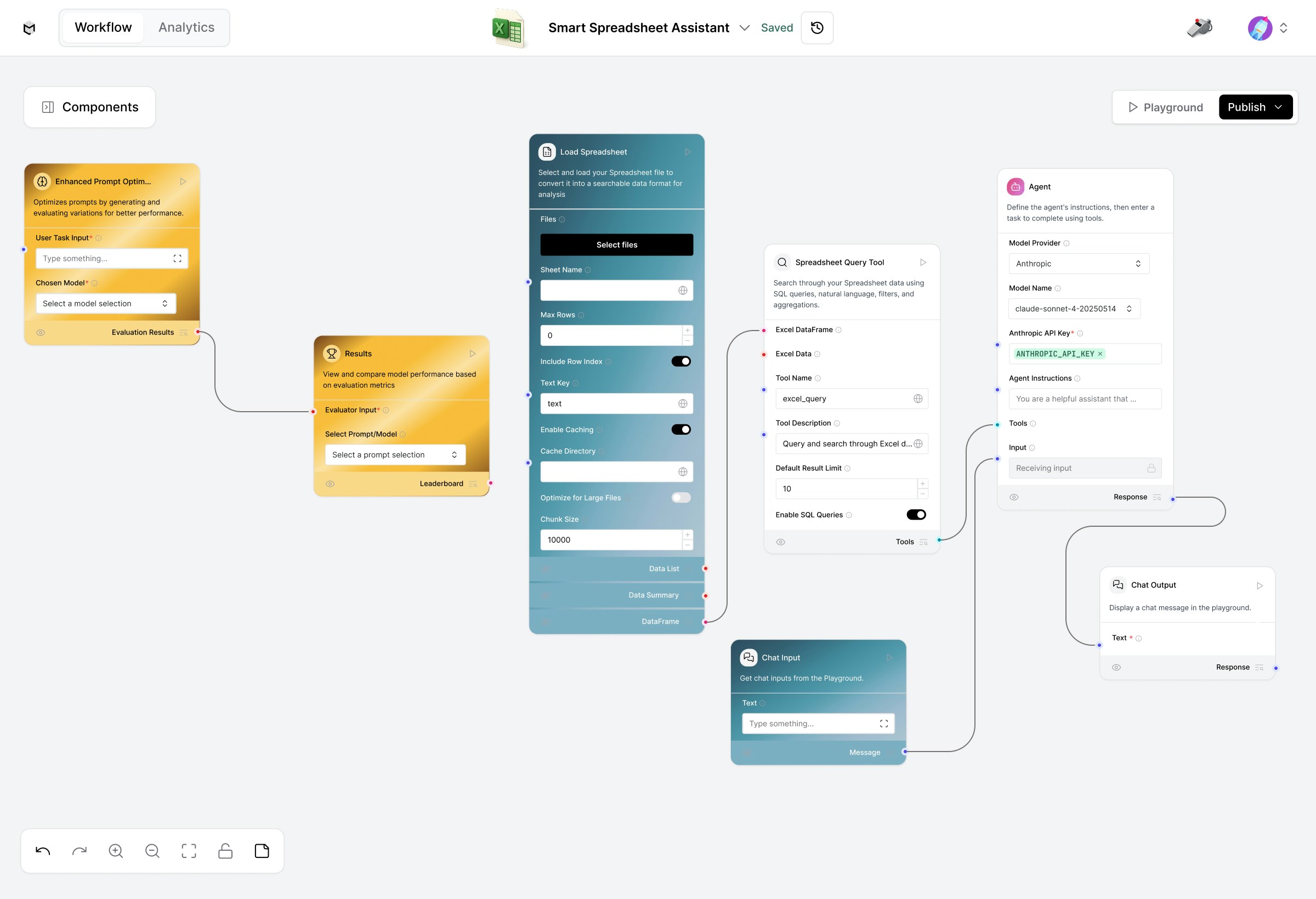
Upload Excel or CSV files, query data, apply filters, and generate instant summaries or insights, all powered by LLMs.
This advanced version also includes a Prompt Optimizer Flow, enabling automated prompt refinement for better query accuracy and analysis quality.
Prerequisites
- A valid Anthropic API Key
- Spreadsheet file (Excel or CSV format)
- Access to the Prompt Optimizer Flow (optional but recommended)
Key Features
- Upload spreadsheets (Excel/CSV) for real-time querying.
- Use natural language or SQL queries to explore data.
- Connect to Anthropic’s Claude models for reasoning and summarization.
- Automatically optimize and test prompt variations for accuracy.
- Ideal for data exploration, reporting, and analytics.
1. Prompt Optimizer Flow
Purpose: Enhance your spreadsheet interaction by fine-tuning natural language prompts for clarity and precision.Flow Overview
User Task – Define the data query or analysis you want to improve (e.g., “Show me the top 10 customers by sales”). Enhanced Prompt Optimizer – Generates, tests, and scores variations of your prompt. Results – Displays performance rankings of each optimized prompt. Usage:- Start from the User Task node.
- Run the Results component to evaluate performance.
- Apply the top-performing prompt to your data analysis workflow.
2. Load Spreadsheet
Purpose: Use the Load Spreadsheet component to import and prepare your data.Steps
- Click Select Files to upload your spreadsheet (Excel or CSV).
- Configure the sheet name, chunk size, and indexing options.
- Enable caching for large files (optional).
- Output is automatically converted into a searchable DataFrame.
3. Spreadsheet Query Tool
Purpose: Search, filter, or aggregate your uploaded spreadsheet data.Supports:
- Natural language queries (e.g., “Find all orders above $500”)
- SQL queries (SELECT * FROM sales WHERE amount > 500)
- Custom filters and sorting options
4. Agent (Claude Integration)
Purpose: Connects your query logic to Anthropic’s Claude Sonnet model for intelligent reasoning and conversational analysis.Setup
- Choose Model Provider: Anthropic
- Select Model Name: claude-sonnet-4-20250514
- Add your Anthropic API Key
- Enter short Agent Instructions (e.g., “You are a helpful data analysis assistant that answers questions about spreadsheets.”)
5. Chat Interface
Purpose: Use the Chat Input and Chat Output components to ask questions directly and view responses in real time.Example
User: “Which region had the highest revenue last quarter?”Assistant: “The West region recorded the highest total revenue of $120K between April and June.”
Example Use Cases
- Sales reporting (“Summarize total sales per month.”)
- Expense analysis (“Find top 5 expense categories.”)
- Research data filtering (“Show all entries with missing values.”)
- Trend summaries (“Compare Q1 and Q2 growth rates.”)