
Use a vector store component in a flow
This example uses the Astra DB vector store component. Your vector store component’s parameters and authentication may be different, but the document ingestion workflow is the same. A document is loaded from a local machine and chunked. The Astra DB vector store generates embeddings with the connected model component and stores them in the connected Astra DB database. This vector data can then be retrieved for workloads like Retrieval Augmented Generation.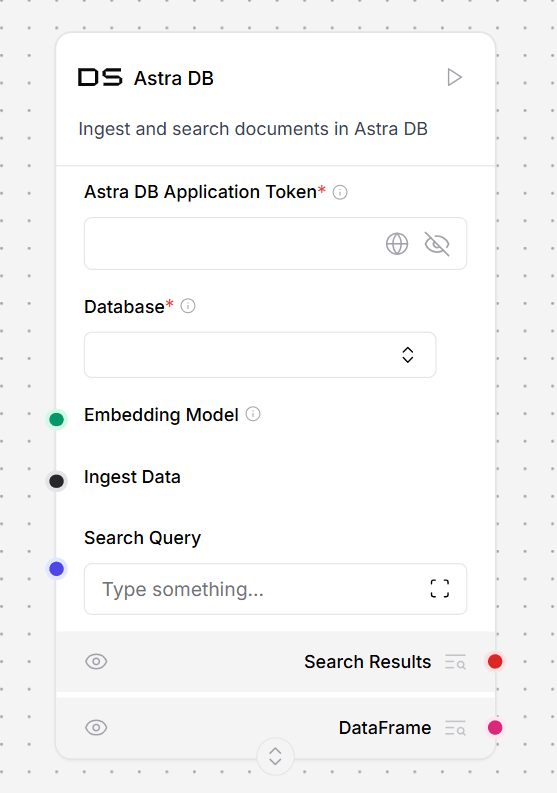
{context} variable in the Prompt component, which informs the Open AI model component’s responses.
Alternatively, connect the vector database component’s Retriever port to a retriever tool, and then to an agent component. This enables the agent to use your vector database as a tool and make decisions based on the available data.
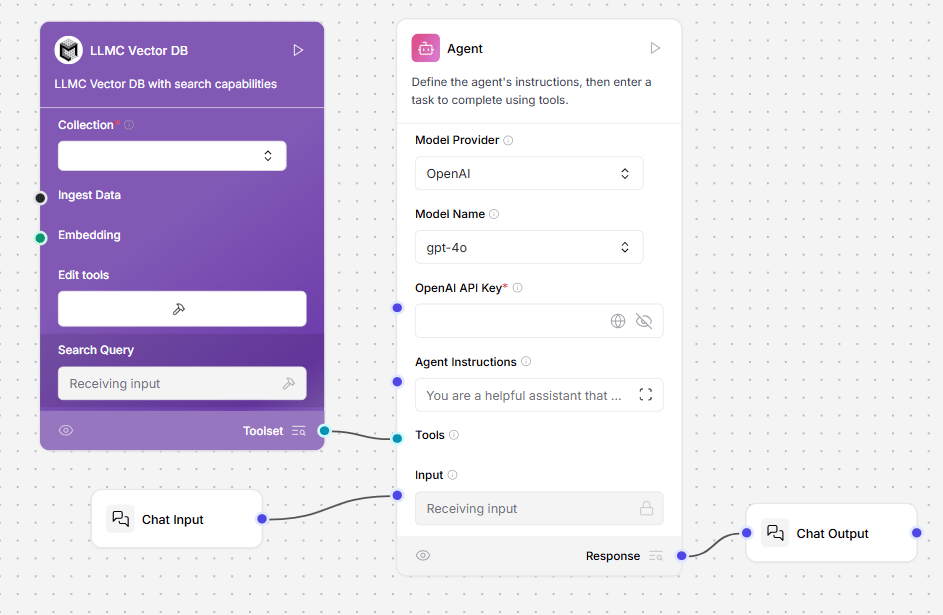
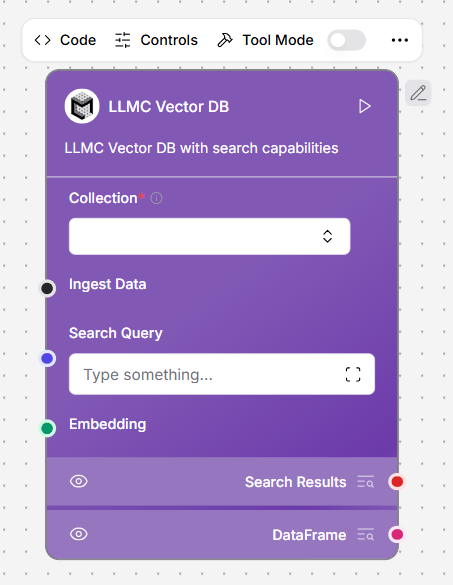
LLMC Vector DB
LLMC Vector DB helps you store and search through your personal documents in a way that feels fast, secure, and tailored just for you. Whether you’re uploading files, adding notes, or saving content from the web, everything is stored in a way that makes it easy to find later , without digging through folders.Key Benefits
Private and SecureYour content is always separated from others. Everything you add is linked to your account only, ensuring complete privacy. Organized Just for You
You’ll only see your own collections. No clutter. No mix-ups. It automatically shows the content that belongs to you neatly filtered and personalized. Flexible Setup
While you focus on your content, LLM Controls is smartly configured to perform at its best, adapting to different needs and environments. Developers can still fine-tune things like speed, search preferences, and more if needed. Seamless Content Capture
Just upload a document or paste a link, and LLM Controls takes care of the rest. It understands and organizes the content instantly, so you can find what you need later in just a few words.
Astra DB Vector Store
This component implements a Vector Store using Astra DB with search capabilities. For more information, see the DataStax documentation.Parameters
Parameters
Inputs
Outputs
Generate embeddings
The Astra DB Vector Store component offers two methods for generating embeddings.- Embedding Model: Use your own embedding model by connecting an Embeddings component in LLM Controls.
- Astra Vectorize: Use Astra DB’s built-in embedding generation service. When creating a new collection, choose the embeddings provider and models, including NVIDIA’s
NV-Embed-QAmodel hosted by Datastax.
importantThe embedding model selection is made when creating a new collection and cannot be changed later.
AstraDB Graph vector store
This component implements a Vector Store using AstraDB with graph capabilities. For more information, see the Astra DB Serverless documentation.Parameters
Parameters
Inputs
Outputs
Cassandra
This component creates a Cassandra Vector Store with search capabilities. For more information, see the Cassandra documentation.Parameters
Parameters
Inputs
Outputs
Cassandra Graph Vector Store
This component implements a Cassandra Graph Vector Store with search capabilities.Parameters
Parameters
Inputs
Outputs
Chroma DB
This component creates a Chroma Vector Store with search capabilities. The Chroma DB component creates an ephemeral vector database for experimentation and vector storage.-
To use this component in a flow, connect it to a component that outputs Data or DataFrame. This example splits text from a URL component, and computes embeddings with the connected OpenAI Embeddings component. Chroma DB computes embeddings by default, but you can connect your own embeddings model, as seen in this example.
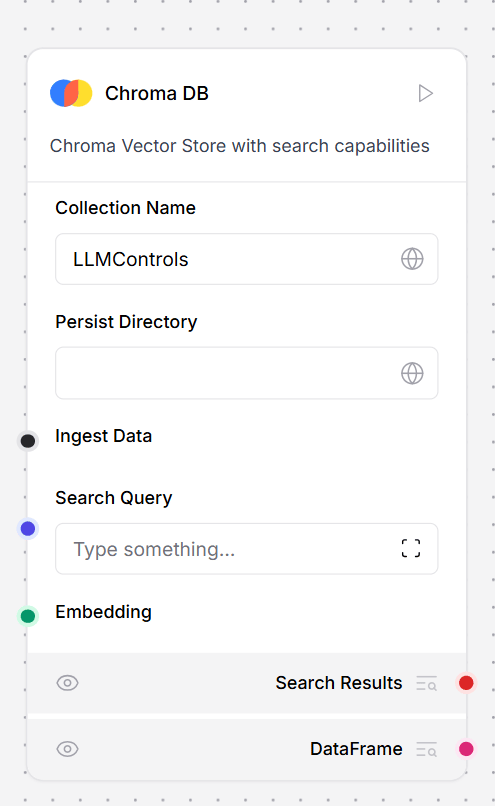
- In the Chroma DB component, in the Collection field, enter a name for your embeddings collection.
-
Optionally, to persist the Chroma database, in the Persist field, enter a directory to store the
chroma.sqlite3file. This example uses./chroma-dbto create a directory relative to where LLM Controls is running. - To load data and embeddings into your Chroma database, in the Chroma DB component, click Run component.
- To view the split data, in the Split Text component, click Inspect output.
- To query your loaded data, open the Playground and query your database. Your input is converted to vector data and compared to the stored vectors in a vector similarity search.
Parameters
Parameters
Inputs
Outputs
Clickhouse
This component implements a Clickhouse Vector Store with search capabilities. For more information, see the Clickhouse Documentation.Parameters
Parameters
Inputs
Outputs
Couchbase
This component creates a Couchbase Vector Store with search capabilities. For more information, see the Couchbase documentation.Parameters
Parameters
Inputs
Outputs
Local DB
The Local DB component is LLM Controls’ enhanced version of Chroma DB. The component adds a user-friendly interface with two modes (Ingest and Retrieve), automatic collection management, and built-in persistence in Lang’s cache directory. Local DB includes Ingest and Retrieve modes. The Ingest mode works similarly to ChromaDB, and persists your database to the LLM Controls cache directory. The LLM Controls cache directory location is specified inLLMC_CONFIG_DIR. For more information.
The Retrieve mode can query your Chroma DB collections.
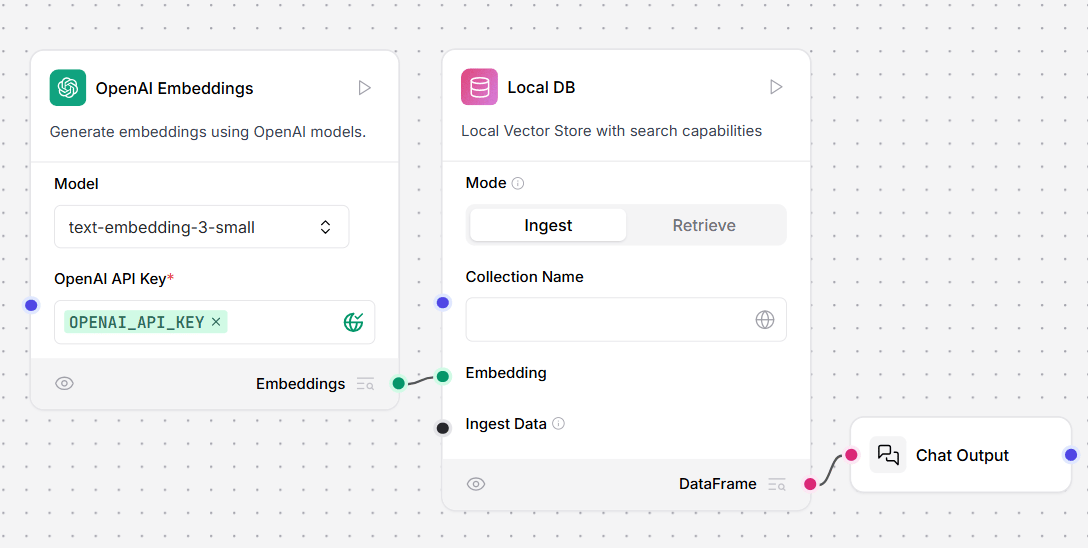
Parameters
Parameters
Inputs
Outputs
Elasticsearch
This component creates an Elasticsearch Vector Store with search capabilities. For more information, see the Elasticsearch documentation.Parameters
Parameters
Inputs
Outputs
FAISS
This component creates a FAISS Vector Store with search capabilities. For more information, see the FAISS documentation.Parameters
Parameters
Inputs
Outputs
Graph RAG
This component performs Graph RAG (Retrieval Augmented Generation) traversal in a vector store, enabling graph-based document retrieval. For more information, see the Graph RAG documentation. For an example flow, see the Graph RAG template.Parameters
Parameters
Inputs
Outputs
Hyper-Converged Database (HCD)
This component implements a Vector Store using HCD. To use the HCD vector store, add your deployment’s collection name, username, password, and HCD Data API endpoint. The endpoint must be formatted likehttp[s]://DOMAIN_NAME or IP_ADDRESS[:port], for example, http://192.0.2.250:8181.
Replace DOMAIN_NAME or IP_ADDRESS with the domain name or IP address of your HCD Data API connection.
To use the HCD vector store for embeddings ingestion, connect it to an embeddings model and a file loader:
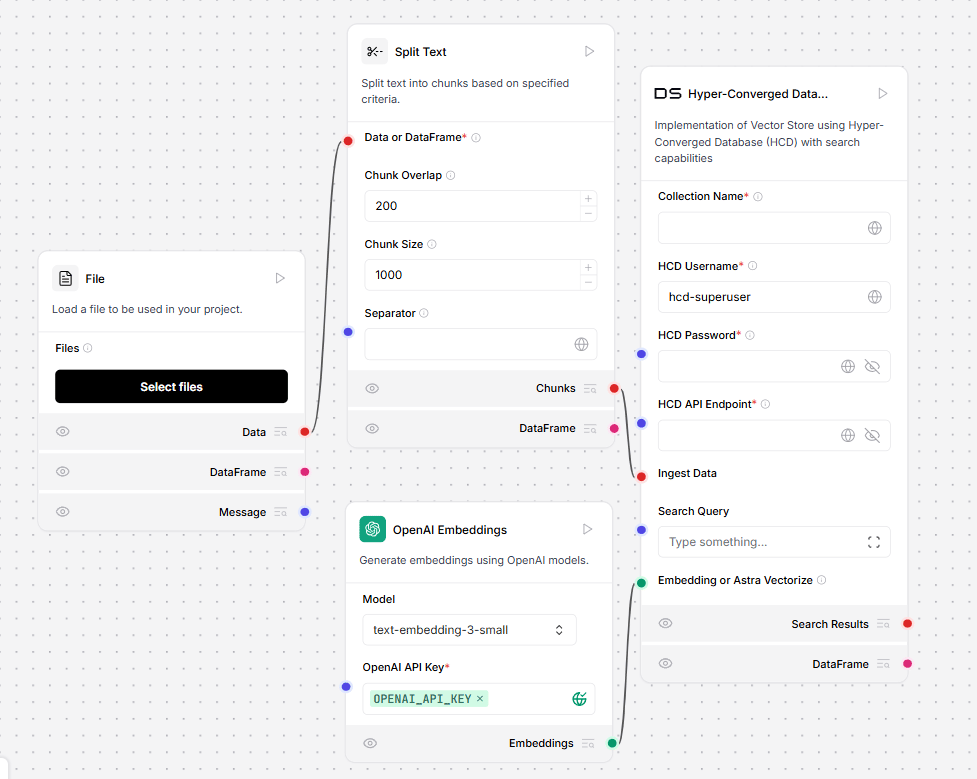
Parameters
Parameters
Inputs
Outputs
Milvus
This component creates a Milvus Vector Store with search capabilities. For more information, see the Milvus documentation.Parameters
Parameters
Inputs
Outputs
MongoDB Atlas
This component creates a MongoDB Atlas Vector Store with search capabilities. For more information, see the MongoDB Atlas documentation.Parameters
Parameters
Inputs
Outputs
Opensearch
This component creates an Opensearch vector store with search capabilities For more information, see Opensearch documentation.Parameters
Parameters
Inputs
Outputs
PGVector
This component creates a PGVector Vector Store with search capabilities. For more information, see the PGVector documentation.Parameters
Parameters
Inputs
Outputs
Pinecone
This component creates a Pinecone Vector Store with search capabilities. For more information, see the Pinecone documentation.Parameters
Parameters
Inputs
Outputs
Redis
This component creates a Redis Vector Store with search capabilities. For more information, see the Redis documentation.Parameters
Parameters
Inputs
Outputs
Supabase
This component creates a connection to a Supabase Vector Store with search capabilities. For more information, see the Supabase documentation.Parameters
Parameters
Inputs
Outputs
Upstash
This component creates an Upstash Vector Store with search capabilities. For more information, see the Upstash documentation.Parameters
Parameters
Inputs
Outputs
Vectara
This component creates a Vectara Vector Store with search capabilities. For more information, see the Vectara documentation.Parameters
Parameters
Inputs
Outputs
Vectara Search
This component searches a Vectara Vector Store for documents based on the provided input. For more information, see the Vectara documentation.Parameters
Parameters
Inputs
Outputs
Weaviate
This component facilitates a Weaviate Vector Store setup, optimizing text and document indexing and retrieval. For more information, see the Weaviate Documentation.Parameters
Parameters
Inputs
Outputs
Weaviate Search
This component searches a Weaviate Vector Store for documents similar to the input. For more information, see the Weaviate Documentation.Parameters
Parameters
Inputs
Outputs