
Prompts are a combination of natural language and variables created with curly braces.
Use a prompt component in a flow
An example of modifying a prompt can be found in Vector RAG starter flow, where a basic chatbot flow is extended to include a full vector RAG pipeline.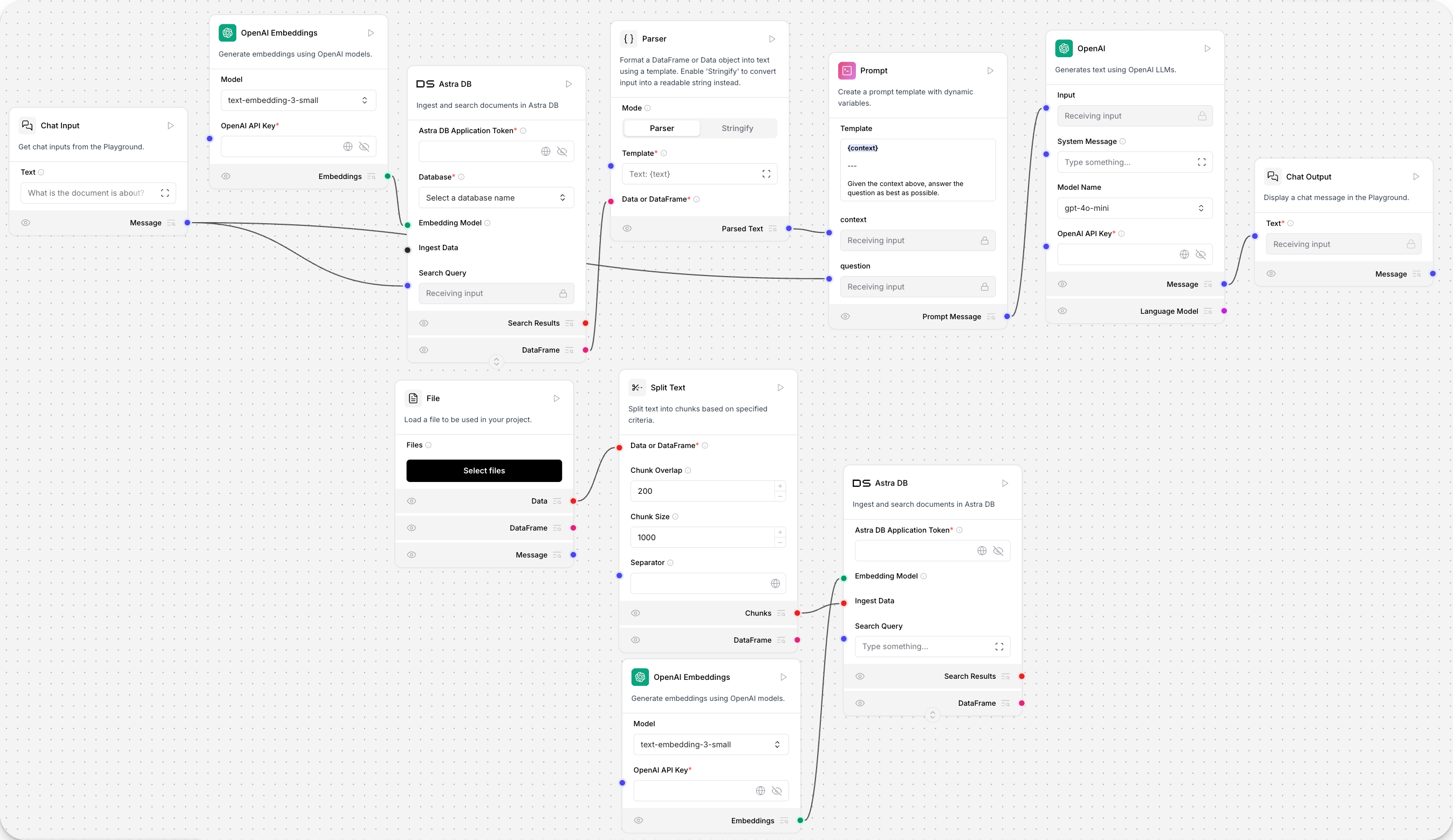
Answer the user as if you were a GenAI expert, enthusiastic about helping them get started building something fresh.
This prompt creates a “personality” for your LLM’s chat interactions, but it doesn’t include variables that you may find useful when templating prompts.
To modify the prompt template, in the Prompt component, click the Template field. For example, the {context} variable gives the LLM model access to embedded vector data to return better answers.
When variables are added to a prompt template, new fields are automatically created in the component. These fields can be connected to receive text input from other components to automate prompting, or to output instructions to other components. An example of prompts controlling agents behavior is available in the sequential tasks agent starter flow.
Parameters
Parameters
Inputs
Outputs
Results
This component displays and compares model performance based on evaluation metrics from the Prompt Optimizer. It stores ranked results in a leaderboard with accuracy, speed, cost, and detailed feedback.Parameters
Parameters
Inputs
Outputs