
Prerequisites
- AssemblyAI API Key (required for all components)
- An audio or video file (.mp3, .wav, .mp4, .flac, .ogg, .webm, .mov, etc.)
- Basic familiarity with LLMC components
Create the Audio/Video Transcription Flow
1. Transcribe Your Audio/Video
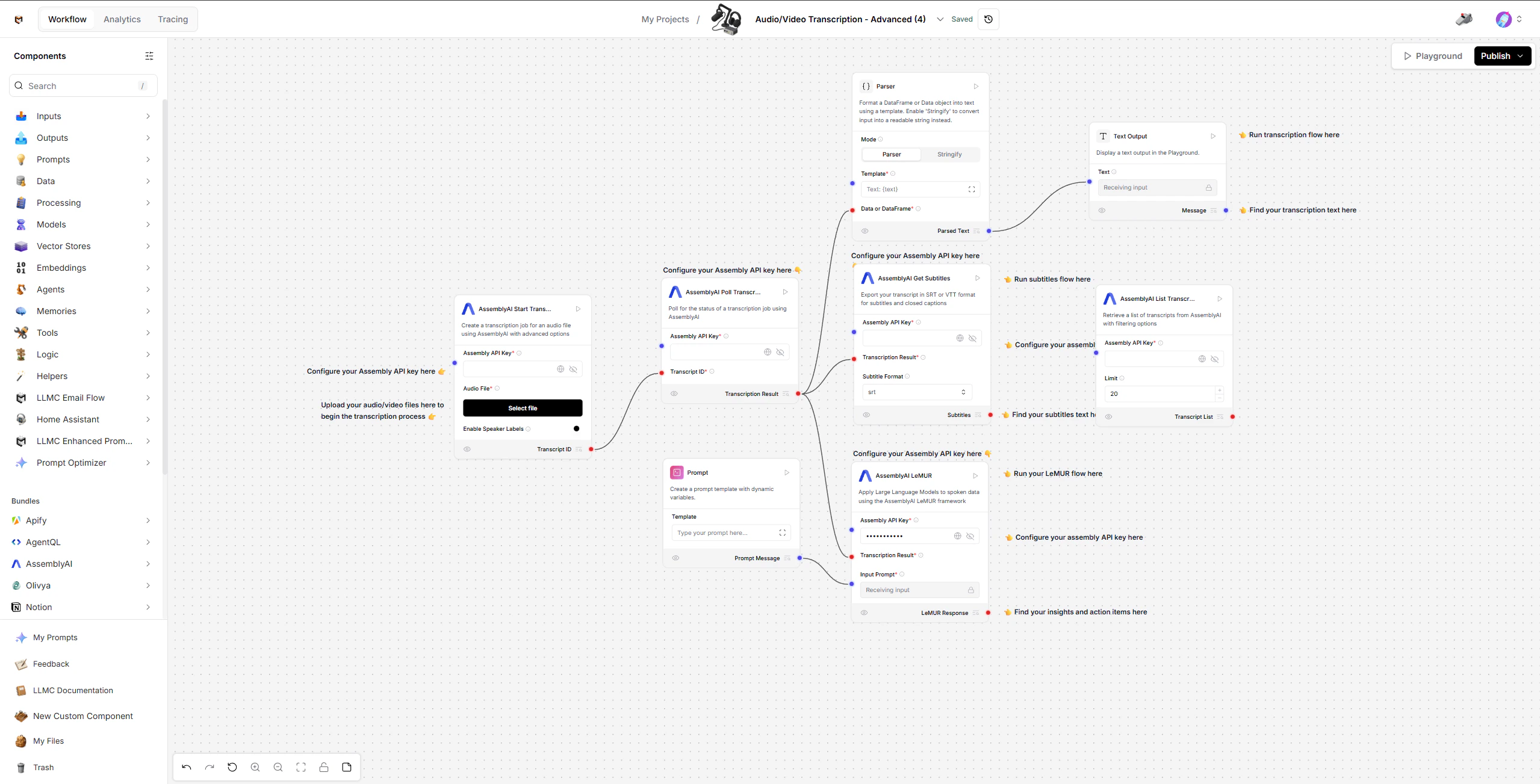
Start with the AssemblyAI Start Transcript component (left side of the workspace). This uploads your file and begins the transcription process. Steps:- Upload your audio/video file using the Audio File field.
- Add your AssemblyAI API Key.
- Optionally enable Speaker Labels to identify different speakers.
- The component submits the file and outputs a Transcript ID.
2. View Transcription Text
Once the transcription completes, the result flows into the Transcription Flow (top section). Components:- Parser - Formats the transcription result into readable text using a template.
- Text Output - Displays the transcription text in the Playground.
3. Generate Subtitles
The transcription result also flows into the Subtitles Flow (middle section). Components:- AssemblyAI Get Subtitles - Exports your transcript in SRT or VTT format for subtitles and closed captions.
- Assembly API Key (required)
- Transcription Result (from Poll Transcript)
- Subtitle Format (SRT or VTT)
4. Get AI-Powered Insights with LeMUR
Use the LeMUR Flow (bottom section) to apply Large Language Models to your spoken data. Components:- Prompt - Define what you want the LLM to do with the transcription (e.g., summarize, extract action items, answer questions).
- AssemblyAI LeMUR - Applies LLMs to the transcription result using the AssemblyAI LeMUR framework.
- Assembly API Key (required)
- Transcription Result (from Poll Transcript)
- Input Prompt (from Prompt component)
- Endpoint (task, summary, or question-answer)
5. View Past Transcriptions
Use the AssemblyAI List Transcripts component (right side, standalone) to retrieve a list of previous transcripts from your AssemblyAI account. User Configurations:- Assembly API Key (required)
- Limit (default: 20)
- Status Filter (all, queued, processing, completed, error)
Modify or Extend
- Change the Prompt template to extract different insights (summaries, key points, action items, Q&A).
- Toggle Speaker Labels to identify who said what in multi-speaker recordings.
- Switch between SRT and VTT subtitle formats depending on your platform.
- Adjust the LeMUR endpoint between task, summary, and question-answer modes.
- Use List Transcripts to revisit and reprocess previous transcriptions.
Configuration Checklist
Example
Input: Upload a meeting recording (.mp3) Output:- Full transcription text with speaker labels
- SRT subtitle file for video embedding
- AI-generated meeting summary with action items via LeMUR
Built With
- LLMC Framework
- AssemblyAI Speech Recognition
- AssemblyAI LeMUR Framework
- AssemblyAI Subtitles Export