
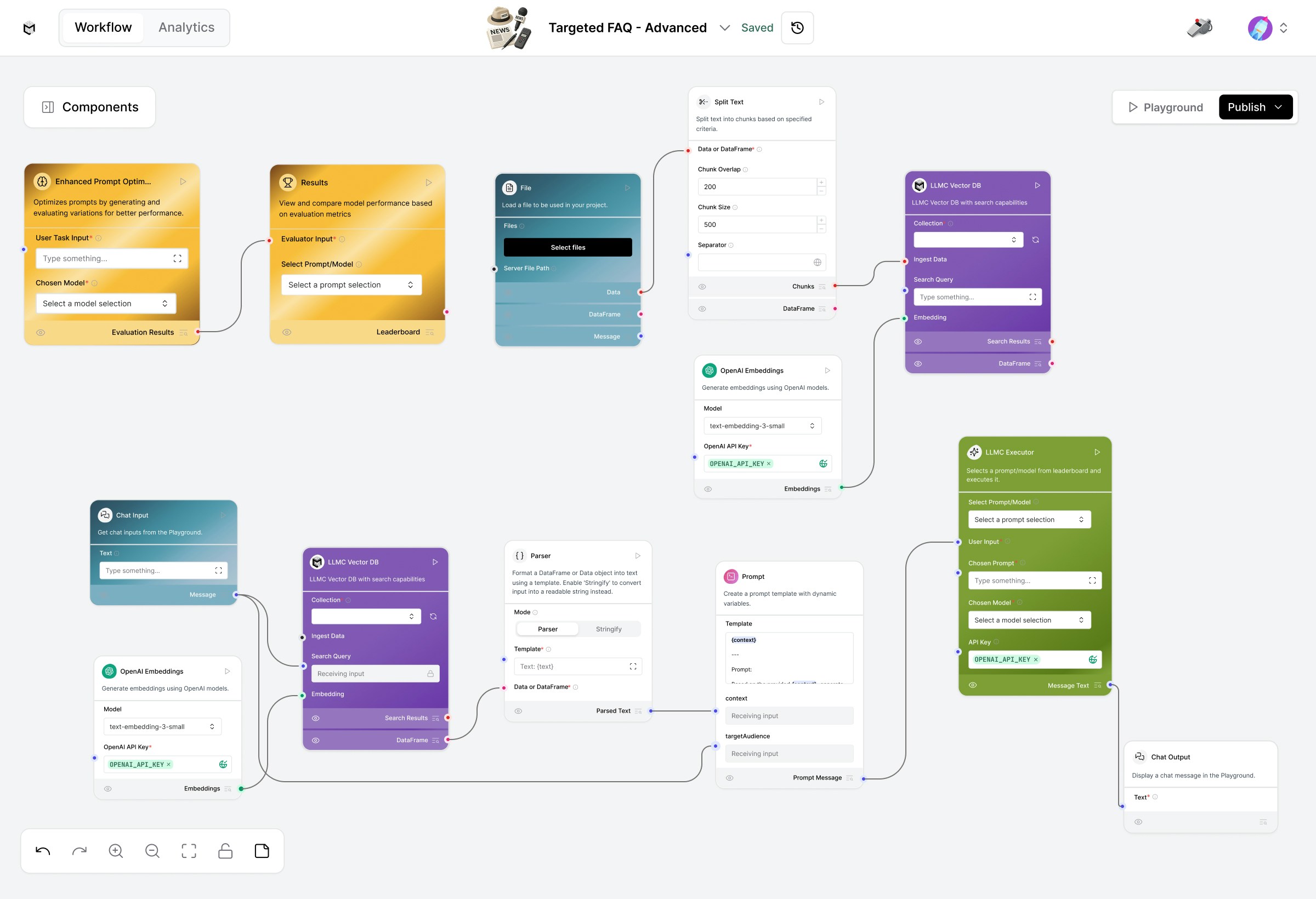
This advanced setup combines vector-based knowledge retrieval with prompt optimization and LLMC Executor for consistently high-quality, context-specific answers.
Prerequisites
- OpenAI API Key (required for both embeddings and model)
- A structured FAQ or document file (PDF, TXT)
- Basic familiarity with LLMC components
Create the Targeted FAQ Flow
1. Load Your FAQ Data
Start with the Load Data Flow (bottom section of the workspace).This flow prepares your knowledge base for retrieval. Steps:
- Upload your document using the File component.
- Split the content into manageable text chunks via Split Text.
- Generate embeddings with OpenAI Embeddings (text-embedding-3-small).
- Store embeddings in LLM Vector DB for future semantic retrieval.
Ensure your OpenAI API Key is added to the Embeddings component.
2. Query FAQs for a Target Audience
Once your data is embedded, switch to the Retriever Flow (middle section). Components:- User Input – Enter persona or audience (e.g., “environment enthusiast”).
- LLM Vector DB – Retrieves relevant FAQ chunks based on audience and query.
- OpenAI Embeddings – Matches the same embedding model used in the loader flow.
- Parser – Formats and cleans retrieved content for the LLM.
- Prompt – Generates a question-aware, persona-specific FAQ response.
- Chat Output – Displays the final answer directly in the playground.
Try modifying the persona field to see how answers adapt to different users.
3. Optimize Your FAQ Prompts
Use the Prompt Optimizer Flow to refine your prompt instructions and improve FAQ response quality. How it works:- Automatically generates prompt variations and test cases.
- Scores and ranks are prompted by relevance, accuracy, and tone consistency.
- Displays a leaderboard of best-performing prompts.
- Input your optimization task (e.g., “Generate the best FAQ tone for customer support”).
- Click Run on the Result node.
- Review and select the top-performing prompt from the leaderboard.
4. Execute and Compare Results
Once optimized prompts are ready, use the LLMC Executor to run them. In the LLMC Executor:- Select your optimized Prompt and preferred Model (gpt-4o, claude-4-sonnet, etc.).
- Paste your OpenAI API Key if not already configured.
- Click Play to execute the query.
- The Output displays your final, persona-tailored FAQ answer.
Modify or Extend
- Change the persona tone in the Prompt to match the brand voice or audience type.
- Swap models in LLMC Executor to test performance differences.
- Adjust chunk size and overlap in Split Text for better retrieval precision.
- Use Results Leaderboard to continuously improve FAQ quality over time.
Configuration Checklist
Example
Input: Target Audience – “College Students”Output: FAQs rewritten in a simplified, relatable tone for students.
Built With
- LLMC Framework
- Prompt Optimizer Flow
- LLMC Executor
- RAG Architecture (Vector Retrieval + Prompting)
- OpenAI GPT Models
Deliver precise, audience-tailored FAQ responses with automation, retrieval intelligence, and optimized prompting.