
Overview
Functional Verification is a built-in testing tool in the AI Builder that answers one question: does this flow actually work? Building a flow is one thing - knowing it runs end to end and produces sensible output is another. Functional Verification runs your flow against a set of realistic test inputs, watches what comes out, and tells you whether each case passed or failed. It’s a smoke test for your workflow: it catches flows that crash, error out, return nothing, or produce clearly broken responses. You trigger it from the same chat you used to build the flow. Just ask the assistant to verify or test your flow, and a verification panel opens where test cases run one by one, streaming pass/fail results in real time. It’s important to understand what Functional Verification is not: it does not grade accuracy or precision. It doesn’t check whether an answer is factually perfect or whether a summary hit every key point. It checks whether the flow functionally works - that it responds to the input in a broadly reasonable way and nothing is broken.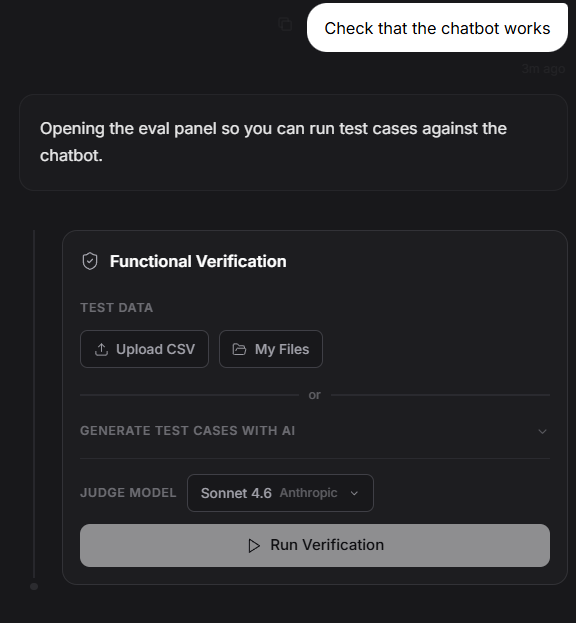
How It Works
Trigger it from chat
Once a flow exists on the canvas, ask the assistant to verify it. It recognizes natural phrasing: Example:- “Verify the flow.”
- “Test it - does it work?”
- “Run some test cases against this.”
- “Check that the chatbot works.”
Generate test cases automatically
You don’t have to write test cases yourself. The assistant can generate a diverse set of realistic inputs for your flow - easy cases, edge cases, and ambiguous ones - along with an ideal reference answer for each. It infers what kind of input your flow expects from the components on the canvas. A chatbot gets realistic user questions. A document-processing flow gets realistic document text - a contract clause, a report excerpt, a medical note - rather than questions, so the file-ingestion path is exercised the way it will be in production. You can also provide your own test cases if you have specific inputs in mind.Run each case through the real flow
Every test case runs through your actual flow, exactly as it would when deployed. Nothing is mocked. For chat-style flows, the test input is sent as the user message. For flows that ingest files, the test text is injected directly into the file inputs so the ingestion path runs for real.Judge the output
After each case runs, the output is evaluated to decide whether it passed. The bar is deliberately loose - the goal is to catch broken flows, not to grade quality. A case fails when the output is:- Empty
- A raw error or traceback
- Completely off-topic
- Clearly the result of the workflow breaking
Watch results stream in
As verification runs, the panel updates live:- A start indicator showing how many test cases will run
- Per-case results - pass or fail, the actual output produced, and a short reason when a case fails
- A final summary with the total passed and failed counts
When To Use It
After building a new flow
Before you rely on a flow or publish it, verify it. A quick run of generated test cases confirms the pipeline is wired correctly and runs end to end. Example:- “I’ve built the support bot - verify it works before I publish.”
After editing a flow
Swapped a model, changed a prompt, added memory, rewired a file input? Re-verify to confirm the change didn’t break anything. Example:- “I swapped the model - verify again.”